Thursday, November 17, 2011

Load Balance SMTP with F5 BIG-IP

The F5 BIG-IP has a template for Exchange 2010 which assists administrators with configuring load balancing for Outlook Anywhere, Active Sync and Outlook Web App. This template does not configure SMTP load balancing. There are many circumstances where you may want an SMTP endpoint IP address to be highly available and load balanced between multiple hub transport servers.

In this post I will go through and show you how to configure the BIG-IP LTM for load balancing the SMTP protocol and the challenges associated with this. This article was written using the F5 BIG-IP LTM VE version 10.2.3.

Create a Health Monitor

Create a health monitor which monitors the Exchange 2010 SMTP service on our Exchange 2010 servers. The heath monitor will send SMTP HELO requests on a regular basis to ensure the SMTP servers are healthy.

Expand Local Traffic and click Add next to Monitors.


I called the monitor SMTP_Monitor. Set the Type to SMTP. Provided an interval of 120 seconds meaning the monitor will send an SMTP HELO every 2 minutes to the Ex2010 servers to see if they are still online. Configured the Alias service port to 25.


Create a Pool for the SMTP Servers

A load balancing pool is a logical set of devices, in our case SMTP servers, that you group together to receive and process traffic. To create a new pool under Pool List click Add.


I called the pool smtp_pool. Select the SMTP_Monitor we created earlier. Select the load balancing method as Round Robin. Add the SMTP servers to our pool in which we wish to distribute inbound SMTP connections to.


Create an SMTP Virtual Server

Create an SMTP Virtual Server on the F5 BIG-IP which will allow the BIG-IP system to listen on TCP25 to load balance incoming SMTP sessions. To do this under Virtual Servers --> Virtual Server List click add.


I called the SMTP Virtual Server SMTP_VS. Under Destination I specified 172.16.51.174. This is the Virtual IP the BIG-IP will listen on for incoming SMTP traffic. Select a service port of 25 and place the device in an enabled state.

Under configuration set SNAT Pool to Auto Map (I have explained what Auto Map is below).


Scroll down further and under resources set the Default Pool to smtp_pool along with the default persistence profile to source_addr.


Test our BIG-IP SMTP Virtual Server

The F5 BIG-IP device should now be configured to load balance SMTP requests between the two Exchange 2010 servers. In your Virtual Server List the SMTP_VS should come up green.


From a command prompt verify you can telnet our SMTP virtual server on 172.16.51.174 on port 25.


We can see that it successfully connected to one of the SMTP servers in our load balancing pool "smtp_pool"


At this point your F5 BIG-IP is successfully load balancing SMTP.

The Problem...

When building an email solution it is absolutely critical to avoid becoming an open SMTP relay. Most organisations implement relay restrictions by locking anonymous relay down to certain source IP addresses on their internal network such as applications and printers. Source IP is generally the preferred method as Administrators do not have to deal with SMTP authentication methods. The list of IP addresses who are allowed relay anonymously are usually configured on the Exchange SMTP receive connectors. However when dealing with load balancers such as a F5 BIG-IP Local Traffic Manager this becomes a difficult task.

Why?

Whilst load balancing connections the F5 BIGIP uses SNAT to re-write the source IP address on the SMTP packets to one of its "Self IP" addresses or "Virtual IP" addresses. This means the Exchange servers will see all requests coming from the same IP address making it impossible to determine which request belongs to what client. This is illustrated in the following diagram:
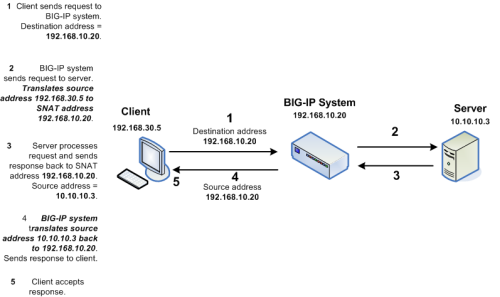


However I have a workaround for you. If we setup two SNAT addresses on the F5 BIG-IP for example 172.16.51.174 and 172.16.51.175 we can configure our BIG-IP to say any source IP addresses that need to be an anonymous open relay hit our Exchange 2010 servers from 172.16.51.174 ELSE hit our Exchange 2010 servers from 172.16.51.175. This solution means we need to configure our list of allowed IP addresses for SMTP relay on our F5 BIG-IP instead of our Exchange SMTP Receive Connectors.

Create a Data Group List

First we must create a list of IP addresses we want to allow anonymous relay for on our F5 BIG-IP. These are the IP addresses we would normally configure on our Exchange receive connectors. To do this we need to create a new data group list.

Add a new data group list by expanding iRules --> Data Group List and clicking the add button.


I called my Data Group List smtp_relay_allowed and specified the IP address 172.16.51.21. You can add as many IP addresses as you want for anonymous relay.


Create a new iRule

An iRule is a powerful and flexible feature of BIG-IP devices which provide you with unprecedented control to directly manipulate and manage any IP application traffic. By creating an iRule we can instruct the BIG-IP to return a different SNAT address based on on the condition. We want to instruct our BIG-IP to perform the following:

IF a clients source IP is on our Data Group List THEN use an SNAT address of 172.16.51.174 ELSE use the SNAT address of 172.16.51.175.

To create the iRule under Local Traffic Select iRule --> iRule List and click the add button.


I called my iRule smtp_irule and created the following code to perform my required conditions as mentioned above.


A copy of the code:

when CLIENT_ACCEPTED {
set accepted_snat "172.16.51.174"

if { [ class exists smtp_relay_allowed ] }
{
if { [class match [IP::client_addr] equals $::smtp_relay_allowed] }
{
snat $accepted_snat
} else {
snat automap
}
} else {
snat automap
}
}


Automap is a feature of the BIGIP where it automatically selects a Self IP at random to use for the SNAT translation. A Self IP is an IP you have assigned to the BIGIP manually under your network configuration. This is different to a Virtual IP address which is created when you setup a virtual server. I only have one Self IP on my BIG IP set to 172.16.51.175 and one virtual IP set to 172.16.51.174 used by all my F5 virtual servers on different TCP ports. As a result automap will ONLY select 172.16.51.175.

Why would you want multiple source SNAT IP addresses?

For each connection made from the BIG-IP to your load balanced servers a TCP source port needs to be opened for the communication. TCP only has 65535 ports for source and destination traffic so if the number of connections exceeded the number of available ports, the BIG-IP would not be able to take new connections. In this event you could add an additional Self IP and rely on the Automap feature or create an SNAT pool which is a predefined list of IP addresses the BIG-IP is allowed to use for SNAT.

I recommend reading the chapter on SNAT configuration from the F5 website:

http://support.f5.com/kb/en-us/products/big-ip_ltm/manuals/product/ltm_configuration_guide_10_0_0/ltm_snat.html

How do I configure Exchange 2010:

On your Exchange 2010 servers create your two receive connectors as normal. Create one receive connector configured for your anonymous relay and setup yoru default receive connector for all other SMTP traffic. Both receive connectors must listen on port 25. Do this on all Exchange servers in your pool.

For information on how to configure your application receive connector for anonymous relay follow this blog post:

http://clintboessen.blogspot.com/2009/07/allow-network-applications-to-relay.html

Apply my new iRule to the SMTP Virtual Server

Next we need to attach the iRule to the SMTP virtual server in the F5 configuration screen. To do this go to your Virtual Servers --> Click Virtual Server List then select our SMTP_VS created earlier.


Select Resources then under iRules click Manage.


Select our smtp_irule out of the list available then click finish.


Testing our Configuration

So time to test the configuration to ensure it works as configured. Lets telnet my BIG-IP SMTP Virtual Server from the host we allowed 172.16.51.23 by running the following command:

telnet 172.16.51.174 25

I then wrote some random comments in the telnet session so we can identify our server 172.16.51.23 in our SMTP logs.


I then repeated the procedure from another server which is not in our Data Group List created above.


In our SMTP logs on our Exchange 2010 server as expected the 172.16.51.23 server came from 172.16.51.174 and the non trusted IP came from 172.16.51.175.

Tuesday, November 8, 2011

VBS Get the OU distinguishedName of the OU containing a User Account

I had an interesting task which I needed to achieve. I had another peice of code grabbing a bunch of user distinguishedName's in Active Directory. For each distinguishedName I needed to grab the OU/container the user account resides in. For example:

"CN=Clint Boessen,OU=Microsoft MVPs,OU=Engineers,OU=IT Professionals,DC=4Logic,DC=local"

We need to cut the "CN=Clint Boessen" of this string in order to determine the organisational unit so we get:

"OU=Microsoft MVPs,OU=Engineers,OU=IT Professionals,DC=4Logic,DC=local"

However sometimes the user accounts are in a container not an OU so we need code smart enough to deal with this.. for example:

"CN=Clint Boessen,CN=Users,DC=4Logic,DC=local"

To be come:

"CN=Users,DC=4Logic,DC=local"

The VB Script below will take care of this... as long as you store the distinguishedName within the strOU attribute.

For example:

strOU = "CN=Clint Boessen,OU=Microsoft MVPs,OU=Engineers,OU=IT Professionals,DC=4Logic,DC=local"

If instr(lcase(strDN),"cn=users") = 0 then
strOU = right(strDN,len(strDN) - instr(lcase(strDN),",ou="))
Else
strOU = right(strDN,len(strDN) - instr(lcase(strDN),",cn=users"))
End If

Thursday, November 3, 2011

Exchange 2003 PFDavAdmin Error

When trying to connect to an Exchange 2003 Server using PFDavAdmin I received the following error:

An error occur ed while trying to establish a connection to the Exchange server. Be sure that port 443 (for SSL) or port 80 (for non-SSL) can be reached. If you are connecting to public folders, be sure that the public folder store is mounted. If you are connecting to mailboxes and the progress bar shows a particular mailbox, be sure that user has at least one email address.

Exception: Failed to connect using secure URL: https://domain.local/ExAdmin/Admin/domain.local/public%20folders/ with error: The underlying connection was closed: Unable to connect to the remote server.. Failed to connect using unsecure URL http://domain.local/ExAdmin/Admin/domain.local/public%20folders/ with error: The remote server returned an error: (503) Server Unavailable.


This error gets generated if you have a proxy server configured in Internet Options. What caught me out however is PFDavAdmin only detects proxy settings on application lauch... not on connection. If you remove your proxy settings from Internet Options, then attempt to connect again using PFDavAdmin the same error will be reproduced as PFDavAdmin will continue trying to use your proxy settings.

You must:

1. Disable your proxy server or add an exclusion.
2. Close PFDavAdmin
3. Relaunch the PFDavAdmin application.

Wednesday, November 2, 2011

The underlying connection was closed: Could not establish trust relationship for the SSL/TLS secure channel.

When Running Test-ActiveSyncConnectivity on Exchange 2010 you will probably experience the following error.

[System.Net.WebException]: The underlying connection was closed: Could not establish trust relationship for the SSL/TLS secure channel. Inner error [System.Security.Authentication.AuthenticationException]: The remote certificate is invalid according to the validation procedure.


There is generally three causes for this problem:

1) Name mismatch - make sure the site name matches exactly as it is in the cert. If there is a "Subject Alternative Name" (SAN) on the details tab, then make sure the name is in that list (note: subject name must also be included in the SAN). Some applications don't supports SANs, but most do. Also note that site1 and site1.domain.com are not the same - this is the most common mistake.

2) Untrusted - you need to install the root certificate into the trusted root certificate store. If this app uses the Microsoft root store, you can check Certificates MMC to see if it shows up. If not, view the details of the certificate from the error box, go to the certification path tab and double click the topmost certificate, go to details tab and Copy to File button to export it, then from your saved copy you can import it to the trusted root store.

3) Expired or not yet valid - usually from the cert expiring - renew it. Can also happen if the time/time zone/date/year is off in the client OS - if this is ok, try also checking the same in BIOS.


Name mismatch is generally the one that catches people out. If you simply run Test-ActiveSyncConnectivity the Exchange 2010 server will not use a trusted URL on your SAN certificate. Make sure you specify the URL on the Test command for example:

Test-ActiveSyncConnectivity -URL "https://mail.contoso.com/Microsoft-Server-ActiveSync"

Friday, October 28, 2011

Outlook Cached Exchange Mode

Cached Exchange Mode is the process of when 2003/2007/2010 downloading a copy of the users mailbox and storing it locally on their workstation. This means all emails opened by the user from there onwards does not hit the Exchange servers significantly reducing load.

Many clients however still disabled cached Exchange mode on their users workstations. When asking them "why", their answer is always:

Because we need the user can access the most updated address book when they click the global address book.

If your company has this requirement this doesn't mean you need to disable Cached Exchange Mode. You can configure a registry key on your clients to simply keep the address book in online mode.

For more information on this key for Outlook 2003/2007/2010 please see:

http://support.microsoft.com/kb/841273

Generally the only time you want to disable cached exchange mode is if your users run on a terminal services or Citrix shared environment where you do not want a copy of EVERY users mailbox downloaded and stored locally on the terminal server!

Outlook does not Redirect to Exchange 2010 SP1 CAS Array

Problem:

You have a single Exchange 2010 SP1 server "Ex2010.domain.local" running HT, MBX and CAS roles. You move a mailbox from the Exchange 2010 SP1 install to a new Exchange 2010 SP1 CAS Array installation "CASArray01.domain.local".

Outlook 2003, 2007 and 2010 will still points at the mailbox "Ex2010.domain.local", it will not automatically update and point at "CASArray01.domain.local". This is because the RPC CA service doesn't respond with a "ecWrongServer" like previous versions of Exchange did.

Microsoft is aware of this issue however their is no easy resolution in terms of a little code tweak.

How do I prevent this from happening:

Microsoft has been telling customers for a long time to always create a CAS Array even if they have one server - they need a one server array. If all servers single servers were setup in an Array from the beginning this problem would not exist.

Is there a way to force all Outlook clients to automatically perform a full re-autodiscover and attach to the new server?

Yes - if you remove the "Host A" record from DNS for the old Exchange 2010 server old Exchange 2010 server "Ex2010.domain.local" the Outlook clients should do a full re-autodiscover and attach to the new CAS array "CASArray01.domain.local" automatically.

This however is generally impractical especially when you want to stage your mailbox move slowly instead of attempt the big bang approach where all mailboxes are moved in one hit. For small server migrations this is a workable solution.

Is there another work around other then removing a Host A record from DNS?

Yes - create a PRF (Outlook Profile) configuration file to automatically update Outlook to point to the new server. You will need to script this out to ensure it automatically runs on all workstations.

http://technet.microsoft.com/en-us/library/cc179062.aspx

Please look at this article for information on pushing these settings via Group Policy or Script:

http://www.howto-outlook.com/howto/deployprf.htm

Monday, October 17, 2011

An IIS directory entry couldn't be created. The error message is Access is denied.

Today while building a new Exchange 2010 environment I noticed a problem where Exchange servers were able to access themselves but not other Exchange 2010 servers in the same organisation.

The error I received when my powershell attempted to connect to another Exchange 2010 server was:

An IIS directory entry couldn't be created. The error message is Access is denied.
. HResult = -2147024891
+ CategoryInfo : NotInstalled: (DEVDREXCH171\EWS (Default Web Site):ADObjectId) [Get-WebServicesVirtualDirectory], IISGeneralCOMException
+ FullyQualifiedErrorId : E2E22D81,Microsoft.Exchange.Management.SystemConfigurationTasks.GetWebServicesVirtualDirectory


The problem was the Microsoft Exchange Security Groups\Exchange Trusted Subsystem group was no longer a member of the local admins on the Exchange 2010 servers. The customer was setting local admin on servers via Group Policy. When policy refreshed it removed any Exchange 2010 specific groups from the local administrators.

UAC Beware with Update Rollups

Beware of user account control (UAC) when installing update rollups for Microsoft Exchange 2007/2010. It will cause your update to fail!

If you get the following error it is most likely because of UAC.

Setup Wizard for Update Rollup 5 for Exchange Server 2010 Service Pack 1 (KB2582113) ended prematurely.

Setup Wizard for Update Rollup 5 for Exchange Server 2010 Service Pack 1 (KB2582113) ended prematurely because of an error. Your system has not been modified. To install this program at a later time, please run the installation again.

To exit the Setup Wizard, click Finish.


So what is an easy way to install the update without having to turn UAC off? Run a command prompt as administrator and launch the msp from command line.

Sunday, October 16, 2011

Do I need to install update rollups in order for Exchange 2010?

Today I'm going to answer a simple question I get asked all the time. You have just setup a new Exchange 2010 SP1 server. As of this writing we are currently up to Exchange 2010 SP1 Update Rollup 5.

Do we need to install Update Rollups 1 through to 5 in order?

The answer is no. Exchange Update Rollups are cumulative. Cumulative means it contains all previous hotfixes. Exchange 2010 Update Rollup 5 also contains update rollups 1-4.

You only need to install the latest service pack followed by the latest update rollup.

For a list of update rollups and build numbers please see the following link:

http://social.technet.microsoft.com/wiki/contents/articles/240.exchange-server-and-update-rollups-builds-numbers.aspx

Sunday, October 9, 2011

#< #5.6.1 smtp;554 5.6.1 Body type not supported by Remote Host> #SMTP#

One of my customers has just finished migrating their user mailboxes from Exchange 2003 to Exchange 2010. After the migration of users my customer experienced a weird NDR (Non-Deliverable Report). This NDR was generated when an Exchange 2010 mailbox user emailed a mail enabled distribution groups containing a mail enabled contact object in Active Directory.

This problem only occured for a select few distribution groups. The NDR received was:

#< #5.6.1 smtp;554 5.6.1 Body type not supported by Remote Host> #SMTP#

The Exchange server generating the NDR was one of the old Exchange 2003 servers. Now why would Exchange 2010 be delivering this email to Exchange 2003? This gave it away. Straight away I looked to see if there was an Expansion Server configured for the distribution group. Yes there was - it was pointing at one of the old Exchange 2003 servers. I simply removed the Exchange 2003 server as an expansion server for the distribution group.

To view if your group has an expansion server configured, go to the properties of the distribution group in Exchange Management Console and click the Advanced tab.


To view if any of your other distribution groups have expansion servers configured for Exchange 2003, use the following powershell command in Exchange Management Shell.

Get-DistributionGroup | fl Name, ExpansionServer

What is an Expansion Server?

Expansion servers route messages that are sent to a single distribution list or group for each of the recipient objects in that list or group. When a user sends a message to a group, the Exchange server that is acting as the expansion server expands the group to its individual members. This expansion permits members of the distribution list or group to receive the message. An expansion server also resolves the names of all recipients in the distribution list or group, and then determines the most efficient path for routing the message.

You configure which hub transport server or Exchange 2000/2003 server you wish to use as your expansion server on the distribution group.

If you do not designate a specific server as the expansion server that expands a message that is sent to a group, the first server that the message is submitted to expands the group, and then sends the message to all of the destination servers.

NOTE: There is a drawback to setting a specific server as the expansion server for a group. If that server is down, no members of the distribution group receive the message.

[Fixed] Can't Insert Page Number Microsoft Word

A customer of mine experienced a weird issue where they were unable to insert a page number in Microsoft Word 2007. When they went to insert page number in Word they received "Save Selection to Page Number Gallery".


After using system internals process monitor I discovered that Word references a file called "Building Blocks.dotx" to create the page number.

On Windows XP/Server 2003 this file is located under:

C:\Documents and Settings\username\Application Data\Microsoft\Document Building Blocks\1033

In Vista/7/2008 this file is located under:

C:\Users\username\AppData\Roaming\Microsoft\Document Building Blocks\1033

I copied Building Blocks.dotx from another computer with Word 2007 installed replacing the file in my user profile. This resolved my issue.

Note: I believe that this resolution will also work for Word 2010.

Offline Address Book 0x80190197

Issue: when Outlook 2007/2010 attempts to download the offline address book via CAS Web Distribution the following error is recieved:

Task 'Microsoft Exchange' reported error (0x80190197) : 'The operation failed'


This error occurs when Outlook attempts to download the offline address book through a proxy server. This is heavily identified... please see:

http://support.microsoft.com/kb/939765

However today I found another scenario which produces exactly the same error. My clients internally download the OAB through HTTP and externally they download the OAB via HTTPS.

In IIS7 go to the OAB Virtual Directory and click SSL Settings.


Untick Require SSL as internal clients are trying to download the OAB without SSL encryption.


Apply the settings.

Thursday, October 6, 2011

Determine if binary is 32bit or 64bit?

Now that there are 16bit, 32bit and even 64bit binaries around for different processor and operating system platform types we need an easy method for determining which machine architecture a binary has been compiled for.

I found a neat little tool called MiTeC EXE Explorer which does exactly that and more. This tool was developed by a guy named Michal Mutl. Michal has developed all sorts of system admin tools... please visit his website at http://www.mitec.cz/.

MiTeC EXE Explorer is such a great little tool as it does not require installing, its a portable executable which can be executed on any server or workstation within your organisation. It is also completely free.

This is a third party non Microsoft tool however you can feel save executing it on your enterprise environment knowing it will not perform unknown miscellaneous activities as the tool received the Softpedia 100% clean award.

To download MiTeC EXE Explorer please visit http://www.mitec.cz/exe.html.

Here is a screenshot of the tool in action:

Sunday, October 2, 2011

The Exchange server for the database object wasn't found in Active Directory Domain Services

Today when working on a customers Exchange server I had an interesting problem. When I ran the Get-PublicFolderDatabase command I received the following error:

The exchange server for the database object "Public Folders" wasn't found in Active Direcoty Domain Services. The object may be corrupted.


I opened the configuration partition with ADSIEdit. Under Services --> Microsoft Exchange --> Exchange Org Name --> Administrative Groups --> Exchange Administrative Group --> Databases I had two public folder databases, 0261515011 and 0931127523. My Exchange 2010 server had a database associated with 0261515011. There was no database associated with 0931127523.

To resolve the issue I deleted 0931127523 with ADSIEdit.

Tuesday, September 27, 2011

Why didnt my routing group connector get created?

Below I'm going to address a bug that exists from Exchange 2007 RTM to Exchange 2010 SP1 (as of this writing). Sometimes when you install Exchange 2010 in a new environment your routing group connector does not get created - colleagues of mine have seen this before.

This happens even when when you specify an Exchange 2003 server in the dialog box below during the Exchange 2010 setup wizard.


When it doesn't get created during the installation if you dig down through your system logs in event viewer you will notice event 1002 from the MSExchangeSetup. See below, pay attention to the bold text.

Log Name: Application
Source: MSExchangeSetup
Date: 27/09/2011 2:28:20 PM
Event ID: 1002
Task Category: Microsoft Exchange Setup
Level: Error
Keywords: Classic
User: N/A
Computer: exchange.domain.local
Description:
Exchange Server component Hub Transport Role failed.
Error: Error:
The following error was generated when "$error.Clear();
if ($roleLegacyRoutingServer -ne $null)
{
$lrs =

$roleLegacyRoutingServer;
$source = [String][System.Environment]::MachineName;

if ($lrs.Length -gt 31)


{
$lrs = $lrs.Substring(0, 31)
};

if ($source.Length -gt 31)
{


$source = $source.Substring(0, 31)
};

$name = $source + "-" + $lrs;
$result = (get-

routinggroupconnector where {$_.Name -eq $name});
if ($result -eq $null)
{
new-

RoutingGroupConnector -SourceTransportServers:$source -TargetTransportServers:$roleLegacyRoutingServer -Cost:1 -Name:$name -Bidirectional:

$false
};

$name = $lrs + "-" + $source;
$result = (get-routinggroupconnector where {$_.Name -eq

$name});
if ($result -eq $null)
{
new-RoutingGroupConnector -SourceTransportServers:

$roleLegacyRoutingServer -TargetTransportServers:$source -Cost:1 -Name:$name -Bidirectional:$false
};
};
" was

run: "Active Directory operation failed on dc.domain.local. This error is not retriable. Additional information: The name reference is invalid.
This may be caused by replication latency between Active Directory domain controllers.
Active directory response: 000020B5: AtrErr: DSID-03152395, #1:
0: 000020B5: DSID-03152395, problem 1005 (CONSTRAINT_ATT_TYPE), data 0, Att

179130e2 (msExchTargetBridgeheadServersDN)
".

Active Directory operation failed on dc.domain.local. This error is not retriable. Additional information: The name reference is invalid.
This may be caused by replication latency between Active Directory domain controllers.
Active directory response: 000020B5: AtrErr: DSID-03152395, #1:
0: 000020B5: DSID-03152395, problem 1005 (CONSTRAINT_ATT_TYPE), data 0, Att

179130e2 (msExchTargetBridgeheadServersDN)


A value in the request is invalid.


Error:
The following error was generated when "$error.Clear();
if ($roleLegacyRoutingServer -ne $null)
{
$lrs =

$roleLegacyRoutingServer;
$source = [String][System.Environment]::MachineName;

if ($lrs.Length -gt 31)


{
$lrs = $lrs.Substring(0, 31)
};

if ($source.Length -gt 31)
{


$source = $source.Substring(0, 31)
};

$name = $source + "-" + $lrs;
$result = (get-

routinggroupconnector where {$_.Name -eq $name});
if ($result -eq $null)
{
new-

RoutingGroupConnector -SourceTransportServers:$source -TargetTransportServers:$roleLegacyRoutingServer -Cost:1 -Name:$name -Bidirectional:

$false
};

$name = $lrs + "-" + $source;
$result = (get-routinggroupconnector where {$_.Name -eq

$name});
if ($result -eq $null)
{
new-RoutingGroupConnector -SourceTransportServers:

$roleLegacyRoutingServer -TargetTransportServers:$source -Cost:1 -Name:$name -Bidirectional:$false
};
};
" was

run: "Active Directory operation failed on dc.domain.local. This error is not retriable. Additional information: The name reference is invalid.
This may be caused by replication latency between Active Directory domain controllers.
Active directory response: 000020B5: AtrErr: DSID-03152395, #1:
0: 000020B5: DSID-03152395, problem 1005 (CONSTRAINT_ATT_TYPE), data 0, Att

179130df (msExchSourceBridgeheadServersDN)
".

Active Directory operation failed on dc.domain.local. This error is not retriable. Additional information: The name reference is invalid.
This may be caused by replication latency between Active Directory domain controllers.
Active directory response: 000020B5: AtrErr: DSID-03152395, #1:
0: 000020B5: DSID-03152395, problem 1005 (CONSTRAINT_ATT_TYPE), data 0, Att

179130df (msExchSourceBridgeheadServersDN)


A value in the request is invalid.


The following error was generated when "$error.Clear();
if ($roleLegacyRoutingServer -ne $null)
{
$lrs =

$roleLegacyRoutingServer;
$source = [String][System.Environment]::MachineName;

if ($lrs.Length -gt 31)


{
$lrs = $lrs.Substring(0, 31)
};

if ($source.Length -gt 31)
{


$source = $source.Substring(0, 31)
};

$name = $source + "-" + $lrs;
$result = (get-

routinggroupconnector where {$_.Name -eq $name});
if ($result -eq $null)
{
new-

RoutingGroupConnector -SourceTransportServers:$source -TargetTransportServers:$roleLegacyRoutingServer -Cost:1 -Name:$name -Bidirectional:

$false
};

$name = $lrs + "-" + $source;
$result = (get-routinggroupconnector where {$_.Name -eq

$name});
if ($result -eq $null)
{
new-RoutingGroupConnector -SourceTransportServers:

$roleLegacyRoutingServer -TargetTransportServers:$source -Cost:1 -Name:$name -Bidirectional:$false
};
};
" was

run: "Active Directory operation failed on dc.domain.local. This error is not retriable. Additional information: The name reference is invalid.
This may be caused by replication latency between Active Directory domain controllers.
Active directory response: 000020B5: AtrErr: DSID-03152395, #1:
0: 000020B5: DSID-03152395, problem 1005 (CONSTRAINT_ATT_TYPE), data 0, Att

179130e2 (msExchTargetBridgeheadServersDN)
".

Active Directory operation failed on dc.domain.local. This error is not retriable. Additional information: The name reference is invalid.
This may be caused by replication latency between Active Directory domain controllers.
Active directory response: 000020B5: AtrErr: DSID-03152395, #1:
0: 000020B5: DSID-03152395, problem 1005 (CONSTRAINT_ATT_TYPE), data 0, Att

179130e2 (msExchTargetBridgeheadServersDN)


A value in the request is invalid.


Error:
The following error was generated when "$error.Clear();
if ($roleLegacyRoutingServer -ne $null)
{
$lrs =

$roleLegacyRoutingServer;
$source = [String][System.Environment]::MachineName;

if ($lrs.Length -gt 31)


{
$lrs = $lrs.Substring(0, 31)
};

if ($source.Length -gt 31)
{


$source = $source.Substring(0, 31)
};

$name = $source + "-" + $lrs;
$result = (get-

routinggroupconnector where {$_.Name -eq $name});
if ($result -eq $null)
{
new-

RoutingGroupConnector -SourceTransportServers:$source -TargetTransportServers:$roleLegacyRoutingServer -Cost:1 -Name:$name -Bidirectional:

$false
};

$name = $lrs + "-" + $source;
$result = (get-routinggroupconnector where {$_.Name -eq

$name});
if ($result -eq $null)
{
new-RoutingGroupConnector -SourceTransportServers:

$roleLegacyRoutingServer -TargetTransportServers:$source -Cost:1 -Name:$name -Bidirectional:$false
};
};
" was

run: "Active Directory operation failed on dc.domain.local. This error is not retriable. Additional information: The name reference is invalid.
This may be caused by replication latency between Active Directory domain controllers.
Active directory response: 000020B5: AtrErr: DSID-03152395, #1:
0: 000020B5: DSID-03152395, problem 1005 (CONSTRAINT_ATT_TYPE), data 0, Att

179130df (msExchSourceBridgeheadServersDN)
".

Active Directory operation failed on dc.domain.local. This error is not retriable. Additional information: The name reference is invalid.
This may be caused by replication latency between Active Directory domain controllers.
Active directory response: 000020B5: AtrErr: DSID-03152395, #1:
0: 000020B5: DSID-03152395, problem 1005 (CONSTRAINT_ATT_TYPE), data 0, Att

179130df (msExchSourceBridgeheadServersDN)

A value in the request is invalid.


Now what is this bug?

The New-RoutingGroupConnector command will only connect to SMTP Virtual Servers that have a common name value of 1. What do I mean by this? In the Exchange 2010 source code the Exchange 2010 product team coded this powershell command to query:

"CN=1,CN=SMTP,CN=Protocols,CN=MERCURY,CN=Servers,CN=SHENTON PARK,CN=Administrative Groups,CN=EXORG,CN=Microsoft,Exchange,CN=Services,CN=Configuration,DC=YOURDOMAIN,DC=COM"

What is this object? This is your SMTP virtual server your administrators see in Exchange 2003 system manager. Any configuration changes made to this virtual server get updated on this Active Directory object in the configuration partition.


If an administrator creates new SMTP virutal servers then deletes the first SMTP virtual server that had a CN value of 1 the issue occurs. For example if I open ADSIEdit in my environment with the problem and navigate to the following location:

Configuration\services\Microsoft Exchange\Org Name\Administrative Groups\Exchange 2003 AG name\Servers\Exchange 2003 servername\Protocol\SMTP

I see that my CN is a value of 3.


To resolve this I performed the following steps:

1. Renamed CN=3 to CN=1 in ADSIEdit by right clicking the object.

2. Force replication to whichever DC your Exchange 2003 server is communicating to. You can find this out by running "nltest /dsgetdc:domain.local" on your Exchange 2003 server provided you have the 2003 support tools installed.

3. Restart the Simple Mail Transfer Service on your Exchange 2003 server - VERY IMPORTANT.

Note: If you manually try and use the New-RoutingGroupConnector in Exchange 2007/2010 shell after the installation is complete, it will also unless you correct the CN= value for your SMTP Virtual Server.

[FIXED] Exchange 2010 Single Server Installation Problems

Today I set out to perform a single Exchange 2003 server migration to a new Exchange 2010 server for approximately 200 users. What is a simple task for me had some bumps.

I installed setup my new Exchange 2010 server as a brick level deployment "all roles on one server".

I performed the following steps:
1. Installed the Exchange 2010 SP1 prerequisites for MBX, HT and CAS.
2. Installed the Microsoft Office 2010 filter packs
3. Performed the Schema update using setup.com /PrepareAD
4. Installed Exchange 2010 with all roles.

After installation completed successfully I rebooted the server. After the reboot I noticed I could not connect to Exchange 2010 using the console or shell. I checked to see if the powershell virutal directory existed... it did not.


For some reason only the mailbox role installed, even though the wizard said all roles were installed successfully. I went back and ran setup.exe again. I selected Hub Transport and Mailbox.. went through the install - rebooted. This time all roles existed. Although Exchange 2010 installed, it was unusable.

When I tried to perform powershell commands in the shell as an Exchange organisation administrator I received the following errors:

Exception calling "GetSteppablePipeline" with "1" argument(s): "The type initializer for 'Microsoft.Exchange.Configuration.Tasks.Task' threw an exception."
+ CategoryInfo : NotSpecified: (:) [], MethodInvocationException
+ FullyQualifiedErrorId : DotNetMethodException


Opening up Exchange Management Console I received the following error:

Initialization failed
The following error occured when retrieving user information for 'user account':
Unexpected error [0x17B26A98] while executing command 'Get-LogonUser'.


Resolution

To resolve the issue I performed the following steps:

1. Uninstalled Exchange 2010 SP1 from my new server
2. Rebooted
3. Installed Exchange 2010 SP1 client access server role
4. Rebooted
5. Tested exchange management console (EMC) and exchange management shell (EMS)
6. Installed Exchange 2010 SP1 hub transport role
7. Rebooted
8. Tested EMC and EMS
9. Installed Exchange 2010 SP1 mailbox role
10. Rebooted
11. Tested EMC and EMS

Only when installing in this order was I able to resolve the issue. Very weird, this is the only time I have experianced this behaviour.

Monday, September 26, 2011

RMS Shared Identity user FederatedEmail.4c1f4d8b-8179-4148-93bf-00a95fa1e042 not found

Today I was re-installing Exchange 2010 into an Active Directory forest which previously had Exchange 2010 installed. The schema was already extended with the Exchange 2010 SP1 schema extensions.

When installing Exchange 2010, installation of the Hub Transport role failed with the following error:

Error:
The following error was generated when "$error.Clear();
if ( ($server -eq $null) -and ($RoleIsDatacenter -ne $true) )
{
Update-RmsSharedIdentity -ServerName $RoleNetBIOSName
}
" was run: "RMS Shared Identity user FederatedEmail.4c1f4d8b-8179-4148-93bf-00a95fa1e042 not found.".


FederatedEmail.4c1f4d8b-8179-4148-93bf-00a95fa1e042 is a Exchange 2010 built in arbitration user account which must exist in every Exchange 2010 environment. The GUID never changes, it is always "4c1f4d8b-8179-4148-93bf-00a95fa1e042".

The setup failed because someone deleted this user account from Active Directory!

How can we get it back?

You have two ways to get this mailbox back. If you have a computer on your network with the Exchange 2010 management tools installed, you can create the user account using powershell with the following command:

New-Mailbox -Arbitration -Name FederatedEmail.4c1f4d8b-8179-4148-93bf-00a95fa1e042 -UserPrincipalName FederatedEmail.4c1f4d8b-8179-4148-93bf-00a95fa1e042@default_accepted_domain

For more information on this see Microsoft KB978776

What happens if you do not have exchange management shell installed on any computers? Well there is another way to get this account back. This account is originally created when you prepare the domain/schema. If you run setup.com /PrepareAD on your domain it will re-create this account for you. See below:


Thursday, September 22, 2011

Connecting to a single AD Object

This script lets you connect to an LDAP DC / LDS server and display attributes on objects:

Set oUser = GetObject("LDAP://localhost:10001/CN=Clint2,OU=TestOU,DC=test,DC=com")
oUser.GetInfo
wscript.echo oUser.Get("otherHomePhone")

Monday, September 19, 2011

A quick way to determine your bridgehead servers?

You want to determine which bridgehead servers have been elected in each Active Directory site to troubleshoot replication issues?

Use the following command:

repadmin /bridgeheads

Sunday, September 18, 2011

Windows Server Backup - DAG Environment

Windows Server Backup or wbadmin.exe cannot be used to backup passive databases in a Database Availability Group environment.

WSB does not back up Passive copies. It can only be used to back up Active copies. This is simply a limitation of the WSB plug-in. Also WSB is only designed to backup small Exchange 2010 environments that are not DAG members.

http://technet.microsoft.com/en-us/library/dd876874.aspx

Also – as indicated in the article, you have to back up the entire volume containing both the database/logs.

So essentially if you want to use WSB to take a full backup of *all* databases, you are looking at either moving all active copies to a single DAG member (for the backup), or using WSB locally on each DAG member that hosts active databases.

Please note, you can backup passive mailbox databases using WSB in a DAG environment as explained in the above article:

"If a server hosting the data being backed up is a member of a database availability group (DAG) and hosts both active and passive database copies, you must disable the Microsoft Exchange Replication service VSS writer. If the Microsoft Exchange Replication service VSS writer is enabled, the backup operation will fail."

Why would you want to use windows server backup to backup a DAG member? Possibly your primary backup product is failing and you want to test the VSS service using an alternative product? In this case you may use BETest.exe to test the VSS snapshot service.

Exchange 2003 Domain Rename with Exchange 2010

Domain Rename's are possible only with Exchange 2003. After you perform the Active Directory rename using the domain rename tool RENDOM, the next step is the fixup the Exchange 2003 attributes using a tool called XDR-Fixup.

XDR-Fixup is not supported on:
- Exchange 5.5
- Exchange 2000
- Exchange 2007
- Exchange 2010

What happens if you have an Exchange 2003 environment that you have just done an ADPrep to prepare the forest for Exchange 2010? Can you still proceed with an Exchange 2003 domain rename?

The answer here is no, the Exchange schema extensions must be that of Exchange 2003 SP2 (no higher).

Wednesday, September 14, 2011

ADAMSync Error -2146893813. Error code: 317

Today I discovered what may be a bug in ADAMSync, however I found a workaround. Let me go into detail sharing my findings with you. First... lets cover off my environment.

I have 4 forests, 10 domains. My AD LDS server is a member of subdomain.forest3.lan. Please see the diagram below.


- My LDS Server has multiple instances "LDS Databases" for each Active Directory domain. These instances are listening on 10001, 10002, 10003, 10004 etc... There is a 1 to 1 relationship between a single domain and its corresponding LDS instance.

- Each LDS Instance has only one application partition with the same distinguishedName mapping an Active Directory domain. For example dc=forest2,dc=lan or dc=bu2,dc=forest1,dc=lan.

- My ADAMSync configuration in each instance replicates the user class objects from Active Directory to "userProxy" class objects in each LDS Instance. Objects are successfully replicating.

- userProxy bind redirection is working successfully for all LDS Instances and the corresponding Active Directory domain (excluding forest4.lan due to no domain trusts existing). For more information on userProxy objects see http://clintboessen.blogspot.com/2011/04/userproxy-class-and-adam-lds.html

- There is no synchronization errors. I have validated all attributes declared in my adamsync.xml file are successfully synchronizing to the corresponding userProxy object in LDS for each user account.

- ADAMSync is successfully creating the same Organisational Unit structure matching that of LDS.

- The base distinguishedName of each LDS instance matches the base distinguishedName of the Active Directory domain.

- All child domains in forest1 synchronise using an ldapquery account located in the parent forest1.lan domain. This is configured in the XML file ldapquery and forest1.lan.

- forest2.lan synchronises using an account in forest2.lan

- forest3.lan synchronises using an account in subdomain.forest3.lan. No user accounts reside in the root domain forest3.lan. This is configured as an "empty root domain".

- forest4.lan synchronises using an account located in forest4.lan

The following Active Directory accounts were setup to make this solution work:

- subdomain.forest3.lan\LDSSVC. This account is only a member of "domain users" in subdomain.forest3.lan. This account has "Log on as service" rights assigned under "user rights assignments" on the LDS Server. This account provides the security context under which LDS Instance runs as a service. i.e. all LDS Services run as this account.

- subdomain.forest3.lan\LDSBoss. This account is only a member of "domain users" in subdomain.forest3.lan. During the installation of each LDS Instance using the "Active Directory Lightweight Directory Services Setup Wizard" this account was specified as the Administrator of each instance. This account has no access to the LDS Server itself, i.e. the account does not even have permissions to login to the LDS Server. It only has "Administrative privilages" inside each LDS Instance. All commands which manipulate LDAP data inside an LDS Instance such as ADAMSync must be run under the security context of this LDSBoss account.

- forest1.lan\ldapquery. This account is a member of "Domain Admins" and "Enterprise Admins"in the forest1.lan root domain. It is specified in the ADAMSync.xml file for each child domain in the forest1.lan forest. This account is used to perform LDAP Queries against the forest1.lan forest. If this account is not a Domain Admin or Enterprise Admin, ADAMSync fails to run.

- forest2.lan\ldapquery. This account is a member of "Domain Admins" in the forest2.lan domain. This is specified in the ADAMSync.xml file for the forest2.lan forest. It is used for LDAP queries against forest2.lan

- subdomain.forest3.lan\ldapquery. This account is a member of "Domain Admins" in the subdomain.forest3.lan domain. This is specified in the ADAMSync.xml file for the subdomain.forest3.lan forest. It is used for LDAP queries against subdomain.forest3.lan

- forest4.lan\ldapquery. This account is a member of "Domain Admins" in the forest4.lan domain. This is specified in the ADAMSync.xml file for the forest4.lan forest. It is used for LDAP queries against forest4.lan

So whats the bug you found clint?

I went and installed my ADAMSync XML configuration file running a command prompt under the security context of the user account SUBDOMAIN\LDSBoss with the following command:

adamsync /install localhost:10001 "C:\Windows\ADAM\AdamSync Configs\SUBDOMAIN\SUBDOMAIN-AdamSyncConf.XML" /passprompt

When prompted I entered the password for the subdomain.forest3.lan\ldapquery account which was specified in the ADAMSync XML file.

When I run ADAMSync.exe using my SUBDOMAIN\LDSBoss credentials (the credentials used to install the XML configuration file), the sync works successfully.

However I then created another account called SUBDOMAIN\boessenc_admin which I added to the configuration partition "Administrators" group in my LDS Instance. When I tried to sync using my SUBDOMAIN\boessenc_admin account the sync failed with ADAMSync.exe terminating. The following error is received:

Error occured fetching internationalized message number -2146893813. Error code: 317


Problem signature:
Problem Event Name: APPCRASH
Application Name: adamsync.exe
Application Version: 6.1.7600.16385
Application Timestamp: 4a5bc94c
Fault Module Name: ntdll.dll
Fault Module Version: 6.1.7600.16695
Fault Module Timestamp: 4cc7b325
Exception Code: c0000005
Exception Offset: 0000000000023b12
OS Version: 6.1.7600.2.0.0.272.7
Locale ID: 3081
Additional Information 1: dba5
Additional Information 2: dba5cead4302f0c0fa066ea618a55f8f
Additional Information 3: f135
Additional Information 4: f135fc65c6fa056fecabbbdf82720b5f


I created a memory dump of the ADAMSync process using the following MSDN article:
http://msdn.microsoft.com/en-us/library/bb787181.aspx

I submitted this memory dump to James Li from the Microsoft Directory Service Support Team. James analysed the memory dump carefully and suspects it might be caused by a bug in AdamSync.exe. Here is the stack information he provided me with:

00 00000000`0013e990 000007fe`fd479ce9 ntdll!RtlFormatMessageEx(
unsigned short * MessageFormat = 0x00000000`00000000,
unsigned long MaximumWidth = 0,
unsigned char IgnoreInserts = 0x10 '',
unsigned char ArgumentsAreAnsi = 0x00 '',
unsigned char ArgumentsAreAnArray = 0x00 '',
char ** Arguments = 0x00000000`0013f3b0,
unsigned short * Buffer = 0x00000000`ff7fb630,
unsigned long Length = 0x26d7,
unsigned long * ReturnLength = 0x00000000`0013f174,
struct _PARSE_MESSAGE_CONTEXT * ParseContext = 0x00000000`0013f1a8)+0x272

01 00000000`0013f110 000007fe`fd479a97 KERNELBASE!BaseDllFormatMessage(
unsigned char ArgumentsAreAnsi = 0x00 '',
unsigned long dwFlags = 0x1000,
void * lpSource = 0x00000000`0013f510,
unsigned long dwMessageId = 0x13d,
unsigned long dwLanguageId = 0x400,
unsigned short * lpBuffer = 0x00000000`ff7fb630,
unsigned long nSize = 0x2710,
char ** arglist = 0x00000000`0013f3b0)+0x239

02 00000000`0013f210 00000000`77024d88 KERNELBASE!FormatMessageW(
unsigned long dwFlags = 0,
void * lpSource = 0x00000000`ff7f91b0,
unsigned long dwMessageId = 0,
unsigned long dwLanguageId = 0xff797074,
unsigned short * lpBuffer = 0x00000000`ff7fb630,
unsigned long nSize = 0x2710,
char ** lpArguments = 0x00000000`0013f3b0)+0x37

03 00000000`0013f260 00000000`ff7942d0 kernel32!FormatMessageWStub(
unsigned long dwFlags = 0x13f510,
void * lpSource = 0x00000000`00002800,
unsigned long dwMessageId = 0,
unsigned long dwLanguageId = 0x5f7f20,
unsigned short * lpBuffer = 0x00000000`ff7fb630,
unsigned long nSize = 0x2710,
char ** lpArguments = 0x00000000`0013f3b0)+0x28


I continued investigating the issue... I then reinstalled the ADAMSync XML file by re-running the ADAMSync.exe process under SUBDOMAIN\boessenc_admin using the same command, and specifying the password for the SUBDOMAIN\ldapquery which was specified in the XML configuration file:

adamsync /install localhost:10001 "C:\Windows\ADAM\AdamSync Configs\SUBDOMAIN\SUBDOMAIN-AdamSyncConf.XML" /passprompt

I then ran the ADAMSync.exe program with the sync switch under the security context of SUBDOMAIN\boessenc_admin. It worked!

What did we learn?

Whatever account you used to install the ADAMSync.exe XML configuration file, i.e. the account the ADAMSync.exe process is running as during the config installation MUST also be used to perform the ADAMSync.exe synchronisation. If you attempt to perform a synchronisation using a different account other then the account used during the XML import, the ADAMSync.exe process will crash.

Forefront Threat Management Gateway - Workgroup Configuration with Exchange 2010

In this post I will give you some information around publishing Exchange 2010 with Forefront Threat Management Gateway (TMG) or ISA 2006 and weather or not these servers should have domain membership.

Microsoft's recommended deployment is that you add your TMG servers as members of your Active Directory domain. For the TMG setup whitepaper please see the following link. This whitepaper explains how to setup TMG step by step with domain membership.

http://download.microsoft.com/download/E/5/6/E56ACB6E-7BCC-40F1-8F18-E636B7BFE088/PublishingExchangeServer2010withForefront.doc

When Microsoft initially released Threat Management Gateway, it did not support workgroup configuration. It's a product that is designed to run as a member of your Active Directory domain and configuring it any other way results in significant loss in functionality and in some cases security. I managed to find a copy of the original release notes published by Microsoft which is available here... stating that TMG does not support workgroup configuration. http://technet.microsoft.com/en-us/library/cc487898.aspx

Previous versions of the product such as ISA2006 did support workgroup configuration and some companies implemented it in this method. There was an outcry and as a result Microsoft changed their stance on this and updated the product to support domain membership.

Can you publish Exchange 2010 using TMG without adding the Threat Management Gateway server as a member of your internal Active Directory domain? Yes you can, there are 3 ways to do this:

- Configure another Active Directory domain to hold TMG. Create a Transitive Forest Trust between your production forest and your TMG forest. Create domain local groups on the TMG Active Directory forest and nest any groups that require access rules inside the TMG forest’s domain local groups.

- Configure an internal PKI, if you want security you need to ensure you have an offline root stand-alone CA, and a subordinate enterprise issuing CA which is AD Integrated. Issue a digital certificate to each domain controller and configure your environment to support LDAP over SSL for AD Authentication. To configure your domain controllers to support LDAPS using SSL see http://support.microsoft.com/kb/321051

- Configure a RADIUS server on your internal network. Configure the TMG server as a RADIUS client to pass through authentication requests to the RADIUS server. The RADIUS server will then pass the authentication request through to Active Directory. You will not get Outlook Anywhere working if your using RADIUS authentication, see http://blogs.isaserver.org/pouseele/2007/02/06/a-quest-for-strong-user-authentication-with-rpc-over-http-services-and-isa-server-2006/

All three of these options have the following disadvantages:

- Will require additional servers weather its certificate authorities, radius servers or domain controllers to run a new AD forest.

- Will extend the project life cycle from an originally estimated 2 weeks to 4-8 weeks depending which of the 3 options you wish to go down.

- Increase complexity of your network and increase downtime periods should infrastructure fail as this is not a highly available deployment.

Neither of these solutions add any significant layer of security and are not seen as efficient solutions due to the Administrative overhead they create.

In a Microsoft whitepaper written by Greg Taylor "Publishing Outlook Anywhere Using NTLM Authentication With Forefront TMG or Forefront UAG", Greg dedicated a section around joining Forefront TMG/Forefront UAG to an Active Directory domain or leaving it workgroup. For a copy of this article see the following URL:

http://www.microsoft.com/download/en/details.aspx?id=22723

Here is an extract from Greg Taylors whitepaper:

"Domain Joining Forefront TMG/Forefront UAG or Leaving in a Workgroup"

In most organizations, the decision whether to domain join the server hosting Forefront TMG/Forefront UAG to your production domain may be one of the more contentious parts of the deployment.

For Forefront UAG deployments, the guidance is clear. Because Forefront UAG is not a firewall, it should be placed behind some other device that acts as a firewall on the corporate network. Also, it's recommended that Forefront UAG be domain joined to make authentication simple and flexible. Forefront TMG is installed on the Forefront UAG computer during installation, but that's done only to protect the host system and for the underlying functionality it provides to Forefront UAG.

Forefront TMG deployments are more complex to discuss because Forefront TMG is considered a firewall and can protect the network edge. Domain joining Forefront TMG offers many advantages: it allows certificate based authentication to be used at Forefront TMG, using Kerberos Constrained Delegation to communicate to Exchange; it allows easy use of Active Directory groups and user objects in publishing rules to restrict access; and it provides other benefits. For an impartial view on whether to domain join Forefront TMG, see Debunking the Myth that the ISA Firewall Should Not be a Domain Member. For more information about identifying your infrastructure design requirements, see Domain and workgroup requirements.


The link Greg Taylor mentions in his white paper "Debunking the Myth that the ISA Firewall Should Not be a Domain Member" by Thomas W Shinder, Microsoft MVP is an excellent read. Please view it here:

http://www.isaserver.org/tutorials/Debunking-Myth-that-ISA-Firewall-Should-Not-Domain-Member.html

In Thomas's article he mentions:

ISA/TMG that is a domain member machine is more secure and more flexible than a non-domain member machine and that they do themselves and their companies a disservice by not joining the ISA firewall to the domain. This is a significant issue and not something to be taken lightly because there is a serious security hit you take when you don’t join the ISA firewall to the domain.

He also covers in his article the primary reason companies go through all this effort of not joining the TMG/ISA server to the internal domain, compliance managers and external auditors that believe in this myth. He writes:

Should the ISA firewall array be placed in a domain or a workgroup? That is the question. Is it nobler to place the ISA firewall in a workgroup where you can avoid the catcalls of clueless compliance managers, "hardware" firewall know-nothings, or “network guys” who think of network security as "port opening and closing", or should you bear the slings and arrows of the same harridan housewives and carping screws for placing the ISA firewall in the domain, where you can get a higher level of overall security and substantially improve your security position?

The last article I would like to point you at is a TechNet article published by Microsoft around considerations when and when not you would place your TMG server as a member of your internal Active Directory domain. Please view this article here:

http://technet.microsoft.com/en-us/library/dd897048.aspx

I would like to finalise by saying majority of TMG deployments should all be a member of your Active Directory domain especially if your just publishing Exchange 2010. However there may be circumstances where your using your TMG server for things other then just Exchange and you may need to look at implementing TMG in a workgroup configuration.

Joining Forefront Threat Management Gateway 2010 to an Active Directory domain to publish Exchange 2010 services to the Internet is not a security threat to your network.

Monday, September 12, 2011

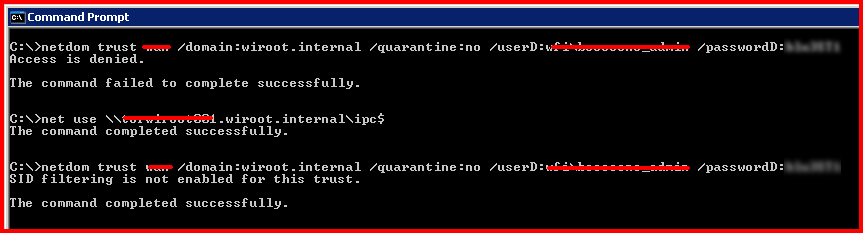
Access is Denied - Disabling SID Filtering

Today I had an issue where I received "Access is Denied" when disabling SID Filtering, even though my account had access.

Of course I checked my command prompt was running with administrative rights... check this is you have User Account Control (UAC) enabled.

I ran the netdom command with /quarantine:no and the correct syntax and received:

The command failed to complete successfully.

To get around this problem I established a UNC connection to the the PDC emulator in the destination forest. This resolved the problem. Please see the screenshot below:

Sunday, September 4, 2011

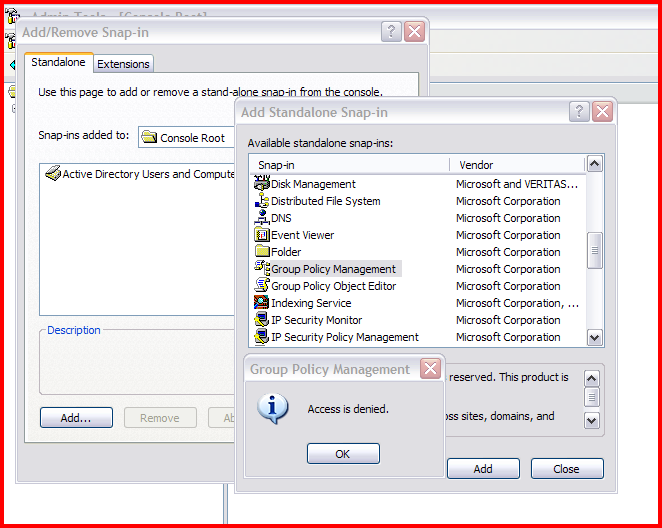
Access is Denied adding GPMC to MMC

Scenario: I have an administrators XP workstation. The administrator has a standard user account and an administrator account. I migrated his standard user account and administrator account to a new Active Directory forest. ADMT performed security translation on his profile. The administrator can successfully login to the new domain keeping his same profile and settings.

Problem: The administrator opens MMC using "run as" and specifies his administrative credentials in the source forest. He can access AD Users and Computers and make configuration changes. When he tries to add group policy management console (GPMC) to the MMC console he receives Access is Denied.


I used Sysinternals Process Monitor (Procmon.exe) and noticed it was having problems writing to a particular registry key.


I granted the administrator account full control over the profile using regedit.


This resolved the problem.