Thursday, July 21, 2011

Understanding how "Log On To" works

In this article we will be having a look at how the Log On To list is populated. This is the list in windows XP/2003 where users can select which domain they are logging into from a drop down list.

I decided to blog this as I spent a morning working out how this worked, and there is little documentation on the Internet.

So where does this list come from?

The logon list is stored from a DomainCache registry key located under:

HKLM\SOFTWARE\Microsoft\Windows NT\CurrentVersion\Winlogon\DomainCache


How does this list populate?

Windows populates the DomainCache registry key from a file called C:\WINDOWS\system32\config\netlogon.ftl.


The DomainCache registry key gets updated from netlogon.ftl as part of the computer boot process and whenever a remote desktop connection is established based on my testing.

Here I added a string record to the DomainCache called CLINTY pointing at a fake domain called clint.local. I then locked my PC, you can see it appear in the list.


If I remote desktop my machine or reboot the PC, it repopulates the DomainCache from netlogon.ftl. Here I remote desktoped my PC, you can see in process monitor it did the repopulation.
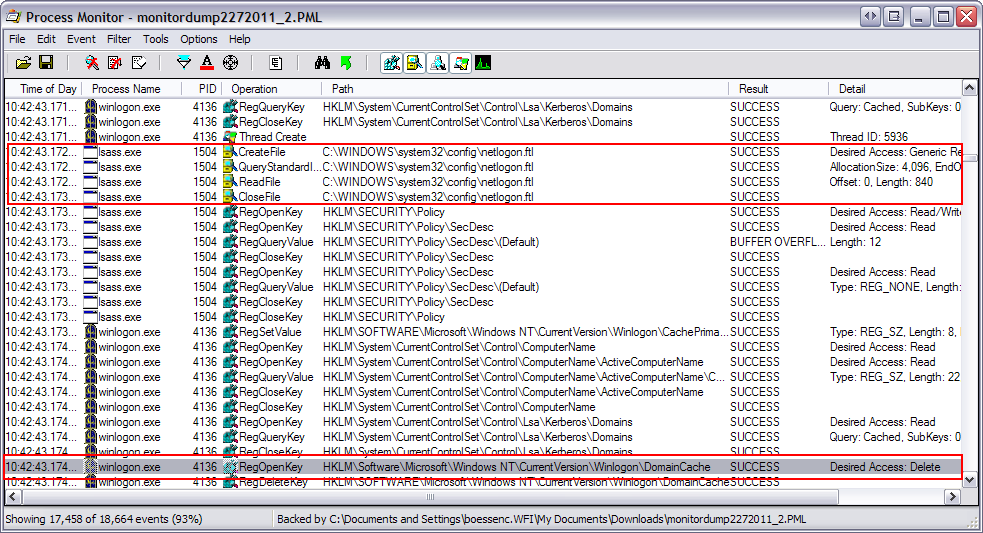


When it repopulated the DomainCache from netlogon.ftl, it deleted my CLINTY record.

What populates netlogon.ftl?

The netlogon.ftl file is populated from Active Directory by the netlogon service - I think this occurs when the system boots... but I'm not sure.

Where in Active Directory does netlogon.ftl populate from?

It the defaultNamingContext partition under the System container. It populates from the TrustedDomain object types.


You can also query this information using nltest or a VBScript:

nltest /domain_trusts


Here is a copy of the VB Script used in the above screenshot.

' This code prints the trusts for the specified domain.
' ------ SCRIPT CONFIGURATION ------
strDomain = "wfi.wan"
' ------ END CONFIGURATION ---------

' Trust Direction Constants taken from NTSecAPI.h
set objTrustDirectionHash = CreateObject("Scripting.Dictionary")
objTrustDirectionHash.Add "DIRECTION_DISABLED", 0
objTrustDirectionHash.Add "DIRECTION_INBOUND", 1
objTrustDirectionHash.Add "DIRECTION_OUTBOUND", 2
objTrustDirectionHash.Add "DIRECTION_BIDIRECTIONAL", 3

' Trust Type Constants - taken from NTSecAPI.h
set objTrustTypeHash = CreateObject("Scripting.Dictionary")
objTrustTypeHash.Add "TYPE_DOWNLEVEL", 1
objTrustTypeHash.Add "TYPE_UPLEVEL", 2
objTrustTypeHash.Add "TYPE_MIT", 3
objTrustTypeHash.Add "TYPE_DCE", 4

' Trust Attribute Constants - taken from NTSecAPI.h
set objTrustAttrHash = CreateObject("Scripting.Dictionary")
objTrustAttrHash.Add "ATTRIBUTES_NON_TRANSITIVE", 1
objTrustAttrHash.Add "ATTRIBUTES_UPLEVEL_ONLY", 2
objTrustAttrHash.Add "ATTRIBUTES_QUARANTINED_DOMAIN", 4
objTrustAttrHash.Add "ATTRIBUTES_FOREST_TRANSITIVE", 8
objTrustAttrHash.Add "ATTRIBUTES_CROSS_ORGANIZATION", 16
objTrustAttrHash.Add "ATTRIBUTES_WITHIN_FOREST", 32
objTrustAttrHash.Add "ATTRIBUTES_TREAT_AS_EXTERNAL", 64

set objRootDSE = GetObject("LDAP://" & strDomain & "/RootDSE")
set objTrusts = GetObject("LDAP://cn=System," & _
objRootDSE.Get("defaultNamingContext") )

objTrusts.Filter = Array("trustedDomain")
Wscript.Echo "Trusts for " & strDomain & ":"

for each objTrust in objTrusts

for each strFlag In objTrustDirectionHash.Keys
if objTrustDirectionHash(strFlag) = objTrust.Get("trustDirection") then
strTrustInfo = strTrustInfo & strFlag & " "
end If
next

for each strFlag In objTrustTypeHash.Keys
if objTrustTypeHash(strFlag) = objTrust.Get("trustType") then
strTrustInfo = strTrustInfo & strFlag & " "
end If
next

for each strFlag In objTrustAttrHash.Keys
if objTrustAttrHash(strFlag) = objTrust.Get("trustAttributes") then
strTrustInfo = strTrustInfo & strFlag & " "
end If
next

WScript.Echo " " & objTrust.Get("trustPartner") & " : " & strTrustInfo
strTrustInfo = ""
next

Disable SID Filtering - Access is denied.

I went and attempted to disable SID Filtering over some trust links to prepare for SID History during domain migration using the following command:

netdom trust TrustingDomainName /domain: TrustedDomainName /quarantine:No /userD: domainadministratorAcct /passwordD: domainadminpwd

http://technet.microsoft.com/en-us/library/cc772816.aspx

When doing this I got the following error (click to enlarge):


After research I found the cause. “Network access: Allow anonymous SID/name translation” was set to disabled on the Trusted Domain. This this should be enabled on domain controllers – please see http://technet.microsoft.com/en-us/library/cc728431.aspx.

To disable SID Filtering you must Enable anonymous SID/name translation on your Default Domain Controllers GPO for the Trusted Domain.

I set it to enabled. This policy is located under:

Computer Configuration\Windows Settings\Security Settings\Local Policies\Security Options\


After this the problem was resolved:


Note: Access is denied can also be caused if you use NetBIOS names instead of FQDN's for the domain names.

Monday, July 18, 2011

Microsoft Sync Toy - Perfect for Home Users

Today I stumbled across a fantastic little application called Sync Toy. Perfect for home users who want to backup data to a external drive on a regular basis, between computers or to mapped drive pointing to a cloud provider such as Windows Live.

SyncToy 2.1 is a free application that synchronizes files and folders between locations. Typical uses include sharing files, such as photos, with other computers and creating backup copies of files and folders.

It is so easy to use, I think my mum could do it.

Here I have setup synchronization of My Documents to my Microsoft Windows Live SkyDrive cloud account to ensure my documents are backed up at all times. This is a free service. This also allows me to sync the files down to any new computer I work on.

Z:\ is mapped to windows live cloud account.

Please click to enlarge:


As of this writing the latest version of SyncToy is 2.1. The x86 and x64 version is available from here:

http://www.microsoft.com/download/en/details.aspx?id=15155

Note: If you wish to setup a drive letter mapped to your Windows Live SkyDrive service please see the following link:

http://www.addictivetips.com/microsoft-office/map-local-drive-letter-to-live-skydrive-using-office-2010/

Thursday, July 7, 2011

Bind to AD using Alternative Credentials VBS

Below is a VBS Script by MVP Richard L. Mueller which I found very useful. It shows you how to connect to Active Directory using alternative credentials.

Please view his original post here:
http://www.rlmueller.net/ADOAltCredentials.htm

Option Explicit

Dim objRootDSE, strDNSDomain, adoCommand, adoConnection
Dim strBase, strFilter, strAttributes, strQuery, adoRecordset
Dim strDN, strUser, strPassword, objNS, strServer

Const ADS_SECURE_AUTHENTICATION = &H1
Const ADS_SERVER_BIND = &H200

' Specify a server (Domain Controller).
strServer = "MyServer"

' Specify or prompt for credentials.
strUser = "MyDomain\TestUser"
strPassword = "xyz12345"

' Determine DNS domain name. Use server binding and alternate
' credentials. The value of strDNSDomain can also be hard coded.
Set objNS = GetObject("LDAP:")
Set objRootDSE = objNS.OpenDSObject("LDAP://" & strServer & "/RootDSE", _
strUser, strPassword, _
ADS_SERVER_BIND Or ADS_SECURE_AUTHENTICATION)
strDNSDomain = objRootDSE.Get("defaultNamingContext")

' Use ADO to search Active Directory.
' Use alternate credentials.
Set adoCommand = CreateObject("ADODB.Command")
Set adoConnection = CreateObject("ADODB.Connection")
adoConnection.Provider = "ADsDSOObject"
adoConnection.Properties("User ID") = strUser
adoConnection.Properties("Password") = strPassword
adoConnection.Properties("Encrypt Password") = True
adoConnection.Properties("ADSI Flag") = ADS_SERVER_BIND _
Or ADS_SECURE_AUTHENTICATION
adoConnection.Open "Active Directory Provider"
Set adoCommand.ActiveConnection = adoConnection

' Search entire domain. Use server binding.
strBase = "
' Search for all users.
strFilter = "(&(objectCategory=person)(objectClass=user))"

' Comma delimited list of attribute values to retrieve.
strAttributes = "distinguishedName"

' Construct the LDAP query.
strQuery = strBase & ";" & strFilter & ";" _
& strAttributes & ";subtree"

' Run the query.
adoCommand.CommandText = strQuery
adoCommand.Properties("Page Size") = 100
adoCommand.Properties("Timeout") = 30
adoCommand.Properties("Cache Results") = False
Set adoRecordset = adoCommand.Execute

' Enumerate the resulting recordset.
Do Until adoRecordset.EOF
' Retrieve values.
strDN = adoRecordset.Fields("distinguishedName").Value
Wscript.Echo strDN
adoRecordset.MoveNext
Loop

' Clean up.
adoRecordset.Close
adoConnection.Close

List all OU's and Sub OU's using VBS

Simple Script to list all OU's and Sub OU's using a VBScript

On Error Resume Next

Const ADS_SCOPE_SUBTREE = 2

Set objConnection = CreateObject("ADODB.Connection")
Set objCommand = CreateObject("ADODB.Command")
objConnection.Provider = "ADsDSOObject"
objConnection.Open "Active Directory Provider"
Set objCommand.ActiveConnection = objConnection

objCommand.Properties("Page Size") = 1000
objCommand.Properties("Searchscope") = ADS_SCOPE_SUBTREE

objCommand.CommandText = _
"SELECT Name FROM 'LDAP://ou=finance,dc=fabrikam,dc=com' WHERE objectCategory='user'"
Set objRecordSet = objCommand.Execute

objRecordSet.MoveFirst
Do Until objRecordSet.EOF
Wscript.Echo objRecordSet.Fields("Name").Value
objRecordSet.MoveNext
Loop

Wednesday, July 6, 2011

The replication scope could not be set. For more information, see "DNS zone replication in Active Directory

When configuring the DNS zones to replicate to all domains in the forest, instead of all domains just in the current domain the following error was experianced:

"The replication scope could not be set. For more information, see "DNS zone replication in Active Directory" in Help and Support. The error was:

There was a server failure.


To understand where DNS is stored in Active Directory please see:

http://clintboessen.blogspot.com/2010/02/active-directory-dns-zone-locations.html

When trying to connect to the DNS Domain Partition Zone using ADSI Edit (following the above article) the following error was received:

Operation failed. Error code: 0x202b
A referral was returned from the server.

0000202B: RefErr: DSID-03100742, data 0, 1 access points
ref 1 : 'DomainDnsZones.domain.local'


It turned out that the partitions "DomainDNSZones" and "ForestDNSZones" were a lost cause. To fix this you need to perform the following steps:

1. use NTDSUtil to remove the replicas for both ForestDNSZone and DomainDNSZone. Wait for replication. Verify the changes took place then delete each of the partitions.

2. After the deletion has processed to all domain controllers, go into DNS Management and change the Zone to Forest Level/Domain Level. Active Directory will automatically recreate the partition within Active Directory. These new AD application partitions will automatically replicate to all DNS servers. These will then be accessible through ADSI Edit.

It may take over 30 minutes to get to synchronise the DNS zone around - AD is very slow when it comes to DNS.

After this no errors are showing up in the DNS or Active Directory event logs, diagnostics come back clean.

ILM Sample Code PrepareMoveRequest Exchange 2010 Cross Forest Mailbox Moves - Multi Forest

Microsoft Identity Lifecycle Manager Service Pack 1 Feature Pack 1 (ILM 2007 SP1 FP1) can be used to pre-stage the user accounts with the appropriate attributes in a destination forest for cross-forest mailbox moves The out of the box GALSync MA cannot be used since it creates contact object instead of user object required for Online Mailbox Move. Microsoft has provided a sample code extension for the management agents to perform this which can be downloaded from:

http://www.microsoft.com/download/en/details.aspx?id=17741

The ILM sample code demonstrates how to sync source mailbox as Mail Enabled Users (MEU).

The problem with this sample code is was only designed for migration between two forests. My customer wishes to pre-stage user accounts from 2 forests into a new forest meaning I have two source forests! In the OneWaySync.xml file by default we have:

<?xml version="1.0" encoding="utf-8" ?>
<config>
<TargetOU>ou=MaiLboxmoves,DC=targetdom,DC=exchange,DC=contoso,DC=com</TargetOU>
<SourceMAName>Source Forest</SourceMAName>
<TargetMAName>Target Forest</TargetMAName>
</config>


I worked with a Microsoft FIM (Forefront Identity Manager) expert named Tracy Yu and together we made changes to the sample code and recompiled a new DLL to account for multiple source forests.

The file we needed to edit was Microsoft.Exchange.Sample.OneWayGALSync.MVRules.dll. The source code for this file is located under the solution folder under the sample ILM sample code package in a file named Microsoft.Exchange.Sample.OneWayGALSync.MVRules.cs. Here is our new code - in red are any changes made:

// ---------------------------------------------------------------------------
//
// Copyright (c) Microsoft Corporation. All rights reserved.
//

// ---------------------------------------------------------------------------

///
/// Example ILM 2007 Provisioning Rule to perform one-way cross-forest GAL synchronization
/// with required prerequisites for mailbox moves from source to target forests
///


using System;
using System.Xml;
using Microsoft.MetadirectoryServices;

namespace Microsoft.Exchange.Sample.OneWayGALSync.MVRules
{
public class MVExtensionObject : IMVSynchronization
{
// define variables for configuration setting
private string targetOU;
private string sourceMAName;
//add by tracy
private string sourceMAName1;
private string targetMAName;

public MVExtensionObject()
{
// No additional constructor logic required
}

void IMVSynchronization.Initialize()
{
// initialize the provisioning rules configuration parameters
// from config file in ILM Extensions directory
XmlDocument xmlConfigFile = new XmlDocument();
xmlConfigFile.Load(Utils.ExtensionsDirectory + "\\OneWaySync.xml");
XmlNode xmlConfig = xmlConfigFile.SelectSingleNode("config");
targetOU = xmlConfig.SelectSingleNode("TargetOU").InnerText.Trim();
sourceMAName = xmlConfig.SelectSingleNode("SourceMAName").InnerText.Trim();
targetMAName = xmlConfig.SelectSingleNode("TargetMAName").InnerText.Trim();
//add by tracy
sourceMAName1 = xmlConfig.SelectSingleNode("SourceMAName1").InnerText.Trim();
}

void IMVSynchronization.Terminate()
{
// No additional termination logic required
}

// For each Mailbox in the Source Forest Provision a connected
// Mail User object in the Target Forest.
void IMVSynchronization.Provision(MVEntry mventry)
{
// ConnectedMA sourceMA = mventry.ConnectedMAs[sourceMAName];
//ConnectedMA targetMA = mventry.ConnectedMAs[targetMAName];
//CSEntry csentry;

//modify by tracy

ConnectedMA targetMA = mventry.ConnectedMAs[targetMAName];
CSEntry csentry;
ConnectedMA sourceMA = null;
ConnectedMACollection MACols = mventry.ConnectedMAs;

foreach(ConnectedMA tmpMA in MACols)
{
if(tmpMA.Name == sourceMAName1)
{
sourceMA = mventry.ConnectedMAs[sourceMAName1];
}
else if (tmpMA.Name == targetMAName)
{
//did nothing
}
else
{
sourceMA = mventry.ConnectedMAs[sourceMAName];
}
}


// if the object has been deleted from Source Forest then delete it
// from Target Forest
if (sourceMA.Connectors.Count == 0)
{
targetMA.Connectors.DeprovisionAll();
return;
}

// This example provisioning rule excludes certain Exchange object types
if (sourceMA.Connectors.Count != 1 ||
!mventry["msExchHomeServerName"].IsPresent ||
!mventry["mailNickName"].IsPresent)
{
return;
}

ReferenceValue targetDN = targetMA.EscapeDNComponent("CN=" + mventry["cn"].Value).Concat(targetOU);

// check for Contacts in target forest that have to be converted to MEUs
for (int index = 0; index < targetMA.Connectors.Count; index++)
{
if (targetMA.Connectors.ByIndex[index].ObjectType.ToLower().Equals("contact"))
{
bool duplicateDN = targetMA.Connectors.ByIndex[index].DN.ToString().ToLower().Equals(targetDN.ToString().ToLower());

targetMA.Connectors.ByIndex[index].Deprovision();
if (duplicateDN)
return;
}
}

if (targetMA.Connectors.Count != 0)
return;

// provision a new AD User Object in the targetOU container
csentry = targetMA.Connectors.StartNewConnector("user");
csentry.DN = targetDN;

// provision the following minimal attributes on the new MailUser object
csentry["samAccountName"].Value = mventry["samAccountName"].Value;
csentry["msexchRecipientTypeDetails"].IntegerValue = 0x80;// MailUser
csentry["userAccountControl"].IntegerValue = 0x202; // ACCOUNTDISABLE | NORMAL_ACCOUNT
csentry["msexchRecipientDisplayType"].IntegerValue = -1073741818; // equivalent to *unsigned* 0xC0000006 i.e. ACL-able, Synced, MailUser
csentry["msExchMasterAccountSID"].Value = mventry["msExchMasterAccountSID"].IsPresent ? mventry["msExchMasterAccountSID"].Value : mventry["objectSID"].Value;
csentry["msExchMailboxGUID"].Value = mventry["msExchMailboxGUID"].Value;
csentry["mailNickname"].Value = mventry["mailNickname"].Value;
csentry["proxyAddresses"].Values = mventry["proxyAddresses"].Values;
csentry["proxyAddresses"].Values.Add("X500:" + mventry["legacyExchangeDN"].Value); // this ensures migrated mail that addresses this user is reply-able in target forest
csentry["msExchVersion"].IntegerValue = 44220983382016; // Set version to E14

csentry.CommitNewConnector();
}

bool IMVSynchronization.ShouldDeleteFromMV(CSEntry csentry, MVEntry mventry)
{
throw new EntryPointNotImplementedException();
}
}
}


Now when we can create two source domains in our OneWaySync.xml file for two source management agents.

<?xml version="1.0" encoding="utf-8" ?>
<config>
<TargetOU>ou=MaiLboxmoves,DC=targetdom,DC=exchange,DC=contoso,DC=com</TargetOU>
<SourceMAName>Source Forest 1</SourceMAName>
<SourceMAName1>Source Forest 2</SourceMAName1>
<TargetMAName>Target Forest</TargetMAName>
</config>


Thanks Tracy!

stopped-error-limit

I was using ILM (Identity Lifecycle Manager) to synchronize users cross forest to prepare for cross-forest mailbox moves using the sample code provided by Microsoft. Please see:

http://www.microsoft.com/download/en/details.aspx?id=17741

I was synchronizing over 5000 users to the new forest. Synchronization was failing with stopped-error-limit.


I found out that MIIS / ILM and FIM only allow up to 5000 objects by default. You can change this with a DWORD in the registry which you create under HKLM\SYSTEM\CurrentControlSet\miisserver\Parameters. This is documented by Microsoft on KB2387673

I set my limit to 10,000 which resolved the problem.

Tuesday, June 28, 2011

Microsoft Office 2010 SP1 Released

Microsoft Office 2010 Service Pack 1 has now been officially released by Microsoft as of June 28th 2011.

The official KB for this release is 2460049

Download the 32bit version from here:

http://www.microsoft.com/downloads/details.aspx?FamilyId=9D2E1282-8B69-418B-AFA0-9F61239EC8BE

Download the 64bit version from here:

http://www.microsoft.com/downloads/details.aspx?FamilyId=E9F3C2D0-C321-4910-A4CE-B2F294B42D65

Wednesday, June 22, 2011

WARNING: An unexpected error has occurred and a Watson dump is being generated: Failed to find the mailbox.

In this post I'm going to address a very common problem many new Exchange 2010 Administrators face.

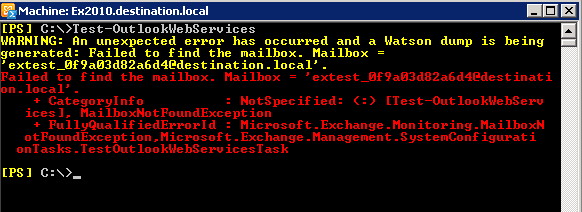
When running commands such as Test-OutlookWebServices on an Exchange 2010 CAS you will receive the following error:

[PS] C:\>Test-OutlookWebServices
WARNING: An unexpected error has occurred and a Watson dump is being generated: Failed to find the mailbox. Mailbox ='extest_0f9a03d82a6d4@destination.local'.
Failed to find the mailbox. Mailbox = 'extest_0f9a03d82a6d4@destination.local'.
+ CategoryInfo : NotSpecified: (:) [Test-OutlookWebServices], MailboxNotFoundException
+ FullyQualifiedErrorId : Microsoft.Exchange.Monitoring.MailboxNotFoundException,Microsoft.Exchange.Management.SystemConfigurationTasks.TestOutlookWebServicesTask


This is probally the first time you have run the Test command isn't it? In Exchange 2010 you need a test mailbox to perform tests with. This can be created using the new-TestCasConnectivityUser.ps1 powershell script Microsoft provides us with Exchange 2010.

All you need to do is navigate to the Scripts directory:

C:\Program Files\Microsoft\Exchange Server\V14\Scripts

Then run .\new-TestCasConnectivityUser.ps1

Provide the test mailbox a password when prompted...


Easy?

Monday, June 20, 2011

Error 49: ldap_simple_bind_s() failed: Invalid Credentials

I have setup a Windows Server 2008 R2 server running LDS. I have an LDS Instance running on 10001 (LDAP) and 20001 (LDAPS).

I added a user account using the following:

dn: CN=testaccount,CN=Users,DC=domain,DC=ADAM
changetype: add
objectClass: user
userPrincipalName: testaccount
cn: testaccount
displayName: My Test Account
userPassword: Passw0rd


Note: As the requirement for special formatting of unicodePwd has been lifted Microsoft has placed a default requirement to ensure all password operations are done through LDAPS instead of LDAP. To allow password operations through LDAP please see:

http://clintboessen.blogspot.com/2011/06/0x2077-illegal-modify-operation-some.html

When I attempt to bind to this account using ldp.exe using "Simple Bind" over LDAP (not secure LDAP) using the following credentials I get an error:

username: CN=testaccount,CN=Users,DC=domain,DC=ADAM
password: Passw0rd

-----------
res = ldap_simple_bind_s(ld, 'CN=testaccount,CN=Users,DC=domain,DC=ADAM', ); // v.3
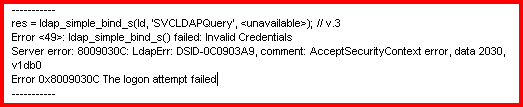
Error <49>: ldap_simple_bind_s() failed: Invalid Credentials
Server error: 8009030C: LdapErr: DSID-0C0903A9, comment: AcceptSecurityContext error, data 2030, v1db0
Error 0x8009030C The logon attempt failed
-----------


There were three things I needed to change to get this working.

Problem 1

I read from multiple places on the internet that by default when you associate a password to an account - the account is disabled. I also know that this error can be related to the user account being disabled - please see:

http://social.technet.microsoft.com/Forums/en-US/winserverDS/thread/44d29c43-4203-400a-bff4-c488da5c5f57/


However the attribute which sets the account password to disabled "msDS-UserAccountDisabled" was not associated with the user class object in the schema. AD LDS has a series of attributes to control a user account for items such as Account Lockout, Account Disabled, Password Never Expires, User Cannot Change Password etc. For a list of these attributes please see:

http://msdn.microsoft.com/en-us/library/aa772124.aspx

Note: Active Directory does not have these attributes, instead all these values are associated with an attribute called userAccountControl. This attribute has an integer set to it.. 512 is a normal account. To disable an account add a value of 2. In decimal, this is 514 (2 + 512). For more information on how this works in Active Directory please see: http://support.microsoft.com/kb/305144

To associate these attributes with the user class object you need to connect to the LDS Instance using the Active Directory Schema Console. If Active Directory Schema does not exist in your MMC snap-in list register it using "regsrv32 schmmgmt.dll" from command line.

Note: When connecting to your LDS Instance you cannot use localhost or it will fail. You must use the IP address of the LDS Instance. This is due to a code error in the Active Directory schema console, please see:

http://clintboessen.blogspot.com/2011/06/lds-active-directory-schema-status.html

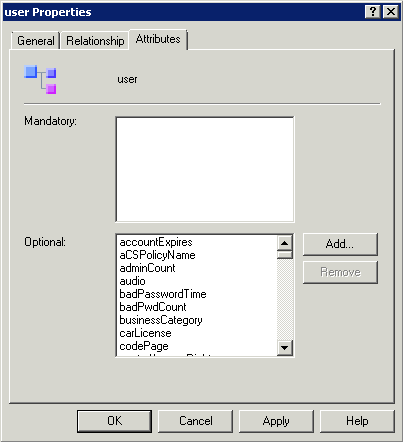
Once connected to your LDS Instance in Active Directory Schema MMC snap-in go to the properties of the user class object and click the attributes tab.


As you see none of the msDS-User type class objects exist. Go ahead and add the following attributes:

- ms-DS-UserAccountAutoLocked

- msDS-UserAccountDisabled

- msDS-UserDontExpirePassword

- ms-DS-UserEncryptedTextPassword

- msDS-UserPasswordExpired

- ms-DS-UserPasswordNotRequired


After the attribute is added, restart your LDS Instance service and connect to the application partition in ADSIEdit containing your user account. Set the msDS-UserAccountDisabled to FALSE.


Problem 2

You must allow Simple Bind requests to an AD LDS Instance over standard LDAP. To do this connect to the configuration partition on your LDS Instance using ADSIEdit. My instance is listening on TCP 10001.


Navigate to:

CN=Directory Service,CN=Windows NT,CN=Services,CN=Configuration,CN={GUID}

Open the properties of Directory Service. Open the multivalued attribute msDS-Other-Settings. Ensure RequireSecureSimpleBind is set to 0. This will ensure that both LDAP and LDAPS connections are allowed to bind authentication to the LDS Instance.


Note: RequireSecureProxyBind is for userProxy class objects which perform bind proxy redirection.

Problem 3

The third problem related to the following TechNet article:

http://technet.microsoft.com/en-us/library/cc732460.aspx

This article states:

AD LDS does not include any default security principals. However, AD LDS does provide importable schema extensions that you can use to create users in AD LDS. Users that are created from these user classes can be used as security principals. In addition, you can make any object class in the AD LDS schema a security principal by adding the msDS-bindableobject auxiliary class and the unicodePwd attribute to the schema definition of an object class. Each AD LDS security principal must be assigned an account and password, which AD LDS uses for authentication.

To do this open up ADSIEdit and connect to the Schema partition of your LDS Instance.


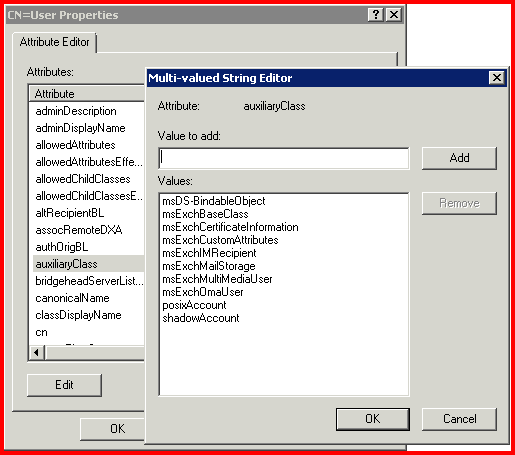
Navigate to the CN=User class object in ADSIEdit under the Schema partition and open its properties.


As you see the msDS-bindableobject auxiliary class does not exist.


Add it to the list and click OK.


Restart the LDS Instance under the services MMC console.

Reset the user's password by connecting to the appropriate application partition in ADSIEdit, right clicking on the user and clicking Reset Password.

I was now ale to perform a simple bind to my LDS Instance using a LDS user account.

-----------
res = ldap_simple_bind_s(ld, 'CN=SVCLDAPQuery,CN=Users,DC=domain,DC=ADAM',); // v.3
Authenticated as: 'CN=SVCLDAPQuery,CN=Users,DC=domain,DC=ADAM'.
-----------


You can also do this using an LDIF file:

dn: CN=User,CN=Schema,CN=Configuration,DC=X
changetype: Modify
add: auxiliaryClass
auxiliaryClass: msDS-BindableObject
-

dn:
changetype: modify
add: schemaUpdateNow
schemaUpdateNow: 1
-


imported using (ignore line wraps below)

ldifde -i -f
-s : -c
"CN=Schema,CN=Configuration,DC=X" #schemaNamingContext


Thanks to Lee Fight (Directory Services MVP) who assisted me in getting this working!

Wednesday, June 15, 2011

Active Directory userAccountControl and LDS

Active Directory user accounts have an attribute called userAccountControl which is used to control items such as Account Lockout, Account Disabled, Password Never Expires, User Cannot Change Password etc. This is determined by an integer value... based on the value the system knows which options are enabled and which are disabled. The value 512 is the base value for all normal user accounts. To understand all integers that make this attribute work please refer to the following KB article.

http://support.microsoft.com/kb/305144

AD LDS (ADAM) does not support the userAccountControl attribute. Instead, AD LDS uses several individual attributes to hold the information that is contained in the flags of the userAccountControl attribute.

For a list of these attributes please refer to the following MSDN article:


http://msdn.microsoft.com/en-us/library/aa772124.aspx


Any userAccountControl flags that are not listed below are not supported by AD LDS.

0x2081 Multiple values were specified for an attribute

I'm trying to import the following LDIF file into an LDS Instance using LDIFDE.

dn: CN=SVCLDAPQuery,CN=Users,DC=testinstance,DC=ADAM
changetype: add
objectClass: user
userPrincipalName: SVCLDAPQuery
cn: Service Now LDAP Query
displayName: Service Now LDAP Query
userPassword: Passw0rd

I am performing the import with the following command:

ldifde -i -f SVCLDAPQuery.ldf -s localhost:10001

This command throws out the following errors:

Connecting to "localhost:10001"
Logging in as current user using SSPI
Importing directory from file "SVCLDAPQuery.ldf"
Loading entries.
Add error on entry starting on line 1: Invalid DN Syntax
The server side error is: 0x2081 Multiple values were specified for an attribute that can have only one value.
The extended server error is:
00002081: NameErr: DSID-03050C42, problem 2003 (BAD_ATT_SYNTAX), data 0, best match of:
'CN=SVCLDAPQuery,CN=Users,DC=testinstance,DC=ADAM'

0 entries modified successfully.
An error has occurred in the program
No log files were written. In order to generate a log file, please
specify the log file path via the -j option.


This occured because the "cn" attribute did not match the first part of the "distinguishedName" attribute. If we change this to:

dn: CN=SVCLDAPQuery,CN=Users,DC=testinstance,DC=ADAM
changetype: add
objectClass: user
userPrincipalName: SVCLDAPQuery
cn: SVCLDAPQuery
displayName: Service Now LDAP Query
userPassword: Passw0rd

The import will work correctly:


Please also see this problem as it is related:
http://clintboessen.blogspot.com/2011/06/0x2077-illegal-modify-operation-some.html

0x2077 Illegal modify operation. Some aspect of the modification is not permitted.

I'm trying to import the following LDIF file into an LDS Instance using LDIFDE.

dn: CN=SVCLDAPQuery,CN=Users,DC=testinstance,DC=ADAM
changetype: add
objectClass: user
userPrincipalName: SVCLDAPQuery
userPassword: Passw0rd


Note: For ADAM, Microsoft enabled the userPassword attribute to function as a write-alias for unicodePwd and removed the requirement for the special formatting unicodePwd required. This allows your LDIF files to have clear-text passwords specified.

I am performing the import with the following command:

ldifde -i -f SVCLDAPQuery.ldf -s localhost:10001

This command throws out the following errors:

Connecting to "localhost:10001"
Logging in as current user using SSPI
Importing directory from file "SVCLDAPQuery.ldf"
Loading entries.
Add error on entry starting on line 1: Operations Error
The server side error is: 0x2077 Illegal modify operation. Some aspect of the modification is not permitted.
The extended server error is:
00002077: SvcErr: DSID-033807B5, problem 5012 (DIR_ERROR), data 8237

0 entries modified successfully.
An error has occurred in the program
No log files were written. In order to generate a log file, please
specify the log file path via the -j option.


As the requirement for special formatting of unicodePwd has been lifted Microsoft has placed a default requirement to ensure all password operations are done through LDAPS instead of LDAP. This is why it will not import the password!

To lift this requirement make the following change to the configuration partition of the instance:

Navigate to CN=Directory Service,CN=Windows NT,CN=Services,CN=Configuration,CN={GUID of the ADAM}

Edit dSHeuristics attribute and set value to 0000000001001


Now you can perform password operations without requiring LDAPS.


Please also see this problem as it is related:
http://clintboessen.blogspot.com/2011/06/0x2081-multiple-values-were-specified.html

Monday, June 13, 2011

Ldap error occured. ldap_add_sW: Object Class Violation

I am performing ADAMSync from an Active Directory domain to an LDS Instance. My AD Domain Partition is called DC=Domain,DC=Local. My LDS Instance also has the same distinguished name of DC=Domain,DC=Local. When Syncing the following error is experienced:

Processing Entry: Page 18, Frame 1, Entry 48, Count 1, USN 0
Processing source entry

Processing in-scope entry 08080633da0dfe4f8b46508f00f2708f.
Adding target object CN=JoeBlow,OU=Disabled accounts,OU=IS Users,OU=IS,DC=Domain,DC=Local.
Adding attributes: sourceobjectguid, sn, title, description, physicalDeliveryOfficeName, telephoneNumber, givenName, instanceType, department, company, objectSid, sAMAccountName, lastagedchange, objectclass,
Ldap error occured. ldap_add_sW: Object Class Violation.
Extended Info: 0000207D: UpdErr: DSID-0315121C, problem 6002 (OBJ_CLASS_VIOLATION), data 19
.
Ldap error occured. ldap_add_sW: Object Class Violation.
Extended Info: 0000207D: UpdErr: DSID-0315121C, problem 6002 (OBJ_CLASS_VIOLATION), data 19
.


************
************
************ A fatal error occured in the program while processing entry
************ GUID=08080633da0dfe4f8b46508f00f2708f
************ The error will be ignored at user request. Continuing...
************
************


Below I will explain how to resolve this. I am syncing all User Objects from Active Directory to userProxy objects in LDS. This is required for single sign on (SSO). userProxy objects forward authentication bind requests to domain controllers which process the authentication request, pass it back to LDS then to the client.

To understand this in more detail please read my following blog post on the userProxy class:

http://clintboessen.blogspot.com/2011/04/userproxy-class-and-adam-lds.html

Here is a copy of my XML configuration file I installed into ADAMSync:

<?xml version="1.0"?>
<doc>
<configuration>
<!-- Sync File Description -->
<description>ADAMSync Configuration</description>
<security-mode>object</security-mode>
<!-- source-ad-name = fqdn of the domain controller -->
<source-ad-name>domaincontroller.domain.local</source-ad-name>
<!-- source-ad-partition = root AD domain partition -->
<source-ad-partition>dc=domain,dc=local</source-ad-partition>
<!-- source-ad-account = use this to specify an account to connect to AD -->
<!-- if not used, the current user will be used -->
<source-ad-account>ldapquery</source-ad-account>
<account-domain>domain</account-domain>
<!-- target-dn = target ADAM OU -->
<target-dn>dc=domain,dc=local</target-dn>
<query>
<!-- base-dn = should be the root AD partition if you want all users -->
<base-dn>dc=domain,dc=local</base-dn>
<!-- object-filter = standard ldap query format, this will grab all users -->
<!-- need to review results to see if you should modify this filter -->
<object-filter>(objectCategory=person)</object-filter>
<attributes>
<!-- include=userproxy requires objectSID to link back to the AD account -->
<include>objectSID</include>
<include>givenName</include>
<include>sn</include>
<include>description</include>
<include>title</include>
<include>company</include>
<include>department</include>
<include>mail</include>
<include>physicalDeliveryOfficeName</include>
<include>telephoneNumber</include>
<include>sAMAccountName</include>
</attributes>

</query>
<!-- map for user-to-userproxy object types -->
<user-proxy>
<source-object-class>user</source-object-class>
<target-object-class>userProxy</target-object-class>
</user-proxy>

<schedule>
<aging>
<frequency>0</frequency>
<num-objects>0</num-objects>
</aging>
<schtasks-cmd></schtasks-cmd>
</schedule>
</configuration>
<synchronizer-state>
<dirsync-cookie></dirsync-cookie>
<status></status>
<authoritative-adam-instance></authoritative-adam-instance>
<configuration-file-guid></configuration-file-guid>
<last-sync-attempt-time></last-sync-attempt-time>
<last-sync-success-time></last-sync-success-time>
<last-sync-error-time></last-sync-error-time>
<last-sync-error-string></last-sync-error-string>
<consecutive-sync-failures></consecutive-sync-failures>
<user-credentials></user-credentials>
<runs-since-last-object-update></runs-since-last-object-update>
<runs-since-last-full-sync></runs-since-last-full-sync>
</synchronizer-state>
</doc>


Notice the bits in bold. These are the attribute I want to Sync. I am also syncing these attributes FROM a user object TO a userProxy object. Let's use the "Active Directory Schema" mmc snap-in to look at the LDS Instance schema. To understand how to use "Active Directory Schema" mmc snap-in to connect to an LDS Instance please read:

http://technet.microsoft.com/en-us/library/cc816707.aspx

Your also going to probably run into this problem when connecting to the LDS Instance:

http://clintboessen.blogspot.com/2011/06/lds-active-directory-schema-status.html

In this environment I imported the following schema extensions MS-UserProxy.ldf, MS-AdamSyncMetadata.ldf, MS-AdamSchemaW2K8.ldf to my LDS Instance. In my Active Directory Schema if I look at my userProxy class object attribute association I have the following attributes associated:


However in my user class object I have the following attributes associated:


Can you pick the problem yet? I have asked ADAMSync to sync the following attributes FROM user class in Active Directory TO userProxy:

<attributes>
<!-- include=userproxy requires objectSID to link back to the AD account -->
<include>objectSID</include>
<include>givenName</include>
<include>sn</include>
<include>description</include>
<include>title</include>
<include>company</include>
<include>department</include>
<include>mail</include>
<include>physicalDeliveryOfficeName</include>
<include>telephoneNumber</include>
<include>sAMAccountName</include>
</attributes>


userProxy does not have these attributes associated. After I added these attributes to the userProxy class object all was fixed:

LDS Active Directory Schema Status Unavailable

Back when LDS (Lightweight Directory Services) was called ADAM (Active Directory Application Mode) there was a console known as "ADAM Schema" which was the ADAM version of the "Active Directory Schema" MMC console.


Now with LDS the "ADAM Schema" no longer exists. Microsoft say to use "Active Directory Schema" for both LDS and Active Directory databases. For the TechNet article please see:

http://technet.microsoft.com/en-us/library/cc816707.aspx

I setup an LDS instance running on TCP10001. When I try and connect to the instance using Active Directory Schema on localhost:10001 it comes up as available. However I know my instance is there as I can connect to it using ADSIEdit.


I found out if you connect using the IP address of the server's primary network interface card it connects successfully.


Must be something dodgy embedded into the code of the Active Directory Schema snap-in.

Monday, June 6, 2011

Allowing Domain Membership through a Cisco Firewall

When setting up windows networks a DMZ must be created. This DMZ cannot contain any PC's that are a member of your internal Active Directory domain for security reasons. For your SME companies best practice is to generally configure all machines in your DMZ in a workgroup setup. For your enterprise companies best practice is to create a separate active directory forest for your DMZ. This allows centralised management over your DMZ servers allowing administrators to control servers using things such as Group Policy and WSUS.

However there are times where you need to allow PC's in your DMZ to access your internal Active Directory. For example I needed to setup an ADAM server to synchronise only particular attributes from various domains in an Active Directory forest which to be exposed to the internet using LDAPS (Secure LDAP) on secure port 636 for an external application. This ADAM server needs to be a member of of the Active Directory domain as I require User Proxy Bind Redirection to forward authentication requests through to an Active Directory domain controller. We created a separate DMZ just to contain this server requiring domain membership.


For more information on User Proxy Bind Redirection see:

http://clintboessen.blogspot.com/2011/04/userproxy-class-and-adam-lds.html

Windows machines are not very "firewall friendly". To start off with we opened up the following ports between our isolated "Domain DMZ" and our internal network:

UDP 53 – DNS Queries
TCP 88 – Kerberos v5 over TCP
UDP 88 – Kerberos v5 over UDP
TCP 135 – Microsoft Report Procedure Call Endpoint Mapper
UDP 389 – Unsecure LDAP over UDP
TCP 389 – Unsecure LDAP over TCP
TCP 443 – WSUS Windows Updates
TCP 445 – Simple Message Block Protocol
TCP 1688 – Key Management Server
TCP 3268 – Global Catalog Requests
TCP 3389 – Remote Desktop for management purposes

All the ports above still do not allow a workstation to be a member of an Active Directory domain due to the DCOM RPC ports. Microsoft RPC (MS-RPC) does not only use port TCP135 it also uses randomly generated ports from TCP 1024-65535 for XP/2003 and TCP 49152-65535 for Vista/2008 upwards. These are frequently informally referred to as "random RPC ports." In these cases, RPC clients rely on the RPC Endpoint Mapper (EPM) which runs on TCP135 to tell them which dynamic port(s) were assigned to the server.

Multiple components from the underlining windows subsystem get assigned their own dynamic RPC port every time the windows PC boots. These components include:

- Active Directory (Local Security Authority) – Runs on each domain member!
- Certificate Services
- Cluster Service
- Distributed File System
- Distributed File System Replication
- Distributed Link Tracking Server
- Distributed Transaction Coordinator
- Outlook MAPI Client
- ISA Server
- Fax Service
- File Replication
- FTP Publishing Service
- Group Policy
- Net Logon
- Remote Storage Notification
- Remote Storage Server
- Systems Management Server 2.0
- Terminal Services Licensing
- Terminal Services Session Directory

All these windows components get a dynamic port each time the system boots. RPC clients discover which port these services are on by querying TCP 135 (the port mapper).

So how did we get around this without opening every port from 1024-65535?

Our corporate firewall is currently a Cisco ASA 5540 running OS v8.4(1). The lastest Cisco OS software for the 5540 has integrated smarts for the Windows RPC Endpoint Mapper (EPM) running on TCP135. Cisco refers to this as "DCERPC".

This process works as follows:
1. A client queries an EPM server for the dynamically-allocated port number of a required DCERPC service. The EPM server listens on the well-known TCP port 135.
2. The ASA, located between the client and EPM server, intercepts the communication.
3. The EPM server indicates the port number on which the DCERPC service is available.
4. The ASA opens a pinhole for that DCERPC service.

This allows us to make the access control lists (ACLs) as tight as possible maintaining security whilst allowing application functionality through the ASA firewall.

Here is the Syntax used for configuring this functionality on our ASA:

class-map dcerpc
match port tcp eq 135
policy-map interface_dcerpc
class dcerpc
inspect dcerpc

service-policy interface_dcerpc interface dmz_adam


interface_dcerpc is our custom Service Policy
dmz_adam is our costom interface

Of course you also need to allow TCP135 (the RPC Port Mapper) in the ACL rules for this to work!

For more information on these dynamically generated RPC ports used by Windows Systems please see the following Microsoft knowledge base articles:

http://support.microsoft.com/kb/154596
http://support.microsoft.com/kb/832017

A big thank you to Peter Revill (CCIE #18371 Routing and switching, Voice) for helping me out on this one.

Alternate Witness Server in Database Availability Groups

In this post we will look at the Alternate Witness Server - what is it?

The Alternate Witness Server provides a replacement witness server for a DAG to use after a datacenter switchover. When you are performing a datacenter switchover, you’re restoring service and data to an alternate or standby datacenter after you’ve deemed your primary datacenter un-usable from a messaging service perspective.

Although you can configure an Alternate Witness Server (and corresponding Alternate Witness Directory) for a DAG at any time, the Alternate Witness Server will not be used by the DAG until part-way through a datacenter switchover; specifically, when the Restore-DatabaseAvailabilityGroup cmdlet is used.

The Alternate Witness Server itself does not provide any redundancy for the Witness Server, and DAGs do not dynamically switch witness servers, nor do they automatically start using the Alternate Witness Server in the event of a problem with the Witness Server.

The reality is that the Witness Server does not need to be made redundant. In the event the server acting as the Witness Server is lost, it is a quick and easy operation to configure a replacement Witness Server from either the Exchange Management Console or the Exchange Management Shell.

Exchange 2010 Max Message Size Precedence

In Exchange 2007/2010 you can set SMTP message size quota's in 3 locations:

- Global Settings (Set-TransportConfig)
- Receive Connectors (Set-ReceiveConnector)
- Send Connectors (Set-SendConnector)

But which of these have Precedence?

The more restrictive limits always take precedence.

If you set the SMTP message size quota on a receive connector to 50MB but leave the TransportConfig quota to 10MB - Exchange will still only be able to receive 10MB emails.

If you set the SMTP message size quota on the TransportConfig to 50MB but leave a receive connector at 10MB - Exchange will only be able to receive 10MB emails on that particular receive connector.

To increase message size quota's you need to ensure you configure Every Receive connector, Send connector and the Global Settings on the transport config.

Why does it behave like this?

With Exchange 2003 and before, messages can pass directly between local
mailboxes as long as they don't need a (RG or SMTP) connector.
In that sense, the global limit is not applied to all messages.

Now, all messages need a Hub transport, including messages from a local
mailbox to another local mailbox. So, the global limit is always respected.

Thursday, June 2, 2011

The security database on the server does not have a computer account for this workstation trust relationship

After joining a new Windows Server 2008 R2 member server to the domain I was not able to log in, even with a Domain Admin account. The following error was experianced:

The security database on the server does not have a computer account for this workstation trust relationship


After some investigation it turns out the computer new computer account did not have a SPN (Service Principal Name). This is stored in the servicePrincipalName attribute in Active Directory. Below is a screenshot from ADSIEdit:


I added two SPN's to the computer account object in Active Directory in the format of:

HOST/COMPUTERNAME
HOST/COMPUTERNAME.domain.local


I was then able to log in to the new workstation.

Tuesday, May 31, 2011

Continuous Replication Block Mode vs Continuous Replication File Mode

Exchange 2010 RTM only supported Continuous Replication File Mode.
Exchange 2010 SP1 now supports Continuous Replication Block Mode.

Ok so whats the difference?

Continuous Replication Block Mode

A form of continuous replication that replicates blocks of ESE transaction data between the ESE log buffers on the active mailbox database copy to replication log buffers on one or more passive mailbox databases copies. What does this mean? This means Exchange 2010 has replicate log buffers before the transaction log file is closed. This reduces the amount of transactions that are lost should a failover occur. If a transaction log is not played to the passive node in time, data may be lost during a failover. This is what AutoDatabaseMountDial is for, controls if the database will be mounted based on the based on the number of log files missing by the copy being mounted.

Continuous Replication File Mode

A form of continuous replication that replicates closed transaction log files from the active mailbox database copy to one or more passive mailbox database copies. This means the transaction logs need to be closed before they can be shipped. This is one of the reasons transaction log size as reduced from 5MB to 1MB as of Exchange 2007 - to minimize data loss during Exchange failover.

Please note if a log file does not replicate in time when a failover occurs - the hub transport server in the same site has a service a process known as transport dumpster. The transport dumpster resides on every hub transport server by default however it is not used unless a mailbox failover occurs. What the transport dumpster does is hold email that has already been delivered to the active mailbox server for a specified period of time. In the event that a DAG node fails which prevents the most recent logs from being replicated over, the transport dumpster can redeliver this email.

Transport Dumpster was first introduced in Exchange 2007 for CCR (Continuous Cluster Replication). Please see:

http://clintboessen.blogspot.com/2009/04/scc-single-copy-clusters-vs-ccr.html

So now your asking me why introduce Continuous Replication Block Mode if there is a process called Transport Dumpster that replays emails after a failover? Good question!

The answer is not all exchange mailbox transactions are caught in transport dumpster. Transport dumpster, as it resides on the hub transport will only ever capture SMTP based transactions. There are other internal transactions Exchange generates directly on the mailbox database. These transactions will not reside within Transport Dumpster. Also things like de-duplication software that replaces emails with stubs. These cause transactions to occur which are not registered in Transport Dumpster.

Can I switch between Continuous Replication File Mode and Continuous Replication Block Mode if I'm running Exchange 2010 SP1?

No - The system can automatically switch between file mode and block mode based on the passive copy's ability to keep up with continuous replication.

TechEd North America 2011

In case you missed TechEd North America 2011, or were there and missed some sessions, you can download slide decks and watch presentations from the following location:

http://channel9.msdn.com/Events/TechEd/NorthAmerica/2011

Here are a list of all Exchange presentations:

EXL302 Archiving and Discovery in Microsoft Exchange 2010 SP1 and Exchange Online (Krish Sundaresan)
EXL305 Best Practices for Successfully Transitioning to Microsoft Exchange 2010 (Rand Morimoto)
EXL306 Best Practices for Virtualization of Microsoft Exchange 2010 (Jim Lucey, Jeff Mealiffe)
EXL307 Load Balancing with Microsoft Exchange Server 2010 (Andrew Ehrensing)
EXL309 Microsoft Exchange Online in Microsoft Office 365: Migration Case Study (John Logan, Danny Kim, Ann Vu)
EXL310 Microsoft Exchange Online in Microsoft Office 365: Simple Migration Live! (Ram Poornalingam)
EXL311 Microsoft Exchange Server and Microsoft Office 365: How to Set Up a Hybrid Deployment (Jim Lucey)
EXL312 Designing Microsoft Exchange 2010 Mailbox High Availability for Failure Domains (Ross Smith)
EXL313 Microsoft Exchange Server 2010 Tips and Tricks (Scott Schnoll)
EXL322 Microsoft Exchange Online: Unified Messaging in Microsoft Office 365 (Michael Wilson)
EXL326 What’s New in Microsoft Exchange Server 2010 SP2: Featuring GAL Segmentation (Greg Taylor)
EXL327 Real-World Site Resilience Design in Microsoft Exchange Server 2010 (Robert Gillies)
EXL401 Exchange Server 2010 High Availability Management and Operations (Scott Schnoll)

My personal faverote was - Greg is always entertaining!

EXL326 What’s New in Microsoft Exchange Server 2010 SP2: Featuring GAL Segmentation (Greg Taylor)

Exchange 2010 Active Sync Feature Comparison

I found an excellent article today listing all the features of Exchange Active Sync and which features are supported by what mobiles. Please check this article out here:

http://en.wikipedia.org/wiki/Comparison_of_Exchange_ActiveSync_Clients

Monday, May 30, 2011

Exchange Active Sync Logo Program

Customers have been telling Microsoft for quite some time that one of their top concerns is the increasing diversity of mobile devices that employees use to access company networks. While most mobile devices use EAS, the industry standard for mobile email, EAS policies are not consistently implemented by the mobile device manufacturers. This makes it challenging to know which EAS management features are supported by any particular device.

In the EAS Logo program, participants agree to implement a predefined set of EAS policies (or more). IT professionals can now be assured that devices that bear the logo meet a consistent set of mobile device requirements. Today, we’re launching with the following devices:

- All Windows Phone 7 and Windows Mobile 6.5 devices
- Nokia devices with the Mail for Exchange 3.0.05, including the recently launched Nokia E7
- Apple devices with iOS 4.X, including the iPhone 4, iPhone 3GS, iPad and iPad 2

Microsoft have a strong pipeline of additional device manufacturers working toward compliance. Additional participants will be announced in the coming months, including wireless carriers that will use the logo when marketing compliant devices to their customers.

The EAS Logo Program has the following requirements:
- Direct Push email, contacts & calendar
- Accept, Decline & Tentatively Accept meetings
- Rich formatted email (HTML)
- Reply/Forward state on email
- GAL Lookup
- Autodiscover
- ABQ strings (device type and device model) provided
- Remote Wipe
- Password Required
- Minimum Password Length
- Timeout without User Input
- Number of Failed Attempts

Please refer to the following blog post by Greg Smiley for more information:

http://blogs.technet.com/b/exchange/archive/2011/04/13/announcing-the-exchange-activesync-logo-program.aspx

The official page for the EAS Logo Program can be found here:

http://technet.microsoft.com/en-us/exchange/gg187968.aspx

For a full list of all the Exchange Active Sync features and an understanding of which phones support which features please see:

http://en.wikipedia.org/wiki/Comparison_of_Exchange_ActiveSync_Clients

Advanced DNS Active Directory Questions

One of my clients has 3 Active Directory forests each with multiple domains. Stub zones are in place for the forest root domain in each forest which are stored in each DomainDNSZone for each forest. When a DNS client wants to resolve a hostname for a host in a child domain in a different Active Directory forest it is using recursion referencing the root DNS server (from the Stub Zone) and obtaining the NS RR's for the child domain.

Delegation records and Conditional Forwarders need to be updated manually when DNS servers are added and removed from the environment. Currently the companies delegation records are not align with the DNS servers in each of the child domains for each Active Directory forest. The company wants to implement a solution which is automated so they will never have to worry about updating Delegates or Forwarders. Stub Zones meet the requirement.

The company is currently looking at removing all delegation between parent and child domains in each forest and use Stub Zones instead. They also want wish to use Stub Zones cross forest. To avoid having to create a Stub Zone in each domain they wish to store the Stub Zone for every domain in the ForestDNSZone partition in each forest. This means all domains in each forest will be able to utilize the Stub Zone.

I have the following questions:

Question 1
In an Active Directory Forest we want to store each domain’s DNS zone in the DomainDNSZone partition within Active Directory. We want to configure a Stub Zone for every domain within a DNS forest and store these Stub Zones in the ForestDNSZones partition within Active Directory so they replicate to all AD Domains on the given forest. Question: All domain controllers will have their domain DNS zone under the DomainDNSZones partition in Active Directory. However they will also receive the stub zone for the ForestDNSZones partition as they are a member of the same forest. What happens here with the stub zone located in ForestDNSZones?

Question 2
You can only configure forwarders or stub zones on any given DNS server. What happens if you create a forwarder on one DNS server then on another DNS server in a different AD site you create a stub zone that is AD Integrated. When it goes to replicate, it will replicate the stub zone to the DNS server which in this case both a stub zone and a forwarder exists. How does windows DNS deal with this?

Question 3
In the relationship between child and parent domains, if an organisation chooses to use stub zones instead of delegation, if they do not remove the delegation records which precedence the Stub RR's or the Delegate RR's?

To answer these questions I raised I ended up having to create a lab environment and perform testing. Below are my answers:

Question 1 Answer
If a "Stub Zone" exists in the forest DNS partition but a DNS server in the same forest has a the "Primary Zone" file stored locally or in another location within DNS, the DNS server will ignore the "Stub Zone" in the forest DNS partition. To find this out I created a lab environment with two domains within a single forest:

- contoso.com
- branch.contoso.com

Contoso.com DNS server:


Properties for the branch.contoso.com stub zone on the contoso.com DNS server:


Branch.contoso.com DNS server:


Properties for the contoso.com stub zone on the branch.contoso.com DNS server:


Question 2 Answer
If a stub zone exists on a DNS server windows will not let you create a conditional DNS forwarder matching the same name as the stub zone. If a conditional DNS forwarder exists windows will not let you create a DNS stub zone matching the same name as the conditional forwarder. If you create an AD integrated stub zone on another DNS server in a different active directory site it will replicate through standard AD replication. When it replicates to the server containing the conditional forwarder, the stub zone will take precedence over the conditional forwarder. Stub Zones always have precedence over conditional forwarders.

Question 3 Answer
Stub Zones always have precedence over delegation.

Thursday, May 26, 2011

Initializing MAPI session object failed

I had a user who upgraded from a previous version of Outlook to Outlook 2010. Whenever they open an Outlook email they recieve an error "Initializing MAPI session object failed." After clicking OK the email opens.


This is resolved by going to C:\Windows\System32 and renaming mapi32.dll to mapi32.dll.old. Then run a tool called fixmapi.exe under C:\Windows\System32. This will generate a new mapi32.dll file.

Note: Sometimes Administrators do not have rights to rename or modify mapi32.dll, only "TrustedInstaller" does. In cases like this you need to take ownership of mapi32.dll and provide Administrators access to the file.