
Exchange performs best when it can interact with the physical components of a server directly. If you disagree with this statement that’s usually a symptom exhibited right after a vmware conference - hopefully it will go away.
Before I go into the pitfalls, let me say I love virtualization - most of my Exchange 2010 deployments are virtualized. Virtualization is fantastic for small deployments of Exchange 2010 as it provides many advantages including increasing energy efficiency and requiring less hardware with server consolidation. What us Exchange people are arguing is there are times you do not want to virtualize an Exchange server.
One statement VMware makes is "Virtualize enterprise apps, including Oracle, Exchange, SQL Server, Sharepoint and SAP, and deliver the highest SLAs and top performance.", please see: http://www.vmware.com/virtualization/. How is virtualizing your infrastructure going to achieve top performance? Top performance can only be achieved when software can interact directly with physical hardware bypassing hypervisors completely.
VMware have published publicly that Exchange 2010 DAG replication is supported - please see:
http://kb.vmware.com/selfservice/microsites/search.do?language=en_US&cmd=displayKC&externalId=1037959
This is officially NOT supported by Microsoft. Just because VMware had it working in their lab doesn't with "simulated load generators" doesn't mean it will behave correctly in a production environment - I am talking here from experience. The Microsoft Exchange product team has clearly stated that both HyperV live migration and VMotion are not supported. You can see the link: http://technet.microsoft.com/en-us/library/aa996719.aspx. The link states that you're not supported if you use VMotion/SRM (etc) at the same time as the DAG. That's the support statement. Period.
I have seen problems directly related to virtualizing clustered Exchange 2010 mailbox servers. I have seen virtualized Exchange servers where the windows cluster had kicked the server out of being a cluster member. When you try and readd the node back into the cluster, the cluster node would join and then be evicted again. This can be resolved by evicting the node via ConfigurationOnly and removing it from Windows Clustering. The problem? The Witness! It appears the Witness was locked and the new (old) node could not access it. As it turns out the client vmotioned the server to another node and that's when all the problems began.
I have just got back to Australia from MSIDC (Microsoft Indian Development Centre). During my time at MSIDC I had an interesting debate internally with a Microsoft virtualization MVP named Susantha Silva on this subject. Virtualization MVP's ususally think everything should be virtulized, I'm sure they would virtualize the operating system on their mobile phone if they could! Present during this debate was Sheesh Dubey, Hyper V Program Manager for Microsoft. This debate was closed by Sheesh Dubey saying "If a product team states their application should not be virtualized in any particular circumstance, you should always follow the advise of the product team as they have reasons behind any statement they make."
A pitfall when Virtualizing mailbox servers that are a member of a cluster is taking snapshots in regards to transaction log replication. Go on take a snapshot of a server performing log replication. Have fun fixing it!
Another pitfall to Virtualization is low-balling the RAM because "it's a VM and we can add it whenever". Exchange 2010 was architectured to use slow disk, as a result it needs more memory to provide ample disk cache. Make sure you use the Exchange Storage calculator and calculate your RAM correctly.
Next problem we have is with a concept called Dynamic Memory. This is when a virtual machine is able to automatically extend the amount of memory it has allocated and return it to the hypervisor when its not required through a concept called Ballooning. SQL Server now supports Dynamic Memory as per http://support.microsoft.com/kb/956893, but Exchange 2010 mailbox role however does not (all other Exchange 2010 roles do). This is because the Mailbox Role in Exchange Server does not change its memory allocations on the fly. I encourage you to do a google/bing search for "dynamic memory exchange".
"Not doing the I/O numbers because it’s that magic virtual storage behind VMware". If you want the absolute best disk I/O you need to pass the physical storage directly through to the virtual machine. This provides the best possible I/O performance. If you insist on using a VHD or VMDK file make sure its fixed size! Another problem with shared storage is its very easy to overcommit a RAID Array of disks on a LUN to to many servers. I have seen so many virtual exchange servers where the disk queue lengths exceed 100 - very bad! Especially if your using the recommended Exchange 2010 TIER2 storage model, please make sure nothing else hits the disks!
Tossing a whole DAG on one virtual host. Yes I have seen it done unfortunately. We have mentioned above the reasons why we cannot add live migrate or vmotion a servers that are a member of a DAG cluster. So what is the point? Having two mailbox servers in a DAG cluster on a single host performs worse then if the server was simply a single mailbox server.
People, one virtual CPU does not represent one physical CPU. A virtual CPU represents 1 core of a physical CPU.
RDM/LUN limits per VMWare cluster (FC path limit of 1024 / 4 paths = 256 LUNs per cluster)
RDM LUN limits per Exchange VM (60 LUNs max – 4x SCSI controllers, 15 LUNs per controller)
When Exchange 2010 is virtualized I ususally see the DB/Logs on the same Disk Spindles that are used by the VMs for the operating system. Remember back to the days when all servers were physical. Did the DB and LOGs ever be on the same disks as the operating system? No they didn't.
When virtualizing your client access servers Microsoft NLB does not support Unicast Mode if Notify Switches is turned on. This means you need to configure NLB to use multicast mode and send cluster communication over the servers primary network interface card.
Virtual Sprawl. I see admins just add more and more virtual machines until the virtualization platform almost collapses and dies. They seem to have such faith in it so they don’t even monitor it, they also think that in some mystic way it will compensate for not designing and RAM, disk and CPU correct. I think this is a knowledge and maturity thing of admin.
I have a personal rule I follow, if more then 2000 users require access to a mailbox server and the users are heavy power users I ensure the Exchange server is setup physical. If the users are under 2000, require light weight access to their email and do not require DAG clustering with live migration/vmotion I set the environment up Virtual. This is pending that the disks and servers are not already over committed. On majority of networks Exchange followed by SQL requires more resources then other server. Because of this it does not always make sense to perform server consolidation through virtualization as your Exchange server may already be utilizing majority of resources on the physical host. Please note: CPU's are getting faster, this blog post is getting older. Pay close attention to the CINT Rates value of the CPU and use the sizing spreadsheet created by Ross Smith and size your CPU's appropriately.
Take advantage of cheap local storage, the whole idea of Exchange 2010 is to have multiple copies of your data in different geographical locations on extremely cheap disk/hardware. It is designed to scale out so that you CAN have servers fail. A properly designed enterprise exchange 2010 environment should be able to cope with 49% of the servers failing without taking down the environment. If you have a deep understanding on how Exchange 2010 clustering and native data protection technology you will understand where us Exchange guys are coming from in terms of virtualization.
If your a SME business with up to 1000 users I highly recommend looking at the HP e5000. It's a DAG in a box solution with 2 physical blade servers and locally attached storage. It comes bundled with the Exchange licensing setup with a plug in and go approach. It offers a fast performing lean mean highly available email system for companies that require high levels of email up time. There is loads of information about the e5000 on the internet.
Sunday, May 22, 2011

Saturday, May 21, 2011
Insight into the Ignore Feature in Outlook 2010
In this blog post we will take an insight into how the Ignore feature in Outlook 2010 works. The Ignore feature excludes you from conversation threads your not interested in. If your new to the Ignore feature please read the following URL:
http://office.microsoft.com/en-us/outlook-help/ignore-all-e-mail-messages-in-a-conversation-HA010361232.aspx
Where are Ignore rules stored?
Ignore rules are stored in the inside the users mailbox within a mailbox database. They are treated like an Outlook rule and stored in the XML blob. You can view these rules using MFCMAPI.
As an end user can I view a list of which conversations I'm ignoring?
As an end user using Outlook 2010 there is currently no way of viewing which conversations your ignoring.
As an Exchange Administrator you can use MFCMAPI to view within a mailbox which conversations are currently being ignored. In MFCMAPI under the users mailbox there is a "Conversation Action Settings" hidden folder. If you right click on this folder and click "View Associated Contents table" you can see all the ignored conversations. If you look at the MAPI property “PR_SUBJECT”, you will see the conversation subject string.
Is there a limit to the number of conversations you can ignore?
This is unknown however I have spoke to a senior esculation team within the Exchange product group and me mentioned he has seen over 100,000 before.
Does the client or server process ignored conversations?
The server does it.
What happens to emails that get ignored?
Ignored emails are moved to the deleted items folder within the Exchange 2010 mailbox dumpster. Exchange 2010 uses dumpster 2.0. For more information please see:
http://clintboessen.blogspot.com/2009/10/exchange-2010-dumpster-20.html
How long do ignores last for? For example if I do an ignore to a conversation thread then 6 months later someone does a reply to all on an unrelated topic, does this mean I will not recieve the email?
Ignore Rules only last for 180 days.
Do ignore rules use the message subject of an email?
No it uses the conversationID or conversationTopic properties generated by the Exchange 2010 server.
When you ignore a conversation thread does it include "re:" and "fw:"?
Not unless you’re using conversationTopic, in which case changing the subject will sometimes cause the message to escape. However, adding "re" or "fw" (or their localized equivalents) shouldn’t have any effect.
Hope this information has been helpful.
Monday, May 2, 2011
MapiExceptionMailboxInTransit: Unable to open message store. (hr=0x80004005, ec=1292)
Problem
I am performing cross-forest migration and I am having a had an issue when attempting to perform cross-forest mailbox moves.
A "user" for each "mailbox user" in the source forest exists in the destination forest. These objects were created by Identity Lifecycle Manager. These "user" objects were then prepared to be "mail users" by using the Prepare-MoveRequest.ps1 script for each user using the following syntax:
.\Prepare-MoveRequest.Ps1 -Identity "CN=Paul,OU=User Accounts,DC=source,DC=local" -RemoteForestDomainController "sourceforest-dc1.source.local" -RemoteForestCredential $Remote -LocalForestDomainController "destinationforest-dc01.destination.local" -LocalForestCredential $Local -TargetMailUserOU "OU=FromILM,DC=destination,DC=local" –UseLocalObject
I am trying to perform the mailbox move using the following command:
New-MoveRequest -Identity "CN=Paul,OU=FromILM,DC=destination,DC=local" -RemoteLegacy -TargetDatabase "Mailbox Database 0205912051" -RemoteGlobalCatalog "sourceforest-dc1.source.local" -RemoteCredential $Remote -TargetDeliveryDomain "contoso.com"
When I create the move request, the move request status update does not change, it just stays at "InProgress".
[PS] C:\>Get-MoveRequest
DisplayName Status TargetDatabase
----------- ------ --------------
Tamara InProgress Mailbox Database 0205912051
I bumped up the EventLogLevel for MSExchangeIS\9002 System\Move Mailbox" to medium by using the following powershell command:
Set-EventLogLevel "MSExchangeIS\9002 System\Move Mailbox" -Level Medium
In the destination Exchange 2010 server the following event logs were logged under "Application Log" with the EventLogLevel turned up.
Log Name: Application
Source: MSExchange Mailbox Replication
Date: 2/05/2011 4:27:37 PM
Event ID: 1101
Task Category: Mailbox Move
Level: Warning
Keywords: Classic
User: N/A
Computer: Ex2010.destination.local
Description:
Mailbox move for 'destination.local/FromILM/Paul' (fcfdc22e-d8d8-44f1-bdfe-140fdbc0d1ca) encountered a transient failure. The operation will be retried (9 out of 60).
Error code: -2147467259
MapiExceptionMailboxInTransit: Unable to open message store. (hr=0x80004005, ec=1292)
Diagnostic context:
Lid: 18969 EcDoRpcExt2 called [length=132]
Lid: 27161 EcDoRpcExt2 returned [ec=0x0][length=132][latency=0]
Lid: 23226 --- ROP Parse Start ---
Lid: 27962 ROP: ropLogon [254]
Lid: 17082 ROP Error: 0x50C
Lid: 26937
Lid: 21921 StoreEc: 0x50C
Lid: 27962 ROP: ropExtendedError [250]
Lid: 1494 ---- Remote Context Beg ----
Lid: 26426 ROP: ropLogon [254]
Lid: 22787 Error: 0x0
Lid: 13032 StoreEc: 0x8004010F
Lid: 7588 StoreEc: 0x8004010F
Lid: 6564 StoreEc: 0x8004010F
Lid: 24316
Lid: 2199 StoreEc: 0x50C
Lid: 17097 StoreEc: 0x50C
Lid: 8620 StoreEc: 0x50C
Lid: 1750 ---- Remote Context End ----
Lid: 26849
Lid: 21817 ROP Failure: 0x50C
Lid: 26297
Lid: 16585 StoreEc: 0x50C
Lid: 32441
Lid: 1706 StoreEc: 0x50C
Lid: 24761
Lid: 20665 StoreEc: 0x50C
Lid: 25785
Lid: 29881 StoreEc: 0x50C

Log Name: Application
Source: MSExchangeIS
Date: 2/05/2011 4:27:37 PM
Event ID: 9660
Task Category: Logons
Level: Warning
Keywords: Classic
User: N/A
Computer: Ex2010.destination.local
Description:
User Paul (/o=Destination/ou=Exchange Administrative Group (FYDIBOHF23SPDLT)/cn=Recipients/cn=Paul) failed to log on because their mailbox is in the process of being moved.

In the "System Log" I also noticed the Microsoft Exchange Mailbox Replication service crashing during the move.
Log Name: System
Source: Service Control Manager
Date: 3/05/2011 9:07:13 AM
Event ID: 7031
Task Category: None
Level: Error
Keywords: Classic
User: N/A
Computer: Ex2010.destination.local
Description:
The Microsoft Exchange Mailbox Replication service terminated unexpectedly. It has done this 1 time(s). The following corrective action will be taken in 5000 milliseconds: Restart the service.

My Environment
In the destination domain I have:
- A single Exchange 2010 server with CAS, MB and HT roles installed running SP1, Update Rollout 4.
- Public folders
In the source domain I have:
- A single Exchange 2003 server running Service Pack 2
- An Exchange 2010 SP1 Server running Update Rollout 4 only running the CAS role. This is for MRSProxy.
Resolution
The problem occured because MRSProxy was not enabled on the Exchange 2010 Client Access Server in the source forest. When mailboxes are moved from one Exchange 2010 forest to another Exchange 2010 forest, the process is handled through Exchange 2010 Client Access Servers using the MRSProxy service. The only port required to be open between the forests for MRSProxy to use HTTPS traffic is port 443. This works even if the source mailboxes are on 2003 or 2007 MBX servers as long as an Exchange 2010 CAS server exists in both organizations.
MRSProxy is not enabled on client access servers by default. You need to enable this on the source forest client access server. To enable this navigate to the following directory on the Exchange 2010 CAS server in the source forest.
Exchange Installation Path\V14\ClientAccess\ExchWeb\EWS\web.config
Open the web.config in a text editor and find where it says under MRSProxyConfiguration
IsEnabled="false"
MaxMRSConnections="100"
DataImportTimeout="00:01:00

Change IsEnabled to true:

I then rebooted the Exchange 2010 CAS server in the source forest. Upon reboot the cross-forest mailbox moves worked.
The Exchange 2010 CAS Server in the source domain will proxy the move request from the Ex2003 mailbox server.
I also found a TechNet article that explains how to enable this:
http://technet.microsoft.com/en-us/library/ee732395.aspx
NotifyChangeDirectory throws INSUFFICIENT RESOURCES
We had an application called Kentico CMS which we deployed on Windows Server 2008 R2 with IIS 7.5.
Looking in the event log for the app, it's getting "File change notification errors" and tracking (causing the restarts) it with ProcMon we see:
NotifyChangeDirectory calls being made - for a while they succeed and then they start throwing INSUFFICIENT RESOURCES in the status.
The following errors were experienced in event viewer under the application logs:
EventID: 9145
EventType: W
EventTime: 2/11/2011 12:25:04 AM
Source: Application_End
EventCode: ENDAPP
EventDescription: Message: File Change Notification Error in \\files\domains$\k\kwinana.wa.gov.au\public_html\app_themes\default\images\cmsmodules\cms_groups
File Change Notification Error in \\files\domains$\k\kwinana.wa.gov.au\public_html\app_themes\default\images\cmsmodules\cms_groups
File Change Notification Error in \\files\domains$\k\kwinana.wa.gov.au\public_html\app_themes\default\images\cmsmodules\cms_medialibrary
File Change Notification Error in \\files\domains$\k\kwinana.wa.gov.au\public_html\app_themes\default\images\cmsmodules\cms_messageboards
File Change Notification Error in \\files\domains$\k\kwinana.wa.gov.au\public_html\app_themes\default\images\cmsmodules\cms_newsletter
File Change Notification Error in \\files\domains$\k\kwinana.wa.gov.au\public_html\app_themes\default\images\cmsmodules\cms_polls
File Change Notification Error in \\files\domains$\k\kwinana.wa.gov.au\public_html\app_themes\default\images\cmsmodules\cms_reporting
File Change Notification Error in \\files\domains$\k\kwinana.wa.gov.au\public_html\app_themes\default\images\cmsmodules\cms_webanalytics
File Change Notification Error in \\files\domains$\k\kwinana.wa.gov.au\public_html\app_themes\default\images\cmsmodules\cms_tools
File Change Notification Error in \\files\domains$\k\kwinana.wa.gov.au\public_html\app_themes\default\images\cmsmodules\cms_groups
File Change Notification Error in \\files\domains$\k\kwinana.wa.gov.au\public_html\app_themes\default\images\cmsmodules\cms_medialibrary
File Change Notification Error in \\files\domains$\k\kwinana.wa.gov.au\public_html\app_themes\default\images\cmsmodules\cms_messageboards
File Change Notification Error in \\files\domains$\k\kwinana.wa.gov.au\public_html\app_themes\default\images\cmsmodules\cms_newsletter
File Change Notification Error in \\files\domains$\k\kwinana.wa.gov.au\public_html\app_themes\default\images\cmsmodules\cms_polls
File Change Notification Error in \\files\domains$\k\kwinana.wa.gov.au\public_html\app_themes\default\images\cmsmodules\cms_reporting
File Change Notification Error in \\files\domains$\k\kwinana.wa.gov.au\public_html\app_themes\default\images\cmsmodules\cms_webanalytics
File Change Notification Error in \\files\domains$\k\kwinana.wa.gov.au\public_html\cmspages
CONFIG change
File Change Notification Error in \\files\domains$\k\kwinana.wa.gov.au\public_html\cmspages
File Change Notification Error in \\files\domains$\k\kwinana.wa.gov.au\public_html\CMSPages
File Change Notification Error in \\files\domains$\k\kwinana.wa.gov.au\public_html\cmspages
HostingEnvironment initiated shutdown
HostingEnvironment caused shutdown<br />
Shutdown stack: at System.Environment.GetStackTrace(Exception e, Boolean needFileInfo)
at System.Environment.get_StackTrace()
at System.Web.Hosting.HostingEnvironment.InitiateShutdownInternal()
at System.Web.Hosting.HostingEnvironment.InitiateShutdown()
at System.Web.HttpRuntime.ShutdownAppDomain(String stackTrace)
at System.Web.Configuration.HttpConfigurationSystem.OnConfigurationChanged(Object sender, InternalConfigEventArgs e)
at System.Configuration.Internal.InternalConfigRoot.OnConfigChanged(InternalConfigEventArgs e)
at System.Configuration.BaseConfigurationRecord.OnStreamChanged(String streamname)
at System.Web.Configuration.WebConfigurationHostFileChange.OnFileChanged(Object sender, FileChangeEvent e)
at System.Web.DirectoryMonitor.FireNotifications()
at System.Web.Util.WorkItem.CallCallbackWithAssert(WorkItemCallback callback)
at System.Web.Util.WorkItem.OnQueueUserWorkItemCompletion(Object state)
at System.Threading._ThreadPoolWaitCallback.WaitCallback_Context(Object state)
at System.Threading.ExecutionContext.Run(ExecutionContext executionContext, ContextCallback callback, Object state)
at System.Threading._ThreadPoolWaitCallback.PerformWaitCallbackInternal(_ThreadPoolWaitCallback tpWaitCallBack)
at System.Threading._ThreadPoolWaitCallback.PerformWaitCallback(Object state)<br />
Call stack: at Global.LogApplicationEnd()
at Global.Application_End(Object sender, EventArgs e)
at System.RuntimeMethodHandle._InvokeMethodFast(Object target, Object[] arguments, SignatureStruct& sig, MethodAttributes methodAttributes, RuntimeTypeHandle typeOwner)
at System.RuntimeMethodHandle.InvokeMethodFast(Object target, Object[] arguments, Signature sig, MethodAttributes methodAttributes, RuntimeTypeHandle typeOwner)
at System.Reflection.RuntimeMethodInfo.Invoke(Object obj, BindingFlags invokeAttr, Binder binder, Object[] parameters, CultureInfo culture, Boolean skipVisibilityChecks)
at System.Reflection.RuntimeMethodInfo.Invoke(Object obj, BindingFlags invokeAttr, Binder binder, Object[] parameters, CultureInfo culture)
at System.Web.HttpApplication.ProcessSpecialRequest(HttpContext context, MethodInfo method, Int32 paramCount, Object eventSource, EventArgs eventArgs, HttpSessionState session)
at System.Web.HttpApplicationFactory.FireApplicationOnEnd()
at System.Web.HttpApplicationFactory.Dispose()
at System.Web.HttpRuntime.Dispose()
at System.Web.HttpRuntime.ReleaseResourcesAndUnloadAppDomain(Object state)
at System.Threading._ThreadPoolWaitCallback.WaitCallback_Context(Object state)
at System.Threading.ExecutionContext.Run(ExecutionContext executionContext, ContextCallback callback, Object state)
at System.Threading._ThreadPoolWaitCallback.PerformWaitCallbackInternal(_ThreadPoolWaitCallback tpWaitCallBack)
at System.Threading._ThreadPoolWaitCallback.PerformWaitCallback(Object state)
And...
EventMachineName: GIR1
EventID: 289983
EventType: E
EventTime: 2/11/2011 4:24:23 PM
Source: Application_End
EventCode: EXCEPTION
EventDescription: Message: File Change Notification Error in \\files\domains$\o\omsintl.com\public_html
File Change Notification Error in \\files\domains$\o\omsintl.com\public_html
File Change Notification Error in \\files\domains$\o\omsintl.com\public_html
File Change Notification Error in \\files\domains$\o\omsintl.com\public_html
Directory rename change notification for '\\files\domains$\o\omsintl.com\public_html'.
public_html dir change or directory rename
Change Notification for critical directories.
bin dir change or directory rename
Change Notification for critical directories.
App_Browsers dir change or directory rename
CONFIG change
File Change Notification Error in \\files\domains$\o\omsintl.com\public_html
File Change Notification Error in \\files\domains$\o\omsintl.com\public_html
File Change Notification Error in \\files\domains$\o\omsintl.com\public_html
File Change Notification Error in \\files\domains$\o\omsintl.com\public_html\cmsdesk
CONFIG change
File Change Notification Error in \\files\domains$\o\omsintl.com\public_html\cmsdesk
File Change Notification Error in \\files\domains$\o\omsintl.com\public_html\cmspages
CONFIG change
HostingEnvironment initiated shutdown
HostingEnvironment caused shutdown
File Change Notification Error in \\files\domains$\o\omsintl.com\public_html\cmspages<br />
Shutdown stack: at System.Environment.GetStackTrace(Exception e, Boolean needFileInfo)
at System.Environment.get_StackTrace()
at System.Web.Hosting.HostingEnvironment.InitiateShutdownInternal()
at System.Web.Hosting.HostingEnvironment.InitiateShutdown()
at System.Web.HttpRuntime.ShutdownAppDomain(String stackTrace)
at System.Web.Configuration.HttpConfigurationSystem.OnConfigurationChanged(Object sender, InternalConfigEventArgs e)
at System.Configuration.Internal.InternalConfigRoot.OnConfigChanged(InternalConfigEventArgs e)
at System.Configuration.BaseConfigurationRecord.OnStreamChanged(String streamname)
at System.Web.Configuration.WebConfigurationHostFileChange.OnFileChanged(Object sender, FileChangeEvent e)
at System.Web.DirectoryMonitor.FireNotifications()
at System.Web.Util.WorkItem.CallCallbackWithAssert(WorkItemCallback callback)
at System.Web.Util.WorkItem.OnQueueUserWorkItemCompletion(Object state)
at System.Threading._ThreadPoolWaitCallback.WaitCallback_Context(Object state)
at System.Threading.ExecutionContext.Run(ExecutionContext executionContext, ContextCallback callback, Object state)
at System.Threading._ThreadPoolWaitCallback.PerformWaitCallbackInternal(_ThreadPoolWaitCallback tpWaitCallBack)
at System.Threading._ThreadPoolWaitCallback.PerformWaitCallback(Object state)<br />
Call stack: at Global.LogApplicationEnd()
at Global.Application_End(Object sender, EventArgs e)
at System.RuntimeMethodHandle._InvokeMethodFast(Object target, Object[] arguments, SignatureStruct& sig, MethodAttributes methodAttributes, RuntimeTypeHandle typeOwner)
at System.RuntimeMethodHandle.InvokeMethodFast(Object target, Object[] arguments, Signature sig, MethodAttributes methodAttributes, RuntimeTypeHandle typeOwner)
at System.Reflection.RuntimeMethodInfo.Invoke(Object obj, BindingFlags invokeAttr, Binder binder, Object[] parameters, CultureInfo culture, Boolean skipVisibilityChecks)
at System.Reflection.RuntimeMethodInfo.Invoke(Object obj, BindingFlags invokeAttr, Binder binder, Object[] parameters, CultureInfo culture)
at System.Web.HttpApplication.ProcessSpecialRequest(HttpContext context, MethodInfo method, Int32 paramCount, Object eventSource, EventArgs eventArgs, HttpSessionState session)
at System.Web.HttpApplicationFactory.FireApplicationOnEnd()
at System.Web.HttpApplicationFactory.Dispose()
at System.Web.HttpRuntime.Dispose()
at System.Web.HttpRuntime.ReleaseResourcesAndUnloadAppDomain(Object state)
at System.Threading._ThreadPoolWaitCallback.WaitCallback_Context(Object state)
at System.Threading.ExecutionContext.Run(ExecutionContext executionContext, ContextCallback callback, Object state)
at System.Threading._ThreadPoolWaitCallback.PerformWaitCallbackInternal(_ThreadPoolWaitCallback tpWaitCallBack)
at System.Threading._ThreadPoolWaitCallback.PerformWaitCallback(Object state)
The following INSUFFICIENT RESOURCES errors were experienced in process monitor:

To resolve the problem, there are a few settings that can be configured in IIS and ASP.NET To optimize this behavior.
To resolve the issue we set the DWORD HKLM\Software\Microsoft\ASP.NET\FCNMode is a Decimal value of "2" as per http://support.microsoft.com/kb/911272.
If your running a 32bit process on a 64bit server then set this key instead:
HKLM\SOFTWARE\Wow6432Node\Microsoft\ASP.NET\FCNMode
Sunday, April 24, 2011
MSExchangeIS EventID 1121 and 5000
I had an issue today where the Information Store service would not start on any Exchange 2010 server. When you went to start the Information Store service the following error appears:

Windows could not start the Microsoft Exchange Information Store on Local Computer. For more information, review the System Event Log. If this is a non-Microsoft service, contact the service vendor, and refer to service-specific error code -2147221233.
The following errors were appearing in my application log:

Error 0x8004010f connecting to Active Directory.

Unable to initialize the Microsoft Exchange Information Store service. - Error 0x8004010f.
If you experienced these errors you may not have the same problem! There is more then one cause for these error codes..
In my case these errors were occurring because there was no default recipient policy or email address policy. Recipient Policies were the name in Exchange 2000/2003. Email Address Policies are the new name under Exchange 2007/2010. They are the same class object in Active Directory and stored under the same location within the schema.
The default email address policy displays in Exchange System Manager or Exchange Management Console with a priority of Lowest. Each additional policy gets a priority of 1 upwards... 2, 3, 4, 5 etc. When Exchange processes the recipient policy it starts from the highest number an works its way down. Recipient policies have LDAP filters, if a match is made with the filter, the policy is applied. If a policy is applied to a user, no additional policies are processed.
When I went to Exchange Management Console I had a single "Default Policy" under my Email Address Policies, however it had a priority of 1, not "Lowest". No policy had a priority of "Lowest". No email address policy was the default! This was causing the information store not to mount.
I used ADSIEdit to set a default policy by connecting to the configuration partition. The policies located under:
CN=Recipient Policies\CN=\CN=Microsoft Exchange\CN=Services\CN=Configuration\DC=domain\DC=local
To set a policy as the default email address policy, configure the priority to be 2147483647. This value is hard coded into Exchange to be the default email address policy. This value needs to be associated with the msExchPolicyOrder attribute.

There is one more attribute that is also hard coded into Exchange, which enables a policy to become the default email address policy. That attribute is purportedSearch. This attribute must be set to (mailNickname=*).

Once these attributes were set correctly Exchange recognized an email address policy. The information store was now able to start on all servers after AD replication completed.
There is also a TechNet article that provides some information into this error:
http://technet.microsoft.com/en-us/library/bb885057.aspx

Windows could not start the Microsoft Exchange Information Store on Local Computer. For more information, review the System Event Log. If this is a non-Microsoft service, contact the service vendor, and refer to service-specific error code -2147221233.
The following errors were appearing in my application log:

Error 0x8004010f connecting to Active Directory.

Unable to initialize the Microsoft Exchange Information Store service. - Error 0x8004010f.
If you experienced these errors you may not have the same problem! There is more then one cause for these error codes..
In my case these errors were occurring because there was no default recipient policy or email address policy. Recipient Policies were the name in Exchange 2000/2003. Email Address Policies are the new name under Exchange 2007/2010. They are the same class object in Active Directory and stored under the same location within the schema.
The default email address policy displays in Exchange System Manager or Exchange Management Console with a priority of Lowest. Each additional policy gets a priority of 1 upwards... 2, 3, 4, 5 etc. When Exchange processes the recipient policy it starts from the highest number an works its way down. Recipient policies have LDAP filters, if a match is made with the filter, the policy is applied. If a policy is applied to a user, no additional policies are processed.
When I went to Exchange Management Console I had a single "Default Policy" under my Email Address Policies, however it had a priority of 1, not "Lowest". No policy had a priority of "Lowest". No email address policy was the default! This was causing the information store not to mount.
I used ADSIEdit to set a default policy by connecting to the configuration partition. The policies located under:
CN=Recipient Policies\CN=
To set a policy as the default email address policy, configure the priority to be 2147483647. This value is hard coded into Exchange to be the default email address policy. This value needs to be associated with the msExchPolicyOrder attribute.

There is one more attribute that is also hard coded into Exchange, which enables a policy to become the default email address policy. That attribute is purportedSearch. This attribute must be set to (mailNickname=*).

Once these attributes were set correctly Exchange recognized an email address policy. The information store was now able to start on all servers after AD replication completed.
There is also a TechNet article that provides some information into this error:
http://technet.microsoft.com/en-us/library/bb885057.aspx
Tuesday, April 19, 2011
Exception: The Active Directory user wasn't found
I was doing work for a client who recently just had their single Exchange 2003 server upgraded to an Exchange 2010 clustered environment.
When trying to access a public folder database using the new ExFolders tool (the replacement for PFDavAdmin) the following error was experianced:
An error occurred while trying to establish a connection to the Exchange server.
Exception: The Active Directory user wasn't found.

This was resolved by deleting the CN=Servers container from the old administrative group using ADSIEdit. By default this administrative group is called First Administrative Group.

Thursday, April 14, 2011
Why is my server blue screening?
Why is my server blue screening?
Lets analyze that crash dump...
How to analyze a dump file

VSApiNt.sys = Trend Micro
Why am I not surprised.
Seriously over that product... the amount of Trend Micro related problems I have seen over the past few years I can honestly say if it was a choice between Trend Micro on your servers and no antivirus, I would take no antivirus.
Wednesday, April 13, 2011
How to Meet Payment Card Industry Data Security Standard Compliance
Payment Card Industry Data Security Standard (PCI DSS) is a complex set of rules and requirements that applies to every person, business or organisation that handles credit card data. This includes any person, business or organisation that receives, stores, processes or transmits credit card details.
The PCI DSS is a product of the Payment Card Industry Security Standards Council, an organisation founded by participating payment brands Visa International, Master Card, American Express, Diners Club and JCB.
The purpose of the Payment Card Industry Security Standards Council is to establish a uniform world wide standard to aggressively addresses vulnerability and risk associated with the handling of credit card data across all industries.
In this post I will be giving a few tips around how to get your Microsoft Environment to meet PCI DSS compliance.
What is PCI DSS?
First of all you must understand the PCI DSS compliance requirements. Head over to the e-Path website to get an understanding of the rules and requirements around PCI DSS compliance. There is links to PCI Security Standards Council - Supporting documentation which lists everything involved around bring your organisation align with PCI DSS compliance.
http://e-path.com.au/pcidss.html
What do I need to become PCI DSS compliant?
Once you understand the requirements next you need to understand what technology is available to meet these requirements. Microsoft has published an article called "Payment Card Industry Data Security Standard Compliance Planning Guide" which documents all the various Microsoft Technologies available in meeting the PCI requirements. This document is aimed primarily at CIO's and IT Managers however a more detailed target audience is listed inside the document. Download this document from the following location:
http://www.microsoft.com/downloads/en/details.aspx?FamilyID=d8320df1-d0d0-469f-a6fc-b53987bd74c2&displaylang=en
Note: The are many third party (non Microsoft products) that can help you meet PCI DSS compliance, look elsewhere for these.
Microsoft Security Guide
Next you should look at the Microsoft Security Guide for meeting PCI DSS compliance. This provides an overview for the Security Compliance Management Toolkit which is a bunch of administrative tools for locking down a Microsoft Windows network.
The Microsoft Solution Accelerators - Security and Compliance (SA-SC) team developed the security guides included in this suite to provide you with recommendations for hundreds of Group Policy security settings designed to assist customers in making the environments of their organizations more secure.
These SA SC team created two policy sets for different environments:
- Enterprise Client (EC)
- Specialized Security - Limited Functionality (SSLF)
Both meet PCI DSS requirements!
Enterprise Client (EC)
The Enterprise Client (EC) environment referred to in this guidance consists of a domain using AD DS in which computers running Windows Server 2008 with Active Directory manage client computers that can run either Windows Vista or Windows XP, and member servers running Windows Server 2008 or Windows Server 2003 R2.
The domain controllers, member servers, and client computers are managed in this environment through Group Policy, which is applied to sites, domains, and OUs. Group Policy provides a centralized infrastructure within AD DS that enables directory-based change and configuration management of user and computer settings, including security and user data. The Group Policy this guide prescribes does not support client computers running Windows® 2000.
Specialized Security - Limited Functionality (SSLF)
The Specialized Security – Limited Functionality (SSLF) baseline in this guide addresses the demand to help create highly secure environments for computers running Windows Server® 2008. Concern for security is so great in these environments that a significant loss of functionality and manageability is acceptable. The Enterprise Client (EC) security baseline helps provide enhanced security that allows sufficient functionality of the operating system and applications for the majority of organizations.
Caution: The SSLF security settings are not intended for the majority of enterprise organizations. To successfully implement the SSLF settings, organizations must thoroughly test the settings in their environment to ensure that the prescribed security configurations do not limit required functionality.
If you decide to test and deploy the SSLF configuration settings to servers in your environment, the IT resources in your organization may experience an increase in help desk calls related to the limited functionality that the settings impose. Although the configuration for this environment provides a higher level of security for data and the network, it also prevents some services from running that your organization may require. Examples of this include Remote Desktop, which allows users to connect interactively to desktops and applications on remote computers.
For a copy of the Windows Server 2008 Security Guide visit the following location:
http://www.microsoft.com/downloads/en/details.aspx?FamilyID=fb8b981f-227c-4af6-a44b-b115696a80ac&displaylang=en
Note: This documentation refers to using the "Security Compliance Management Toolkit". This toolkit has now been replaced by "Microsoft Security Compliance Manager 1.0".
GPOAccelerator
The Security Compliance Management Toolkit contains a tool called GPOAccelerator which automatically creates all the GPOs that you need to deploy the recommended security settings for your environment allowing you to meet PCI DSS requirements.
By using GPO Accelerator it saves you time preventing the need for manually editing policy settings and applying templates. It can create the recommended GPO lockdown policies for each type of windows server:

All of the GPOs that the GPOAccelerator creates are fully populated with the settings.
The GPOAccelerator will also create lockdown policies for your workstations.

Please see the following link to download the GPOAccelerator whitepaper:
http://sites.google.com/site/cbblogspotfiles/How-To-Use-the-GPOAccelerator.pdf
Note: GPOAccelerator was a tool included in the Security Compliance Management Toolkit. Security Compliance Management Toolkit is now retired and has been replaced with Microsoft Security Compliance Manager 1.0. Microsoft Security Compliance Manager 1.0 now includes a tool called Local Policy Tool (LPT) which takes over the functionality of GPOAccelerator. Please use LPT to create your security policies to meet PCI DSS requirements.
Auditing Requirements for PCI DSS
I read an excellent article on the auditing requirements for PCI DSS. To understand the Auditing Requirements please read:
http://www.a2media.org/logging-for-the-pci-dss-how-to-gather-server-and-firewall-audit-trails-for-pci-dss-requirement-10-2.html
Sunday, April 10, 2011
Exchange 2003 Mailbox Manager Policies
Mailbox management recipient policies are a set of configurable rules that run on a schedule and that evaluate the mailboxes on the local server. The policy uses rules to filter all the recipient objects and to selectively apply mailbox management settings to messages in folders that go past the limit of the predefined rules.
The mailbox management process detects folders in a mailbox that contain messages larger than a certain size. If a message remains in a folder after a predefined time has passed (by default, 30 days), a number of predefined actions can be taken, including the following:
- Generate a report only and send the report to the mailbox owner.
- Move the message to the Deleted Items folder.
- Move the message to System Cleanup folders.
- Delete the message immediately.
Note Use caution when you use the Delete the message immediately option, because users may have to recover their messages.
If you use recipient policies, it is easy to apply or revise the rules. You do not have to reconfigure settings individually on each object. You can also change recipient policy priority levels to change the way that multiple policies are adjusted.
Note There is no default recipient policy for mailbox management (unlike the e-mail recipient policies). However, you can add the required property page to the default recipient policy if you want to create a mailbox management policy that applies to all recipients.
How do you configure Mailbox Manager Policies on the recipient policies?
Well by default these options are hidden. Right click on a recipient policy and click "Change property pages".
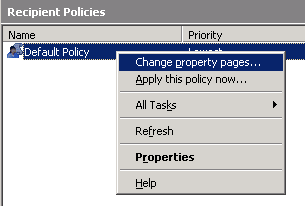
Click Mailbox Manager Settings.

Now the Mailbox Manager Settings will be visible under the Recipient Policy Properties.
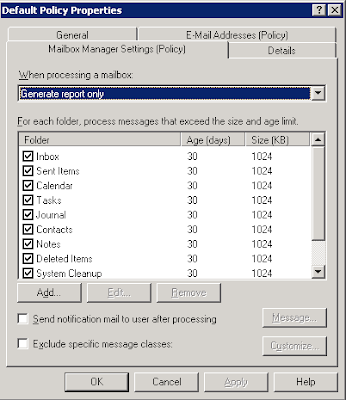
Policies are applied according to the schedule that you set up on each server. This prevents mailbox management from running on all servers in the organization at the same time. However, you can force a manual update if you want a recipient policy to apply immediately.
Note Like e-mail recipient policies, the highest priority recipient policy that applies to an Exchange Server object is the effective policy. Lower priority policies are no longer evaluated after a match has been made.
When you use mailbox management recipient policies, you can configure a filter rule that specifies the subset of messaging-enabled objects that the recipient policy applies to. The recipient policy is then applied to objects that match the filter conditions.
This is useful when you have a subset of users who have different storage requirements. For example, there may be a technical author in your organization who regularly sends out very large attachments that must be stored. You can use a less restrictive mailbox management policy for this user.
Note You can configure mailbox storage limits to obtain a similar result. However, make sure that you note the following differences between mailbox storage limits and mailbox management recipient policies:
- Mailbox storage limits limit the total size of the mailbox.
- Mailbox management recipient policies limit messages over a certain size.
Mailbox Management must be configured to automatically run for the Mailbox Manager policies to apply. This needs to be configured on the server level in System Manager:

You can also choose to run this manually by right clicking on the Exchange 2003 server in system manager going to All Tasks.
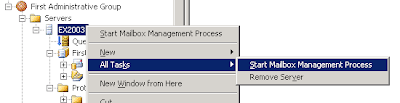
Some parts of this document were taken from KB319188. Please refer to this article for some additional information:
http://support.microsoft.com/kb/319188
The mailbox management process detects folders in a mailbox that contain messages larger than a certain size. If a message remains in a folder after a predefined time has passed (by default, 30 days), a number of predefined actions can be taken, including the following:
- Generate a report only and send the report to the mailbox owner.
- Move the message to the Deleted Items folder.
- Move the message to System Cleanup folders.
- Delete the message immediately.
Note Use caution when you use the Delete the message immediately option, because users may have to recover their messages.
If you use recipient policies, it is easy to apply or revise the rules. You do not have to reconfigure settings individually on each object. You can also change recipient policy priority levels to change the way that multiple policies are adjusted.
Note There is no default recipient policy for mailbox management (unlike the e-mail recipient policies). However, you can add the required property page to the default recipient policy if you want to create a mailbox management policy that applies to all recipients.
How do you configure Mailbox Manager Policies on the recipient policies?
Well by default these options are hidden. Right click on a recipient policy and click "Change property pages".

Click Mailbox Manager Settings.

Now the Mailbox Manager Settings will be visible under the Recipient Policy Properties.

Policies are applied according to the schedule that you set up on each server. This prevents mailbox management from running on all servers in the organization at the same time. However, you can force a manual update if you want a recipient policy to apply immediately.
Note Like e-mail recipient policies, the highest priority recipient policy that applies to an Exchange Server object is the effective policy. Lower priority policies are no longer evaluated after a match has been made.
When you use mailbox management recipient policies, you can configure a filter rule that specifies the subset of messaging-enabled objects that the recipient policy applies to. The recipient policy is then applied to objects that match the filter conditions.
This is useful when you have a subset of users who have different storage requirements. For example, there may be a technical author in your organization who regularly sends out very large attachments that must be stored. You can use a less restrictive mailbox management policy for this user.
Note You can configure mailbox storage limits to obtain a similar result. However, make sure that you note the following differences between mailbox storage limits and mailbox management recipient policies:
- Mailbox storage limits limit the total size of the mailbox.
- Mailbox management recipient policies limit messages over a certain size.
Mailbox Management must be configured to automatically run for the Mailbox Manager policies to apply. This needs to be configured on the server level in System Manager:

You can also choose to run this manually by right clicking on the Exchange 2003 server in system manager going to All Tasks.

Some parts of this document were taken from KB319188. Please refer to this article for some additional information:
http://support.microsoft.com/kb/319188
Whats the difference between ACL, ACE, DACL and SACL?
A security descriptor contains two access control lists (ACLs) used to assign and track security information for each object: the discretionary access control list (DACL) and the system access control list (SACL).
Discretionary access control lists (DACLs). DACLs identify the users and groups that are assigned or denied access permissions on an object. If a DACL does not explicitly identify a user, or any groups that a user is a member of, the user will be denied access to that object. By default, a DACL is controlled by the owner of an object or the person who created the object, and it contains access control entries (ACEs) that determine user access to the object.
System access control lists (SACLs). SACLs identify the users and groups that you want to audit when they successfully access or fail to access an object. Auditing is used to monitor events related to system or network security, to identify security breaches, and to determine the extent and location of any damage. By default, a SACL is controlled by the owner of an object or the person who created the object. A SACL contains access control entries (ACEs) that determine whether to record a successful or failed attempt by a user to access a object using a given permission, for example, Full Control and Read.
Friday, April 8, 2011
UserProxy Class and ADAM / LDS
In this blog post I will be talking about the UserProxy Class which is used to create UserProxy Objects in ADAM / LDS Partitions.
ADAM = 2003 and prior name
LDS = Windows Server 2008 name
ADAM = Active Directory Application Mode
LDS = Lightweight Directory Service
They are both the same thing!
For LDS to forward authentication requests onto Active Directory we need to use UserProxy objects. These are objects get created in an application directory partition within an LDS instance.
In LDAP sense connecting to a database/object is often referred to as binding.
ProxyObjects allow you to use bind redirection, ADAM can accept and process bind requests to an ADAM proxy object that contains as one of its attributes the security ID (SID) from an Active Directory security principal. With ADAM, you can use bind redirection to provide Active Directory users with access to both ADAM data and Active Directory data, using Active Directory domain credentials as a single sign-on (SSO). In addition, you can use ADAM proxy objects to store user data that is specific to a particular application in ADAM, while using Active Directory to store more widely used directory data.
Bind redirection enables a user to bind to ADAM by means of a simple bind while still using Active Directory credentials. Other types of binding with Active Directory credentials work without requiring a proxy, but a simple bind does not. Proxy binding works only for a simple bind.
The ADAM .ldf files, which you can import into the ADAM schema during ADAM setup, contain an object definition for the object userProxy, which can be used for bind redirection. This object contains attributes that include a distinguished name and a SID. By creating a userProxy object in ADAM—specifying a distinguished name to be used for binding—and by using a valid SID from an Active Directory user account, you can bind to ADAM using bind redirection.
There are 4 "types" of users class objects provided by Microsoft:
- InetOrgPerson (the universal standard for LDAP users)
- User (the Microsoft standard lol)
- Organizational-Person (I have never used this)
- UserProxy
There are three default LDF files which you can use to create the userProxy class object in the ADAM/LDS Instance schema. These all exist in the default ADAM folder in your ADAM installation. These LDF files are the ones I was referring to above.
MS-UserProxy.ldf - contains the definitions for the userProxy class only.
MS-InetOrgPerson.ldf - Contains the definitions for all user classes including InetOrgPerson, User, Organizational-Person and userProxy.
MS-User.ldf - Contains definitions for all user classes excluding the InetOrgPerson class.
When would you want to use a userProxy object. Well you may have an external company that has an application that needs to authenticate with objects (such as users) in your Active Directory domain. Creating userProxy objects allows you to have ADAM authenticate logon credentials using AD usernames and passwords from the a domain controller without the application connecting to a domain controller. userProxy objects are very similar to AD and ADAM User objects except they do not store passwords and has an objectSID attribute that contains the SID from the linked AD User object. The SID of the userProxy object matching the User object in Active Directory is key - this is how the proxy works!
You can create userProxy objects using ADSIEdit console or using command line tools however this can be tedious. You can do this automatically for all users in an AD domain partition if you setup something like ADAMSync to synchronize. If you are preparing to use ADAMSync you need to perform the schema expantions on the ADAM partition for ADAMSync to work. You also must import the same Schema extension as your AD FFL to ensure all attributes you wish to sync exist in the ADAM instance schema. There are templates for this in the ADAM folder such as MS-AdamSchemaW2K3.LDF which is the 2003 FFL (Forest Functional Level) schema. When performing syncronization you create an LDAP configuration file which states exactly which attributes will be synced.
By default a SSL certificate required when using Userproxy objects however you can modify this by editing the configuration partition:
CN=Directory Service,CN=Windows NT, CN=Services, CN=Configuration
Change the Attribute RequiresSecureProxyBind from 1 to 0.
The reason it requires SSL by default is to encrypt the user and password information when being transmitted. ADAM does not support kerberos v5, so you must use Secure LDAP (LDAP with SSL Certificate) to protect information. You can use self signed certificates using something like selfssl.exe from the IIS Resource Kit or an internal PKI... or even public if you wish to spend money.
To be able to create UserProxy objects we must extend the ADAM schema to ensure the UserProxy class exists. Objects are created from Class objects.
One more thing, if your going to use userProxy, make sure the ADAM server is a member of the domain that trusts the AD users matching the SIDs in the userProxy objects. If the ADAM server is not a member of the domain they won't work as bind proxies as bind proxies rely on the underlying Windows security infrastructure to be able to forward the authentication to Windows/AD.
What happens if there is more then one domain? The ADAM server can only be a member of one domain! Will userProxy be able to forward authentication requests on to the appropriate domain over the trust links?
The answer is yes, user proxy objects can forward authentication requests over forest trusts, parent child trusts and tree root trusts.

I hope you have learnt something today, I have! Tip:
Buy Brian Desmonds [MVP - Directory Services] book, Active Directory forth edition. Its an awesome read:
http://oreilly.com/catalog/9780596520601
ADAM = 2003 and prior name
LDS = Windows Server 2008 name
ADAM = Active Directory Application Mode
LDS = Lightweight Directory Service
They are both the same thing!
For LDS to forward authentication requests onto Active Directory we need to use UserProxy objects. These are objects get created in an application directory partition within an LDS instance.
In LDAP sense connecting to a database/object is often referred to as binding.
ProxyObjects allow you to use bind redirection, ADAM can accept and process bind requests to an ADAM proxy object that contains as one of its attributes the security ID (SID) from an Active Directory security principal. With ADAM, you can use bind redirection to provide Active Directory users with access to both ADAM data and Active Directory data, using Active Directory domain credentials as a single sign-on (SSO). In addition, you can use ADAM proxy objects to store user data that is specific to a particular application in ADAM, while using Active Directory to store more widely used directory data.
Bind redirection enables a user to bind to ADAM by means of a simple bind while still using Active Directory credentials. Other types of binding with Active Directory credentials work without requiring a proxy, but a simple bind does not. Proxy binding works only for a simple bind.
The ADAM .ldf files, which you can import into the ADAM schema during ADAM setup, contain an object definition for the object userProxy, which can be used for bind redirection. This object contains attributes that include a distinguished name and a SID. By creating a userProxy object in ADAM—specifying a distinguished name to be used for binding—and by using a valid SID from an Active Directory user account, you can bind to ADAM using bind redirection.
There are 4 "types" of users class objects provided by Microsoft:
- InetOrgPerson (the universal standard for LDAP users)
- User (the Microsoft standard lol)
- Organizational-Person (I have never used this)
- UserProxy
There are three default LDF files which you can use to create the userProxy class object in the ADAM/LDS Instance schema. These all exist in the default ADAM folder in your ADAM installation. These LDF files are the ones I was referring to above.
MS-UserProxy.ldf - contains the definitions for the userProxy class only.
MS-InetOrgPerson.ldf - Contains the definitions for all user classes including InetOrgPerson, User, Organizational-Person and userProxy.
MS-User.ldf - Contains definitions for all user classes excluding the InetOrgPerson class.
When would you want to use a userProxy object. Well you may have an external company that has an application that needs to authenticate with objects (such as users) in your Active Directory domain. Creating userProxy objects allows you to have ADAM authenticate logon credentials using AD usernames and passwords from the a domain controller without the application connecting to a domain controller. userProxy objects are very similar to AD and ADAM User objects except they do not store passwords and has an objectSID attribute that contains the SID from the linked AD User object. The SID of the userProxy object matching the User object in Active Directory is key - this is how the proxy works!
You can create userProxy objects using ADSIEdit console or using command line tools however this can be tedious. You can do this automatically for all users in an AD domain partition if you setup something like ADAMSync to synchronize. If you are preparing to use ADAMSync you need to perform the schema expantions on the ADAM partition for ADAMSync to work. You also must import the same Schema extension as your AD FFL to ensure all attributes you wish to sync exist in the ADAM instance schema. There are templates for this in the ADAM folder such as MS-AdamSchemaW2K3.LDF which is the 2003 FFL (Forest Functional Level) schema. When performing syncronization you create an LDAP configuration file which states exactly which attributes will be synced.
By default a SSL certificate required when using Userproxy objects however you can modify this by editing the configuration partition:
CN=Directory Service,CN=Windows NT, CN=Services, CN=Configuration
Change the Attribute RequiresSecureProxyBind from 1 to 0.
The reason it requires SSL by default is to encrypt the user and password information when being transmitted. ADAM does not support kerberos v5, so you must use Secure LDAP (LDAP with SSL Certificate) to protect information. You can use self signed certificates using something like selfssl.exe from the IIS Resource Kit or an internal PKI... or even public if you wish to spend money.
To be able to create UserProxy objects we must extend the ADAM schema to ensure the UserProxy class exists. Objects are created from Class objects.
One more thing, if your going to use userProxy, make sure the ADAM server is a member of the domain that trusts the AD users matching the SIDs in the userProxy objects. If the ADAM server is not a member of the domain they won't work as bind proxies as bind proxies rely on the underlying Windows security infrastructure to be able to forward the authentication to Windows/AD.
What happens if there is more then one domain? The ADAM server can only be a member of one domain! Will userProxy be able to forward authentication requests on to the appropriate domain over the trust links?
The answer is yes, user proxy objects can forward authentication requests over forest trusts, parent child trusts and tree root trusts.
I hope you have learnt something today, I have! Tip:
Buy Brian Desmonds [MVP - Directory Services] book, Active Directory forth edition. Its an awesome read:
http://oreilly.com/catalog/9780596520601
Sunday, April 3, 2011
Exchange 2010 RPC Encryption
Exchange 2010 RTM had RPC Encryption enabled on the Client Access Servers by default. This meant outlook 2003 clients needed to be configured to support MAPI Encryption by configuring the outlook profile.
In Exchange 2010 SP1 RPC Encryption is now disabled by default.
However if you upgrade an Exchange 2010 RTM server to Exchange 2010 SP1 RPC Encryption will remain enabled.
Only fresh installs of Exchange 2010 SP1 will have RPC Encryption disabled.
In Exchange 2010 SP1 RPC Encryption is now disabled by default.
However if you upgrade an Exchange 2010 RTM server to Exchange 2010 SP1 RPC Encryption will remain enabled.
Only fresh installs of Exchange 2010 SP1 will have RPC Encryption disabled.
Thursday, March 31, 2011
OWA 2010 - You don't have permission to open this page
I just performed cross-forest migration of a number of mailboxes. Mailboxes come across as "linked" mailboxes linking to the account in the source forest. To link the mailboxes to the new user account in the destination forest I used the Disable-Mailbox command to unlink the mailbox from the old account followed by the Connect-Mailbox to link the mailbox to the new user account in the destination forest. Users who had been migrated across to the new forest had problems accessing "Options" in Outlook Web App.


Sorry! Access denied
You don't have permission to open this page. If you're a new user or were recently assigned credentials, please wait 15 minutes and try again. If the problem persists, contact your administrator.
I went and created a new mailbox user in the destination forest which I did not migrate. This worked fine. I went and compared attributes between my "test" mailbox account and "jim's" mailbox account.

There were a couple of differences. Jim's mailbox did not have a Role Assignment Policy. The RoleAssignmentPolicy parameter specifies the management role assignment policy to assign to the mailbox when it's created or enabled. If you don't include this parameter when you create or enable a mailbox, the default assignment policy is used. All mailboxes must have at least the default policy! I set the default policy as follows on Jims account
Set-Mailbox "jim" -RoleAssignmentPolicy "Default Role Assignment Policy"
This resolved the problem!
List all Attributes on Active Directory Object
Below is an easy way to quickly identify all attributes on an AD Object using adFind.exe by Joe Richards.
adFind.exe -b "CN=Default Policy,CN=Recipient Policies,CN=Destination,CN=Microsoft Exchange,CN=Services,CN=Configuration,DC=destination,DC=local"

adFind.exe -b "CN=Default Policy,CN=Recipient Policies,CN=Destination,CN=Microsoft Exchange,CN=Services,CN=Configuration,DC=destination,DC=local"

Wednesday, March 30, 2011
An unknown error occurred, error code: 0x80070057
I'm performing a cross-forest migration using Prepare-MoveRequest.ps1, Identity Lifecycle Manager and Active Directory Migration Tool.
After a windows 7 PC was migrated to the new forest the user account and his mailbox, Outlook 2010 continued to reference the old Exchange 2003 servers which were failing to refer the user to the new Exchange 2010 servers in the new forest.

I created an Outlook PRF file with the following configuration:
[General]
Custom=1
ProfileName=Outlook
DefaultProfile=Yes
OverwriteProfile=Yes
ModifyDefaultProfileIfPresent=TRUE
[Service List]
;ServiceX=Microsoft Outlook Client
ServiceEGS1=Exchange Global Section
Service1=Microsoft Exchange Server
[ServiceEGS1]
MailboxName=%UserName%
HomeServer=ex2010.destination.local
AccountName=%UserName%
ConfigFlags=0x00000100
[Service1]
OverwriteExistingService=Yes
UniqueService=No
MailboxName=%UserName%
HomeServer=ex2010.destination.local
I attempted to import the PRF into Outlook 2010 using the following command:
outlook.exe /importprf path:C:\outlook.prf
During the import the following error was experienced:
An unknown error occurred, error code: 0x80070057

This turns out to be a bug with Outlook 2010 importing PRF files. I found this on knowledge base 2028193.
http://support.microsoft.com/kb/2028193
After installing the following hotfix my problem was resolved:
http://support.microsoft.com/default.aspx?scid=kb;en-US;2281463
Sunday, March 27, 2011
ADMT Error 0x80004005
I was performing an Active Directory Migration from a Windows Server 2008 DFL/FFL forest with Exchange 2003 to a Windows Server 2008 R2 DFL/FFL forest with Exchange 2010. During the migration I got the following error:
2011-03-28 14:42:03 Unable to store default excluded system properties in database. Unspecified error (0x80004005)
2011-03-28 14:42:03 The following system properties will be excluded:
2011-03-28 14:42:03 mail,proxyAddresses,msDS-PSOApplied,msDS-HostServiceAccount,altRecipient,
2011-03-28 14:42:03 altRecipientBL,attributeCertificate,attributeCertificateAttribute,audio,authOrig,
2011-03-28 14:42:03 authOrigBL,autoReply,autoReplyMessage,businessRoles,carLicense,dLMemDefault,
2011-03-28 14:42:03 dLMemRejectPerms,dLMemRejectPermsBL,dLMemSubmitPerms,dLMemSubmitPermsBL,
2011-03-28 14:42:03 dLMemberRule,deletedItemFlags,delivContLength,delivExtContTypes,
2011-03-28 14:42:03 deliverAndRedirect,deliveryMechanism,departmentNumber,dnQualifier,employeeNumber,
2011-03-28 14:42:03 employeeType,enabledProtocols,expirationTime,extensionAttribute1,
2011-03-28 14:42:03 extensionAttribute10,extensionAttribute11,extensionAttribute12,
2011-03-28 14:42:03 extensionAttribute13,extensionAttribute14,extensionAttribute15,
2011-03-28 14:42:03 extensionAttribute2,extensionAttribute3,extensionAttribute4,extensionAttribute5,
2011-03-28 14:42:03 extensionAttribute6,extensionAttribute7,extensionAttribute8,extensionAttribute9,
2011-03-28 14:42:03 extensionData,folderPathname,formData,forwardingAddress,gecos,gidNumber,
2011-03-28 14:42:03 heuristics,hideDLMembership,homeMDB,homeMTA,homePostalAddress,houseIdentifier,
2011-03-28 14:42:03 importedFrom,internetEncoding,ipHostNumber,jpegPhoto,kMServer,labeledURI,
2011-03-28 14:42:03 language,languageCode,logRolloverInterval,loginShell,mAPIRecipient,
2011-03-28 14:42:03 mDBOverHardQuotaLimit,mDBOverQuotaLimit,mDBStorageQuota,mDBUseDefaults,
2011-03-28 14:42:03 mailNickname,memberUid,monitoredConfigurations,monitoredServices,
2011-03-28 14:42:03 monitoringAvailabilityStyle,monitoringAvailabilityWindow,monitoringCachedViaMail,
2011-03-28 14:42:03 monitoringCachedViaRPC,monitoringMailUpdateInterval,monitoringMailUpdateUnits,
2011-03-28 14:42:03 monitoringRPCUpdateInterval,monitoringRPCUpdateUnits,msDFSR-ComputerReferenceBL,
2011-03-28 14:42:03 msDFSR-MemberReferenceBL,msDS-ObjectReferenceBL,msDS-SourceObjectDN,
2011-03-28 14:42:03 msExchADCGlobalNames,msExchALObjectVersion,
2011-03-28 14:42:03 msExchAggregationSubscriptionCredential,msExchAlternateMailboxes,
2011-03-28 14:42:03 msExchApprovalApplicationLink,msExchArbitrationMailbox,msExchArchiveDatabaseBL,
2011-03-28 14:42:03 msExchArchiveDatabaseLink,msExchArchiveGUID,msExchArchiveName,msExchArchiveQuota,
2011-03-28 14:42:03 msExchArchiveWarnQuota,msExchAssistantName,msExchAvailabilityOrgWideAccountBL,
2011-03-28 14:42:03 msExchAvailabilityPerUserAccountBL,msExchBlockedSendersHash,
2011-03-28 14:42:03 msExchBypassModerationBL,msExchBypassModerationFromDLMembersBL,
2011-03-28 14:42:03 msExchBypassModerationFromDLMembersLink,msExchBypassModerationLink,msExchCU,
2011-03-28 14:42:03 msExchCalendarRepairDisabled,msExchCoManagedByLink,msExchCoManagedObjectsBL,
2011-03-28 14:42:03 msExchConferenceMailboxBL,msExchConfigurationUnitBL,
2011-03-28 14:42:03 msExchContentConversionSettings,msExchControllingZone,msExchCustomProxyAddresses,
2011-03-28 14:42:03 msExchDelegateListBL,msExchDelegateListLink,msExchDeviceAccessControlRuleBL,
2011-03-28 14:42:03 msExchDirsyncID,msExchDumpsterQuota,msExchDumpsterWarningQuota,
2011-03-28 14:42:03 msExchELCExpirySuspensionEnd,msExchELCExpirySuspensionStart,
2011-03-28 14:42:03 msExchELCMailboxFlags,msExchEdgeSyncCookies,msExchEdgeSyncRetryCount,
2011-03-28 14:42:03 msExchEdgeSyncSourceGuid,msExchEnableModeration,msExchExchangeServerLink,
2011-03-28 14:42:03 msExchExpansionServerName,msExchExternalOOFOptions,msExchExternalSyncState,
2011-03-28 14:42:03 msExchFBURL,msExchForeignGroupSID,msExchGroupDepartRestriction,
2011-03-28 14:42:03 msExchGroupJoinRestriction,msExchHABShowInDepartments,msExchHideFromAddressLists,
2011-03-28 14:42:03 msExchHomeServerName,msExchHouseIdentifier,msExchIMACL,msExchIMAP4Settings,
2011-03-28 14:42:03 msExchIMAPOWAURLPrefixOverride,msExchIMAddress,msExchIMMetaPhysicalURL,
2011-03-28 14:42:03 msExchIMPhysicalURL,msExchIMVirtualServer,msExchImmutableId,
2011-03-28 14:42:03 msExchInconsistentState,msExchIntendedMailboxPlanBL,
2011-03-28 14:42:03 msExchIntendedMailboxPlanLink,msExchLabeledURI,msExchLicenseToken,
2011-03-28 14:42:03 msExchMDBRulesQuota,msExchMailboxFolderSet,msExchMailboxGuid,
2011-03-28 14:42:03 msExchMailboxMoveBatchName,msExchMailboxMoveFlags,
2011-03-28 14:42:03 msExchMailboxMoveRemoteHostName,msExchMailboxMoveSourceMDBBL,
2011-03-28 14:42:03 msExchMailboxMoveSourceMDBLink,msExchMailboxMoveStatus,
2011-03-28 14:42:03 msExchMailboxMoveTargetMDBBL,msExchMailboxMoveTargetMDBLink,
2011-03-28 14:42:03 msExchMailboxOABVirtualDirectoriesLink,msExchMailboxPlanType,
2011-03-28 14:42:03 msExchMailboxSecurityDescriptor,msExchMailboxTemplateLink,msExchMailboxUrl,
2011-03-28 14:42:03 msExchManagementSettings,msExchMasterAccountHistory,msExchMasterAccountSid,
2011-03-28 14:42:03 msExchMaxBlockedSenders,msExchMaxSafeSenders,msExchMessageHygieneFlags,
2011-03-28 14:42:03 msExchMessageHygieneSCLDeleteThreshold,msExchMessageHygieneSCLJunkThreshold,
2011-03-28 14:42:03 msExchMessageHygieneSCLQuarantineThreshold,
2011-03-28 14:42:03 msExchMessageHygieneSCLRejectThreshold,msExchMobileAllowedDeviceIDs,
2011-03-28 14:42:03 msExchMobileBlockedDeviceIDs,msExchMobileDebugLogging,msExchMobileMailboxFlags,
2011-03-28 14:42:03 msExchMobileMailboxPolicyLink,msExchMobileRemoteDocumentsAllowedServersBL,
2011-03-28 14:42:03 msExchMobileRemoteDocumentsBlockedServersBL,
2011-03-28 14:42:03 msExchMobileRemoteDocumentsInternalDomainSuffixListBL,msExchMobileSettings,
2011-03-28 14:42:03 msExchModeratedByLink,msExchModeratedObjectsBL,msExchModerationFlags,
2011-03-28 14:42:03 msExchOURoot,msExchOWAAllowedFileTypesBL,msExchOWAAllowedMimeTypesBL,
2011-03-28 14:42:03 msExchOWABlockedFileTypesBL,msExchOWABlockedMIMETypesBL,
2011-03-28 14:42:03 msExchOWAForceSaveFileTypesBL,msExchOWAForceSaveMIMETypesBL,msExchOWAPolicy,
2011-03-28 14:42:03 msExchOWARemoteDocumentsAllowedServersBL,
2011-03-28 14:42:03 msExchOWARemoteDocumentsBlockedServersBL,
2011-03-28 14:42:03 msExchOWARemoteDocumentsInternalDomainSuffixListBL,msExchOWASettings,
2011-03-28 14:42:03 msExchOWATranscodingFileTypesBL,msExchOWATranscodingMimeTypesBL,
2011-03-28 14:42:03 msExchObjectCountQuota,msExchObjectID,msExchOmaAdminExtendedSettings,
2011-03-28 14:42:03 msExchOmaAdminWirelessEnable,msExchOrganizationsAddressBookRootsBL,
2011-03-28 14:42:03 msExchOrganizationsGlobalAddressListsBL,msExchOrganizationsTemplateRootsBL,
2011-03-28 14:42:03 msExchOriginatingForest,msExchPOP3Settings,msExchParentPlanBL,
2011-03-28 14:42:03 msExchParentPlanLink,msExchPfRootUrl,msExchPoliciesExcluded,
2011-03-28 14:42:03 msExchPoliciesIncluded,msExchPolicyEnabled,msExchPolicyList,
2011-03-28 14:42:03 msExchPolicyOptionList,msExchPreviousAccountSid,msExchPreviousHomeMDB,
2011-03-28 14:42:03 msExchProvisioningFlags,msExchProxyCustomProxy,msExchQueryBaseDN,
2011-03-28 14:42:03 msExchRBACPolicyBL,msExchRBACPolicyLink,msExchRMSComputerAccountsBL,
2011-03-28 14:42:03 msExchRMSComputerAccountsLink,msExchRecipLimit,msExchRecipientDisplayType,
2011-03-28 14:42:03 msExchRecipientTypeDetails,msExchRecipientValidatorCookies,
2011-03-28 14:42:03 msExchRequireAuthToSendTo,msExchResourceCapacity,msExchResourceDisplay,
2011-03-28 14:42:03 msExchResourceGUID,msExchResourceMetaData,msExchResourceProperties,
2011-03-28 14:42:03 msExchResourceSearchProperties,msExchRetentionComment,msExchRetentionURL,
2011-03-28 14:42:03 msExchSMTPReceiveDefaultAcceptedDomainBL,msExchSafeRecipientsHash,
2011-03-28 14:42:03 msExchSafeSendersHash,msExchSendAsAddresses,msExchSenderHintTranslations,
2011-03-28 14:42:03 msExchServerAdminDelegationBL,msExchServerAssociationBL,
2011-03-28 14:42:03 msExchServerAssociationLink,msExchServerSiteBL,msExchSetupStatus,
2011-03-28 14:42:03 msExchSharingPartnerIdentities,msExchSharingPolicyLink,msExchSignupAddresses,
2011-03-28 14:42:03 msExchSupervisionDLBL,msExchSupervisionDLLink,msExchSupervisionOneOffBL,
2011-03-28 14:42:03 msExchSupervisionOneOffLink,msExchSupervisionUserBL,msExchSupervisionUserLink,
2011-03-28 14:42:03 msExchSyncAccountsPolicyDN,msExchTUIPassword,msExchTUISpeed,msExchTUIVolume,
2011-03-28 14:42:03 msExchTextMessagingState,msExchThrottlingPolicyDN,msExchTransportInboundSettings,
2011-03-28 14:42:03 msExchTransportOutboundSettings,msExchTransportRecipientSettingsFlags,
2011-03-28 14:42:03 msExchUMAddresses,msExchUMAudioCodec,msExchUMAudioCodec2,msExchUMCallingLineIDs,
2011-03-28 14:42:03 msExchUMDtmfMap,msExchUMEnabledFlags,msExchUMEnabledFlags2,msExchUMFaxId,
2011-03-28 14:42:03 msExchUMListInDirectorySearch,msExchUMMailboxOVALanguage,
2011-03-28 14:42:03 msExchUMMaxGreetingDuration,msExchUMOperatorNumber,msExchUMPhoneProvider,
2011-03-28 14:42:03 msExchUMPinChecksum,msExchUMRecipientDialPlanLink,msExchUMServerWritableFlags,
2011-03-28 14:42:03 msExchUMSpokenName,msExchUMTemplateLink,msExchUnmergedAttsPt,msExchUseOAB,
2011-03-28 14:42:03 msExchUserAccountControl,msExchUserBL,msExchUserCulture,msExchVersion,
2011-03-28 14:42:03 msExchVoiceMailboxID,msExchWindowsLiveID,msRADIUS-FramedIpv6Route,
2011-03-28 14:42:03 msRADIUS-SavedFramedIpv6Route,msSFU30Aliases,msSFU30Name,msSFU30NisDomain,
2011-03-28 14:42:03 msSFU30PosixMember,msSFU30PosixMemberOf,networkAddress,nisMapName,
2011-03-28 14:42:03 oOFReplyToOriginator,otherMailbox,pOPCharacterSet,pOPContentFormat,personalPager,
2011-03-28 14:42:03 photo,preferredLanguage,promoExpiration,protocolSettings,publicDelegates,
2011-03-28 14:42:03 publicDelegatesBL,registeredAddress,replicatedObjectVersion,
2011-03-28 14:42:03 replicationSensitivity,replicationSignature,reportToOriginator,reportToOwner,
2011-03-28 14:42:03 roomNumber,secretary,securityProtocol,shadowExpire,shadowFlag,shadowInactive,
2011-03-28 14:42:03 shadowLastChange,shadowMax,shadowMin,shadowWarning,submissionContLength,
2011-03-28 14:42:03 supportedAlgorithms,targetAddress,telephoneAssistant,textEncodedORAddress,
2011-03-28 14:42:03 trackingLogPathName,type,uid,uidNumber,unauthOrig,unauthOrigBL,unixHomeDirectory,
2011-03-28 14:42:03 unixUserPassword,unmergedAtts,userPKCS12,userSMIMECertificate,
2011-03-28 14:42:03 x500uniqueIdentifier
This is due to the difference of the schema versions, some attributes are not migrated to target domain.
The system attribute exclusion list contains two attributes by default: mail and proxyAddresses. ADMT also reads the schema in the target domain. If the target domain schema is further extended, it adds any attributes to the list that are not part of the base schema. Attributes in this list are excluded from migration operations even if the attribute is not specified in the attribute exclusion list.
For more information about this see the article below "Migrating and Restructuring Active Directory Domains Using ADMT v3.1"
http://www.microsoft.com/downloads/details.aspx?familyid=6D710919-1BA5-41CA-B2F3-C11BCB4857AF&displaylang=en
The self-extracting zip file is part of a multidisk zip file
I require the hotfix Cumulative update package 4 for SQL Server 2008 documented under KB963036.
http://support.microsoft.com/kb/963036
I sent in a request for the hotfix, Microsoft emailed me the download link. I retreived the file 374964_intl_x64_zip.
When I run it and attempt to extract the archive I get the following message.
"The self-extracting zip file is part of a multidisk zip file. Please insert the last disk of the set."

I am given no option other then to press OK. When I press OK three times I get the following error:
"An error occured while unzipping. One or more files were not succesfully unzipped. The error code is 110."

I believe there may be something wrong with the hotfix. I contacted Microsoft using the appropriate Security Essentials portal for hotfix related problems.
https://support.microsoftsecurityessentials.com/Default.aspx
I will update this post when I hear back from Microsoft with the solution.
Resolution
I redownloaded the hotfix and it now works!

What's the difference between SSL Bridging and SSL Tunneling?
Many firewalls on the market support the concept of SSL Bridging and SSL Tunneling. Microsoft firewalls that support this functionality include:
- Internet Security and Acceleration (ISA)
- Forefront Threat Management Gateway (TMG)
What is the difference between SSL Bridging and SSL Tunneling?
SSL Bridging involves decrypting the traffic on the firewall, inspecting the HTML code and filtering it for malware and any content policies that may be applied. The traffic is then re-encrypted usually using a different certificate provided by an Internal Certificate Authority and passing it onto the end client.
SSL Tunneling involves relaying the traffic unmodified still encrypted with the digital certificate to the end client. No filtering can be applied when a router is configured with SSL Tunneling.
Some companies may not wish to have SSL Bridging configured. When dealing with sensitive traffic such as online banking, I for one would be very concerned if I saw the SSL traffic coming to me with a certificate from an Internal Certificate Authority!
Friday, March 25, 2011
Convert Octet String into Readable String
Below shows you how to view an users GUID in Windows Server 2003.
In Server 2003 all GUID attributes in Active Directory were displayed in ADSI edit as Octet values for each Active Directory object.

In Server 2008 ADSIedit GUID attributes are now displayed in a readable format.

If you only have Server 2003 how can you read the GUID on Active Directory objects? Use the following script, here we are finding the GUID of my user account on my KBOMB domain.
Set objUser = GetObject("LDAP://CN=Clint Boessen,OU=Internal,OU=Users,OU=KBOMB,DC=kbomb,DC=local")
arrbytGuid = objUser.objectGuid
strHexGuid = OctetToHexStr(arrbytGuid)
strGuid = HexGuidToGuidStr(strHexGuid)
Wscript.Echo "Guid in display format: " & strGuid
Function OctetToHexStr(arrbytOctet)
' Function to convert OctetString (byte array) to Hex string.
Dim k
OctetToHexStr = ""
For k = 1 To Lenb(arrbytOctet)
OctetToHexStr = OctetToHexStr _
& Right("0" & Hex(Ascb(Midb(arrbytOctet, k, 1))), 2)
Next
End Function
Function HexGuidToGuidStr(strGuid)
' Function to convert Hex Guid to display form.
Dim k
HexGuidToGuidStr = ""
For k = 1 To 4
HexGuidToGuidStr = HexGuidToGuidStr & Mid(strGuid, 9 - 2*k, 2)
Next
HexGuidToGuidStr = HexGuidToGuidStr & "-"
For k = 1 To 2
HexGuidToGuidStr = HexGuidToGuidStr & Mid(strGuid, 13 - 2*k, 2)
Next
HexGuidToGuidStr = HexGuidToGuidStr & "-"
For k = 1 To 2
HexGuidToGuidStr = HexGuidToGuidStr & Mid(strGuid, 17 - 2*k, 2)
Next
HexGuidToGuidStr = HexGuidToGuidStr & "-" & Mid(strGuid, 17, 4)
HexGuidToGuidStr = HexGuidToGuidStr & "-" & Mid(strGuid, 21)
End Function
When I run the visual basic script I get my GUID.

I also have code here for converting SID from octect, hex or binary to String values. This script was developed by a guy named Richard who is an MVP in Microsoft MVP Scripting and ADSI.
Option Explicit
Dim objUser
Set objUser = GetObject("LDAP://CN=Clint Boessen,OU=Internal,OU=Users,OU=KBOMB,DC=kbomb,DC=local")
Wscript.Echo ObjSidToStrSid(objUser.objectSid)
Function ObjSidToStrSid(arrSid)
' Function to convert OctetString (byte array) to Decimal string (SDDL) \Sid.
Dim strHex, strDec
strHex = OctetStrToHexStr(arrSid)
strDec = HexStrToDecStr(strHex)
ObjSidToStrSid = strDec
End Function ' ObjSidToStrSid
Function OctetStrToHexStr(arrbytOctet)
' Function to convert OctetString (byte array) to Hex string.
Dim k
OctetStrToHexStr = ""
For k = 1 To Lenb(arrbytOctet)
OctetStrToHexStr = OctetStrToHexStr _
& Right("0" & Hex(Ascb(Midb(arrbytOctet, k, 1))), 2)
Next
End Function ' OctetStrToHexStr
Function HexStrToDecStr(strSid)
' Function to convert Hex string Sid to Decimal string (SDDL) Sid.
' SID anatomy:
' Byte Position
' 0 : SID Structure Revision Level (SRL)
' 1 : Number of Subauthority/Relative Identifier
' 2-7 : Identifier Authority Value (IAV) [48 bits]
' 8-x : Variable number of Subauthority or Relative Identifier (RID) [32 bits]
'
' Example: '
'\Administrator
' Pos : 0 1 2 3 4 5 6 7 8 9 10 11 12 13 14 15 16 17 18 19 20 21 22 23 24 25 26 27
' Value: 01 05 00 00 00 00 00 05 15 00 00 00 06 4E 7D 7F 11 57 56 7A 04 11 C5 20 F4 01 00 00
' str : S- 1 -5 -21 -2138918406 -2052478737 -549785860 -500
Const BYTES_IN_32BITS = 4
Const SRL_BYTE = 0
Const IAV_START_BYTE = 2
Const IAV_END_BYTE = 7
Const RID_START_BYTE = 8
Const MSB = 3 'Most significant byte
Const LSB = 0 'Least significant byte
Dim arrbytSid, lngTemp, base, offset, i
ReDim arrbytSid(Len(strSid)/2 - 1)
' Convert hex string into integer array
For i = 0 To UBound(arrbytSid)
arrbytSid(i) = CInt("&H" & Mid(strSid, 2 * i + 1, 2))
Next
' Add SRL number
HexStrToDecStr = "S-" & arrbytSid(SRL_BYTE)
' Add Identifier Authority Value
lngTemp = 0
For i = IAV_START_BYTE To IAV_END_BYTE
lngTemp = lngTemp * 256 + arrbytSid(i)
Next
HexStrToDecStr = HexStrToDecStr & "-" & CStr(lngTemp)
' Add a variable number of 32-bit subauthority or
' relative identifier (RID) values.
' Bytes are in reverse significant order.
' i.e. HEX 01 02 03 04 => HEX 04 03 02 01
' = (((0 * 256 + 04) * 256 + 03) * 256 + 02) * 256 + 01
' = DEC 67305985
For base = RID_START_BYTE To UBound(arrbytSid) Step BYTES_IN_32BITS
lngTemp = 0
For offset = MSB to LSB Step -1
lngTemp = lngTemp * 256 + arrbytSid(base + offset)
Next
HexStrToDecStr = HexStrToDecStr & "-" & CStr(lngTemp)
Next
End Function ' HexStrToDecStr
In Server 2003 all GUID attributes in Active Directory were displayed in ADSI edit as Octet values for each Active Directory object.

In Server 2008 ADSIedit GUID attributes are now displayed in a readable format.

If you only have Server 2003 how can you read the GUID on Active Directory objects? Use the following script, here we are finding the GUID of my user account on my KBOMB domain.
Set objUser = GetObject("LDAP://CN=Clint Boessen,OU=Internal,OU=Users,OU=KBOMB,DC=kbomb,DC=local")
arrbytGuid = objUser.objectGuid
strHexGuid = OctetToHexStr(arrbytGuid)
strGuid = HexGuidToGuidStr(strHexGuid)
Wscript.Echo "Guid in display format: " & strGuid
Function OctetToHexStr(arrbytOctet)
' Function to convert OctetString (byte array) to Hex string.
Dim k
OctetToHexStr = ""
For k = 1 To Lenb(arrbytOctet)
OctetToHexStr = OctetToHexStr _
& Right("0" & Hex(Ascb(Midb(arrbytOctet, k, 1))), 2)
Next
End Function
Function HexGuidToGuidStr(strGuid)
' Function to convert Hex Guid to display form.
Dim k
HexGuidToGuidStr = ""
For k = 1 To 4
HexGuidToGuidStr = HexGuidToGuidStr & Mid(strGuid, 9 - 2*k, 2)
Next
HexGuidToGuidStr = HexGuidToGuidStr & "-"
For k = 1 To 2
HexGuidToGuidStr = HexGuidToGuidStr & Mid(strGuid, 13 - 2*k, 2)
Next
HexGuidToGuidStr = HexGuidToGuidStr & "-"
For k = 1 To 2
HexGuidToGuidStr = HexGuidToGuidStr & Mid(strGuid, 17 - 2*k, 2)
Next
HexGuidToGuidStr = HexGuidToGuidStr & "-" & Mid(strGuid, 17, 4)
HexGuidToGuidStr = HexGuidToGuidStr & "-" & Mid(strGuid, 21)
End Function
When I run the visual basic script I get my GUID.

I also have code here for converting SID from octect, hex or binary to String values. This script was developed by a guy named Richard who is an MVP in Microsoft MVP Scripting and ADSI.
Option Explicit
Dim objUser
Set objUser = GetObject("LDAP://CN=Clint Boessen,OU=Internal,OU=Users,OU=KBOMB,DC=kbomb,DC=local")
Wscript.Echo ObjSidToStrSid(objUser.objectSid)
Function ObjSidToStrSid(arrSid)
' Function to convert OctetString (byte array) to Decimal string (SDDL) \Sid.
Dim strHex, strDec
strHex = OctetStrToHexStr(arrSid)
strDec = HexStrToDecStr(strHex)
ObjSidToStrSid = strDec
End Function ' ObjSidToStrSid
Function OctetStrToHexStr(arrbytOctet)
' Function to convert OctetString (byte array) to Hex string.
Dim k
OctetStrToHexStr = ""
For k = 1 To Lenb(arrbytOctet)
OctetStrToHexStr = OctetStrToHexStr _
& Right("0" & Hex(Ascb(Midb(arrbytOctet, k, 1))), 2)
Next
End Function ' OctetStrToHexStr
Function HexStrToDecStr(strSid)
' Function to convert Hex string Sid to Decimal string (SDDL) Sid.
' SID anatomy:
' Byte Position
' 0 : SID Structure Revision Level (SRL)
' 1 : Number of Subauthority/Relative Identifier
' 2-7 : Identifier Authority Value (IAV) [48 bits]
' 8-x : Variable number of Subauthority or Relative Identifier (RID) [32 bits]
'
' Example: '
'
' Pos : 0 1 2 3 4 5 6 7 8 9 10 11 12 13 14 15 16 17 18 19 20 21 22 23 24 25 26 27
' Value: 01 05 00 00 00 00 00 05 15 00 00 00 06 4E 7D 7F 11 57 56 7A 04 11 C5 20 F4 01 00 00
' str : S- 1 -5 -21 -2138918406 -2052478737 -549785860 -500
Const BYTES_IN_32BITS = 4
Const SRL_BYTE = 0
Const IAV_START_BYTE = 2
Const IAV_END_BYTE = 7
Const RID_START_BYTE = 8
Const MSB = 3 'Most significant byte
Const LSB = 0 'Least significant byte
Dim arrbytSid, lngTemp, base, offset, i
ReDim arrbytSid(Len(strSid)/2 - 1)
' Convert hex string into integer array
For i = 0 To UBound(arrbytSid)
arrbytSid(i) = CInt("&H" & Mid(strSid, 2 * i + 1, 2))
Next
' Add SRL number
HexStrToDecStr = "S-" & arrbytSid(SRL_BYTE)
' Add Identifier Authority Value
lngTemp = 0
For i = IAV_START_BYTE To IAV_END_BYTE
lngTemp = lngTemp * 256 + arrbytSid(i)
Next
HexStrToDecStr = HexStrToDecStr & "-" & CStr(lngTemp)
' Add a variable number of 32-bit subauthority or
' relative identifier (RID) values.
' Bytes are in reverse significant order.
' i.e. HEX 01 02 03 04 => HEX 04 03 02 01
' = (((0 * 256 + 04) * 256 + 03) * 256 + 02) * 256 + 01
' = DEC 67305985
For base = RID_START_BYTE To UBound(arrbytSid) Step BYTES_IN_32BITS
lngTemp = 0
For offset = MSB to LSB Step -1
lngTemp = lngTemp * 256 + arrbytSid(base + offset)
Next
HexStrToDecStr = HexStrToDecStr & "-" & CStr(lngTemp)
Next
End Function ' HexStrToDecStr
Thursday, March 24, 2011
Datacenter Activation Coordination mode
In a scenario where the first datacenter contains two DAG members and the witness server, and the second datacenter contains two other DAG members. If the first datacenter loses power and you activate the DAG in the second datacenter (for example, by activating the alternate file share witness in the second datacenter), if the first datacenter is restored without network connectivity to the second datacenter, the DAG may enter a split brain syndrome.
Datacenter Activation Coordination (DAC) mode prevents split brain syndrome from occurring by including a protocol called Datacenter Activation Coordination Protocol (DACP). After a catastrophic failure, when the DAG recovers, it won't automatically mount databases even though the DAG has a quorum. Instead DACP is used to determine the current state of the DAG and whether Active Manager should attempt to mount the databases.
Datacenter Activation Coordination (DAC) mode is disabled by default.
Datacenter Activation Coordination (DAC) mode is disabled by default.
DACP was created to address this issue. Active Manager stores a bit in memory (either a 0 or a 1) that tells the DAG whether it's allowed to mount local databases that are assigned as active on the server. When a DAG is running in DAC mode (which would be any DAG with three or more members), each time Active Manager starts up the bit is set to 0, meaning it isn't allowed to mount databases. Because it's in DAC mode, the server must try to communicate with all other members of the DAG that it knows to get another DAG member to give it an answer as to whether it can mount local databases that are assigned as active to it. The answer comes in the form of the bit setting for other Active Managers in the DAG. If another server responds that its bit is set to 1, it means servers are allowed to mount databases, so the server starting up sets its bit to 1 and mounts its databases.
But when you recover from a primary datacenter power outage where the servers are recovered but WAN connectivity has not been restored, all of the DAG members in the primary datacenter will have a DACP bit value of 0; and therefore none of the servers starting back up in the recovered primary datacenter will mount databases, because none of them can communicate with a DAG member that has a DACP bit value of 1.
To enable DAC mode use the following powershell command:
Set-DatabaseAvailabilityGroup -Identity TOPHDAG01 -DatacenterActivationMode DagOnly
To view weather DAC mode is enabled you may run:
(Get-DatabaseAvailabilityGroup).DatacenterActivationMode
This will say either Off or DagOnly
Friday, March 11, 2011
Logon Script from Profile Tab Not Working
When specifying the logon script via the user account ensure you do not enter a full UNC path.
\\source.local\netlogon\logon.bat does not work.

logon.bat does does work.

The logon script field in the user account properties automatically points to the netlogon directory.
\\source.local\netlogon\logon.bat does not work.

logon.bat does does work.

The logon script field in the user account properties automatically points to the netlogon directory.
The publisher could not be verified.
When running scripts of network shares you may receive the following warning:
The publisher could not be verified. Are you sure you want to run this software?

This prevents the logon script from automatically running when a user logs into their workstation.
Create a group policy object and navigate to User Configuration --> Administrative Templates --> Windows Components --> Attachment Manager
Add "logon.bat" to the "Inclusion list for moderate risk file types" setting.

You can also use wild cards such as *.bat and comma's to separate entries.
Subscribe to:
Posts (Atom)


