
Here is a bunch of links that explain how to manipulate text strings in VBS.
Mid Function:
http://msdn.microsoft.com/en-us/library/wffts6k3(v=vs.85).aspx
Right Function:
http://msdn.microsoft.com/en-us/library/eh8fefz1(v=vs.85).aspx
Left Function:
http://msdn.microsoft.com/en-us/library/sk3xcs8k(v=vs.85).aspx
These functions are to determine how many characters are in the string:
LTrim; RTrim; and Trim Functions
http://msdn.microsoft.com/en-us/library/c623wz83(v=vs.85).aspx
Len Function
http://msdn.microsoft.com/en-us/library/dxsw58z6(v=vs.80).aspx
This website also has lots of handy commands for manipulating strings:
http://www.w3schools.com/VBscript/vbscript_ref_functions.asp
Wednesday, August 24, 2011

Monday, August 22, 2011
List all users in domain using LDAP and VBS
This sample code lists all users in a domain using LDAP, a more powerful connection then WinNT.
This script automatically binds to the default domain naming context:
Another example of a similar script can be found on:
http://www.cruto.com/resources/vbscript/vbscript-examples/misc/searchad/Search-for-All-Users-Using-an-LDAP-Query.asp
This script automatically binds to the default domain naming context:
Set objConnection = CreateObject("ADODB.Connection")
Set objCommand = CreateObject("ADODB.Command")
objConnection.Provider = "ADsDSOObject"
objConnection.Open "Active Directory Provider"
Set objCommand.ActiveConnection = objConnection

objCommand.Properties("Page Size") = 1000

objCommand.CommandText = _
"<LDAP://domain.local/RootDSE>(objectCategory=User);Name,distinguishedName,sAMAccountName,legacyExchangeDN;Subtree"
Set objRecordSet = objCommand.Execute
objRecordSet.MoveFirst

Do Until objRecordSet.EOF
Wscript.Echo objRecordSet.Fields("Name").Value
Wscript.Echo objRecordSet.Fields("sAMAccountName").Value
Wscript.Echo objRecordSet.Fields("legacyExchangeDN").Value
objRecordSet.MoveNext
Loop

This script lets you manually bind to the domain/application partition.

Set objConnection = CreateObject("ADODB.Connection")
Set objCommand = CreateObject("ADODB.Command")
objConnection.Provider = "ADsDSOObject"
objConnection.Open "Active Directory Provider"
Set objCommand.ActiveConnection = objConnection

objCommand.Properties("Page Size") = 1000

objCommand.CommandText = _
"<LDAP://domain.local/dc=domain,dc=local>(objectCategory=User);Name,distinguishedName,sAMAccountName,legacyExchangeDN;Subtree"
Set objRecordSet = objCommand.Execute
objRecordSet.MoveFirst

Do Until objRecordSet.EOF
Wscript.Echo objRecordSet.Fields("Name").Value
Wscript.Echo objRecordSet.Fields("sAMAccountName").Value
Wscript.Echo objRecordSet.Fields("legacyExchangeDN").Value
objRecordSet.MoveNext
Loop
Another example of a similar script can be found on:
http://www.cruto.com/resources/vbscript/vbscript-examples/misc/searchad/Search-for-All-Users-Using-an-LDAP-Query.asp
Wednesday, August 10, 2011
Connecting to the configuration partition of an LDS Instance
LDS Instances like Active Directory also have a Configuration Partition and a Schema Partition. On TechNet it is documented:
By default, the security principal that you specify as the AD LDS administrator during AD LDS setup becomes a member of the Administrators group in the configuration partition.
http://technet.microsoft.com/en-us/library/cc731143.aspx
How do I get to the configuration partition in an LDS Instance?
Well if I connect to my application partition created during the LDS installation wizard and go to my Administrators, I can see nested inside is another Administrators group residing inside the Configuration Partition.

I can now connect to this using ADSIEdit.

Under the administrators group in the configuration partition I can find the account used when I installed the LDS Instance as per Microsoft documentation on TechNet.
By default, the security principal that you specify as the AD LDS administrator during AD LDS setup becomes a member of the Administrators group in the configuration partition.
http://technet.microsoft.com/en-us/library/cc731143.aspx
How do I get to the configuration partition in an LDS Instance?
Well if I connect to my application partition created during the LDS installation wizard and go to my Administrators, I can see nested inside is another Administrators group residing inside the Configuration Partition.

I can now connect to this using ADSIEdit.

Under the administrators group in the configuration partition I can find the account used when I installed the LDS Instance as per Microsoft documentation on TechNet.
ADAMSync Aging
In this post I will describe Aging with ADAMSync. If you configure ADAMSync to replicate your Active Directory information to an LDS Instance, without aging deleted data from Active Directory will never be removed from LDS. For example if you delete a user object from your Active Directory database, this object will not be deleted from the LDS Instance when you run the next sync.
The ADAMSync aging configuration is done under your ADAMSync XML configuration file.
<schedule>
<aging>
<frequency>0</frequency>
<num-objects>0</num-objects>
</aging>
<schtasks-cmd></schtasks-cmd>
</schedule>
The two configuration options you need to configure are frequency and num-objects.
Frequency:
http://technet.microsoft.com/en-us/library/cc737713.aspx
num-objects:
http://technet.microsoft.com/en-us/library/cc778153.aspx
Unfortunately the documentation on TechNet around these is very poor.
Frequency
- If it's set to "0", the Aging will be skipped, AdamSync will return the following informaiton:
a. Aging is skipped.
b. The times since the last sync.
- If it's larger than "0", system will compare its value with the number of times since the last sync:
a. If its value is larger than the number of times since the last sync, Aging will be skipped, and the number of the times since the last sync will be increased by 1.
b. if its value is not larger than the number of times since the last sync, Aging procedure will be called and the number of times since the last sync will be reset.
Examples:
- If the value is set to 0, aging will be not used.
- If the value is set to 1, the aging will be called each time during the sync.
- if it's set to 2, the aging will be called every two sync.
num-objects
num-objects is the number of objects that need to be aged per run. If you make this 0, it will always age all objects against Active Directory. If you make this 50, it will only age 50. When you perform the next sync, it will age the next 50. Don't worry all objects will eventually be aged... depends on how often you schedule task adamsync.exe to run!
Why was Aging developed?
Please read this fantastic article by Eric Fleischman which explains why Aging was developed by Microsoft in ADAMSync.
http://blogs.technet.com/b/efleis/archive/2006/10/28/change-visibility-in-the-directory-or-lack-there-of-aka-what-s-the-point-of-aging.aspx
Thankyou to James Li from the Directory Services Support Team at Microsoft for looking at the source code of ADAMSync.exe and explaining how the code works! This information was published with written permission from Microsoft via email.
The ADAMSync aging configuration is done under your ADAMSync XML configuration file.
<schedule>
<aging>
<frequency>0</frequency>
<num-objects>0</num-objects>
</aging>
<schtasks-cmd></schtasks-cmd>
</schedule>
The two configuration options you need to configure are frequency and num-objects.
Frequency:
http://technet.microsoft.com/en-us/library/cc737713.aspx
num-objects:
http://technet.microsoft.com/en-us/library/cc778153.aspx
Unfortunately the documentation on TechNet around these is very poor.
Frequency
- If it's set to "0", the Aging will be skipped, AdamSync will return the following informaiton:
a. Aging is skipped.
b. The times since the last sync.
- If it's larger than "0", system will compare its value with the number of times since the last sync:
a. If its value is larger than the number of times since the last sync, Aging will be skipped, and the number of the times since the last sync will be increased by 1.
b. if its value is not larger than the number of times since the last sync, Aging procedure will be called and the number of times since the last sync will be reset.
Examples:
- If the value is set to 0, aging will be not used.
- If the value is set to 1, the aging will be called each time during the sync.
- if it's set to 2, the aging will be called every two sync.
num-objects
num-objects is the number of objects that need to be aged per run. If you make this 0, it will always age all objects against Active Directory. If you make this 50, it will only age 50. When you perform the next sync, it will age the next 50. Don't worry all objects will eventually be aged... depends on how often you schedule task adamsync.exe to run!
Why was Aging developed?
Please read this fantastic article by Eric Fleischman which explains why Aging was developed by Microsoft in ADAMSync.
http://blogs.technet.com/b/efleis/archive/2006/10/28/change-visibility-in-the-directory-or-lack-there-of-aka-what-s-the-point-of-aging.aspx
Thankyou to James Li from the Directory Services Support Team at Microsoft for looking at the source code of ADAMSync.exe and explaining how the code works! This information was published with written permission from Microsoft via email.
Monday, August 8, 2011
How to find the server your DFS Namespace Client is talking to
When setting up Distributed File System Replication (DFSR) between multiple file servers, you may want to know which file server your DFS namesace client is communicating with.
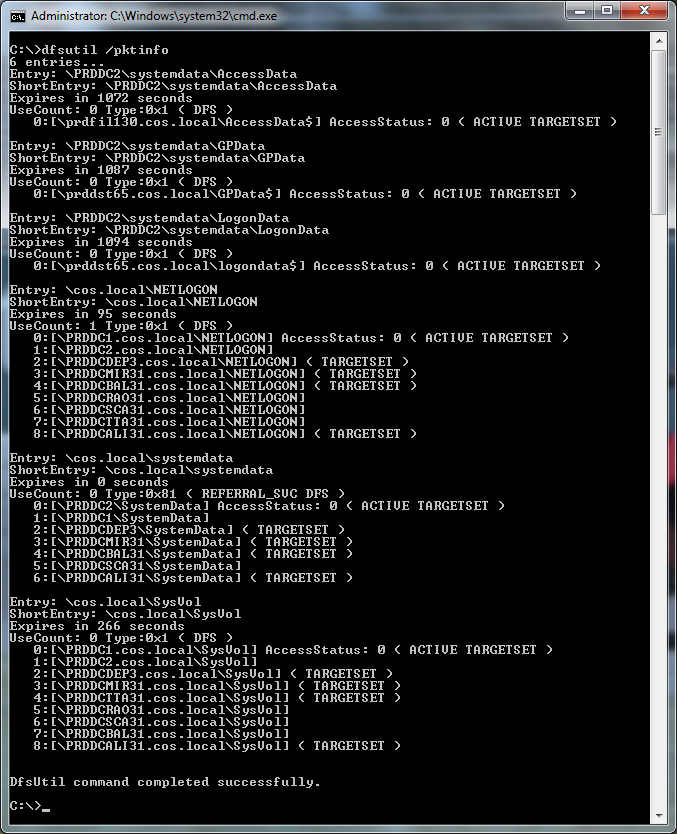
To find this out use the DFSUTIL program with the pktinfo switch. Any ACTIVE TARGETSET servers are servers your workstation is currently talking to.
dfsutil /pktinfo

Alternatively you can right click in a DFS share under explorer and select Properties.

Hit the DFS Tab

To find this out use the DFSUTIL program with the pktinfo switch. Any ACTIVE TARGETSET servers are servers your workstation is currently talking to.
dfsutil /pktinfo
Alternatively you can right click in a DFS share under explorer and select Properties.
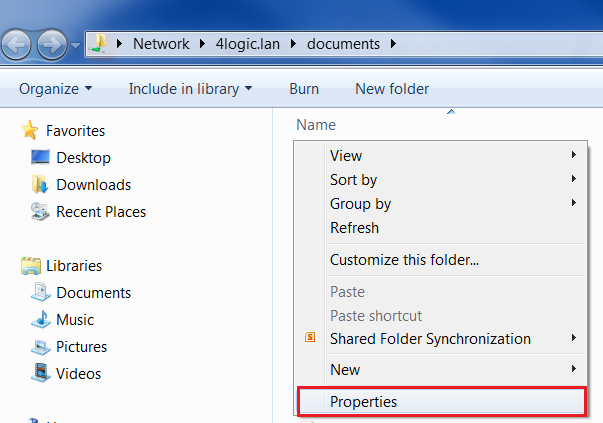
Hit the DFS Tab

Word Crashes Dell XPS 15z Laptop
I just got a new Dell XPS 15z laptop. Microsoft word however continiously crashes generating the following error in event viewer:
Log Name: Application
Source: Application Error
Date: 9/08/2011 9:42:22 AM
Event ID: 1000
Task Category: (100)
Level: Error
Keywords: Classic
User: N/A
Computer: Clint-PC
Description:
Faulting application name: WINWORD.EXE, version: 14.0.4762.1000, time stamp: 0x4bae25cd
Faulting module name: btmofficea.dll, version: 1.0.0.49, time stamp: 0x4d382a1a
Exception code: 0xc0000005
Fault offset: 0x00000000000065ff
Faulting process id: 0xd80
Faulting application start time: 0x01cc56359222c86d
Faulting application path: C:\Program Files\Microsoft Office\Office14\WINWORD.EXE
Faulting module path: C:\Program Files (x86)\Intel\Bluetooth\btmofficea.dll
Report Id: d2f29c37-c228-11e0-8b74-feb16a7ed552
This was caused by the bluetooth module that comes with the laptop. In word I went to file --> options. Under Add-Ins we see the bluetooth driver.

Under COM Add-ins click Go. Untick the send to bluetooth checkbox.

Log Name: Application
Source: Application Error
Date: 9/08/2011 9:42:22 AM
Event ID: 1000
Task Category: (100)
Level: Error
Keywords: Classic
User: N/A
Computer: Clint-PC
Description:
Faulting application name: WINWORD.EXE, version: 14.0.4762.1000, time stamp: 0x4bae25cd
Faulting module name: btmofficea.dll, version: 1.0.0.49, time stamp: 0x4d382a1a
Exception code: 0xc0000005
Fault offset: 0x00000000000065ff
Faulting process id: 0xd80
Faulting application start time: 0x01cc56359222c86d
Faulting application path: C:\Program Files\Microsoft Office\Office14\WINWORD.EXE
Faulting module path: C:\Program Files (x86)\Intel\Bluetooth\btmofficea.dll
Report Id: d2f29c37-c228-11e0-8b74-feb16a7ed552
This was caused by the bluetooth module that comes with the laptop. In word I went to file --> options. Under Add-Ins we see the bluetooth driver.

Under COM Add-ins click Go. Untick the send to bluetooth checkbox.

AD Delegation - How to set default permissions for new group policy objects
When setting up Active Directory delegation, you want administrators to be able to maintain Group Policy without being a Domain Admin. If you read TechNet, Microsoft tells you to use Group Policy Creator Owners, please see:
http://technet.microsoft.com/en-us/library/cc776858.aspx
Lets test it. We have a user named Jess. Jess is only a member of the domain users group. We add Jess to "Group Policy Creator Owners". Jess creates a group policy object called "Jess's Policy". Great, it worked. If we look at the permissions of "Jess's Policy" in group policy management console (GPMC), we see that she has permissions to the group policy object.

Jess does not have permissions to modify or edit any other group policy objects.
The problem with Group Policy Creator Owners
Lets say you have 10 administrators that need to make group policy changes. You add the 10 administrators to Group Policy Creator Owners. One administrator creates a group policy object. The others cannot read or modify the group policy object as only the administrator that created the group policy object owns it. The administrator that created the group policy object must remember to grant the other administrators access to the group policy object. This process needs to re-occur every time an administrator creates a new group policy object.
I don't know why Microsoft recommends to use this approach for group policy delegation as it is not feasible.
The Solution
Change the template permissions in Active Directory!
By default whenever you create a new GPO the following Active Directory system groups are granted access:
- Authenticated Users
- Domain Admins
- Enterprise Admins
- ENTERPRISE DOMAIN CONTROLLERS
- SYSTEM
These permissions are the "default" permission template for newly created group policy objects. We can add additional custom groups to this template by modifying the Active Directory Schema Partition.
To do this use ADSIEdit and connect to the Schema Partition.
View the properties for CN=Group-Policy-Contrainer

The defaultSecurityDescriptor attribute contains the security template for all new group policy objects. By default the defaultSecurityDescriptor looks like this:
D:P(A;CI;RPWPCCDCLCLOLORCWOWDSDDTSW;;;DA)(A;CI;RPWPCCDCLCLOLORCWOWDSDDTSW;;;EA)(A;CI;RPWPCCDCLCLOLORCWOWDSDDTSW;;;CO)(A;CI;RPWPCCDCLCLORCWOWDSDDTSW;;;SY)(A;CI;RPLCLORC;;;AU)(OA;CI;CR;edacfd8f-ffb3-11d1-b41d-00a0c968f939;;AU)(A;CI;LCRPLORC;;;ED)
Schema permissions are written by using the Security Descriptor Definition Language (SDDL).
Note: These SID's will be different in your environment as the beginning of a SID is unique to the given domain.
The beginning of each ACL states what permissions are set over the group or username entry. The second part shows the SID of the group/user account.
I have created a group called AD-GPO-M that I want to add to the template permissions to ensure they get applied to all new group policy objects. We added the following to the end of my SDDL on the defaultSecurityDescriptor attribute. This is the SID that is append to the AD-GPO-M security group.
(A;CI;RPWPCCDCLCLOLORCWOWDSDDTSW;;;S-1-5-21-1445357118-337764505-1417137283-24392)
On the CN=Group-Policy-Contrainer Active Directory object, the defaultSecurityDescriptor attribute now reads:
D:P(A;CI;RPWPCCDCLCLOLORCWOWDSDDTSW;;;DA)(A;CI;RPWPCCDCLCLOLORCWOWDSDDTSW;;;EA)(A;CI;RPWPCCDCLCLOLORCWOWDSDDTSW;;;CO)(A;CI;RPWPCCDCLCLORCWOWDSDDTSW;;;SY)(A;CI;RPLCLORC;;;AU)(OA;CI;CR;edacfd8f-ffb3-11d1-b41d-00a0c968f939;;AU)(A;CI;LCRPLORC;;;ED)(A;CI;RPWPCCDCLCLOLORCWOWDSDDTSW;;;S-1-5-21-1445357118-337764505-1417137283-24392)

Now when I created a new group policy object (GPO) called "Test PCI Member Server" the following permissions were granted by default:

This has now given your non-domain admins who are a member of this group permissions to administer this new group policy object.
For any existing group policy objects they will not currently have access, however you can reset permissions to default which will pull the permissions down from the defaultSecurityDescriptor attribute.

Where are these permissions set?
Permissions for your group policy objects are maintained in two locations.
- Active Directory
- SYSVOL policies container
Whenever you make a change to permissions on a group policy object in group policy management console (GPMC) it will modify permissions on both the Active Directory object and SYSVOL.
In Active Directory the group policy objects are stored under your domain partition --> System --> Policies.

Caution for Multi-Domain Forest
In a multi-domain forest, your administrator account may reside in a Child Domain. You may be nested in the Schema Admins group in the forest root domain. When you use ADSIEdit to modify the CN=Group-Policy-Contrainer on the schema partition you may receive the following error:
Operation failed. Error code: 0x202b
A referral was returned from the server.
0000202B: RefErr: DSID-030A0B09, data 0, 1 access points
ref 1:

I found you need to connect to the schema master in your forest root domain to make this change in ADSIEdit. This resolved the problem.

http://technet.microsoft.com/en-us/library/cc776858.aspx
Lets test it. We have a user named Jess. Jess is only a member of the domain users group. We add Jess to "Group Policy Creator Owners". Jess creates a group policy object called "Jess's Policy". Great, it worked. If we look at the permissions of "Jess's Policy" in group policy management console (GPMC), we see that she has permissions to the group policy object.

Jess does not have permissions to modify or edit any other group policy objects.
The problem with Group Policy Creator Owners
Lets say you have 10 administrators that need to make group policy changes. You add the 10 administrators to Group Policy Creator Owners. One administrator creates a group policy object. The others cannot read or modify the group policy object as only the administrator that created the group policy object owns it. The administrator that created the group policy object must remember to grant the other administrators access to the group policy object. This process needs to re-occur every time an administrator creates a new group policy object.
I don't know why Microsoft recommends to use this approach for group policy delegation as it is not feasible.
The Solution
Change the template permissions in Active Directory!
By default whenever you create a new GPO the following Active Directory system groups are granted access:
- Authenticated Users
- Domain Admins
- Enterprise Admins
- ENTERPRISE DOMAIN CONTROLLERS
- SYSTEM
These permissions are the "default" permission template for newly created group policy objects. We can add additional custom groups to this template by modifying the Active Directory Schema Partition.
To do this use ADSIEdit and connect to the Schema Partition.
View the properties for CN=Group-Policy-Contrainer

The defaultSecurityDescriptor attribute contains the security template for all new group policy objects. By default the defaultSecurityDescriptor looks like this:
D:P(A;CI;RPWPCCDCLCLOLORCWOWDSDDTSW;;;DA)(A;CI;RPWPCCDCLCLOLORCWOWDSDDTSW;;;EA)(A;CI;RPWPCCDCLCLOLORCWOWDSDDTSW;;;CO)(A;CI;RPWPCCDCLCLORCWOWDSDDTSW;;;SY)(A;CI;RPLCLORC;;;AU)(OA;CI;CR;edacfd8f-ffb3-11d1-b41d-00a0c968f939;;AU)(A;CI;LCRPLORC;;;ED)
Schema permissions are written by using the Security Descriptor Definition Language (SDDL).
Note: These SID's will be different in your environment as the beginning of a SID is unique to the given domain.
The beginning of each ACL states what permissions are set over the group or username entry. The second part shows the SID of the group/user account.
I have created a group called AD-GPO-M that I want to add to the template permissions to ensure they get applied to all new group policy objects. We added the following to the end of my SDDL on the defaultSecurityDescriptor attribute. This is the SID that is append to the AD-GPO-M security group.
(A;CI;RPWPCCDCLCLOLORCWOWDSDDTSW;;;S-1-5-21-1445357118-337764505-1417137283-24392)
On the CN=Group-Policy-Contrainer Active Directory object, the defaultSecurityDescriptor attribute now reads:
D:P(A;CI;RPWPCCDCLCLOLORCWOWDSDDTSW;;;DA)(A;CI;RPWPCCDCLCLOLORCWOWDSDDTSW;;;EA)(A;CI;RPWPCCDCLCLOLORCWOWDSDDTSW;;;CO)(A;CI;RPWPCCDCLCLORCWOWDSDDTSW;;;SY)(A;CI;RPLCLORC;;;AU)(OA;CI;CR;edacfd8f-ffb3-11d1-b41d-00a0c968f939;;AU)(A;CI;LCRPLORC;;;ED)(A;CI;RPWPCCDCLCLOLORCWOWDSDDTSW;;;S-1-5-21-1445357118-337764505-1417137283-24392)

Now when I created a new group policy object (GPO) called "Test PCI Member Server" the following permissions were granted by default:

This has now given your non-domain admins who are a member of this group permissions to administer this new group policy object.
For any existing group policy objects they will not currently have access, however you can reset permissions to default which will pull the permissions down from the defaultSecurityDescriptor attribute.

Where are these permissions set?
Permissions for your group policy objects are maintained in two locations.
- Active Directory
- SYSVOL policies container
Whenever you make a change to permissions on a group policy object in group policy management console (GPMC) it will modify permissions on both the Active Directory object and SYSVOL.
In Active Directory the group policy objects are stored under your domain partition --> System --> Policies.

Caution for Multi-Domain Forest
In a multi-domain forest, your administrator account may reside in a Child Domain. You may be nested in the Schema Admins group in the forest root domain. When you use ADSIEdit to modify the CN=Group-Policy-Contrainer on the schema partition you may receive the following error:
Operation failed. Error code: 0x202b
A referral was returned from the server.
0000202B: RefErr: DSID-030A0B09, data 0, 1 access points
ref 1:

I found you need to connect to the schema master in your forest root domain to make this change in ADSIEdit. This resolved the problem.

Wednesday, August 3, 2011
Single Instance Storage (SIS) gone
In previous versions of Exchange 2003-2007 there was a feature called SIS (Single Instance Storage). This meant if an email was sent to multiple mailboxes in a distribution group, it would only get stored in a mailbox database once. When designing database layout it was recommended you group users of a similar operational role under the same mailbox database. This ensures when emails are sent to distribution groups, the email is only stored in the database once.
In Exchange 2010, SIS has now been removed to help improve performance allowing low cost disk to be utilized. This was one of the key factors in reducing disk I/O on the Exchange database.
The decision behind this was around using low cost TIER2 SATA disk, who cares if emails are stored multiple times inside a database?
Have a read of Ross Smith IV's article explaining this in more detail:
http://blogs.technet.com/b/exchange/archive/2010/02/22/3409361.aspx
In Exchange 2010, SIS has now been removed to help improve performance allowing low cost disk to be utilized. This was one of the key factors in reducing disk I/O on the Exchange database.
The decision behind this was around using low cost TIER2 SATA disk, who cares if emails are stored multiple times inside a database?
Have a read of Ross Smith IV's article explaining this in more detail:
http://blogs.technet.com/b/exchange/archive/2010/02/22/3409361.aspx
Thursday, July 28, 2011
ADMT Unable to create or merge object
I am performing domain migration and I ran into the following problem error in the migration logs for a user account:
2011-07-29 13:37:35 WRN1:7665 Unable to create or merge object 'CN=Joe Blow,OU=My Users,DC=domain,DC=local' as another instance of ADMT is currently creating or merging the same object.
I had started migrating Joe Blow to the new forest using ADMT but then realised I hadn't started the Password Export Server on the source domain so I hit "Stop" to stop the migration. I then went and started Password Export Server and tried to migrate the account again. This is where I received the above error.
What happened was ADMT recorded in the ADMT migration SQL database that the account is currently locked as its undergoing migration.
I am using SQL Express 2005 on my ADMT 3.2 server on Windows Server 2008 R2. I went and downloaded SQL Management Studio Express 2005 from here:
http://www.microsoft.com/download/en/details.aspx?id=8961
I then found the location in the ADMT database where the account was locked. It is under the table dbo.LockedObjects.

After deleting this record I was able to successfully migrate the user.
2011-07-29 13:37:35 WRN1:7665 Unable to create or merge object 'CN=Joe Blow,OU=My Users,DC=domain,DC=local' as another instance of ADMT is currently creating or merging the same object.
I had started migrating Joe Blow to the new forest using ADMT but then realised I hadn't started the Password Export Server on the source domain so I hit "Stop" to stop the migration. I then went and started Password Export Server and tried to migrate the account again. This is where I received the above error.
What happened was ADMT recorded in the ADMT migration SQL database that the account is currently locked as its undergoing migration.
I am using SQL Express 2005 on my ADMT 3.2 server on Windows Server 2008 R2. I went and downloaded SQL Management Studio Express 2005 from here:
http://www.microsoft.com/download/en/details.aspx?id=8961
I then found the location in the ADMT database where the account was locked. It is under the table dbo.LockedObjects.

After deleting this record I was able to successfully migrate the user.
Wednesday, July 27, 2011
Making Domain Controllers cover more then one site
When designing Active Directory sites and services, usually you decide which Active Directory site objects you want to place your domain controllers. Sites are usually mapped to physical locations but can also be logical depending on your design.
However, there is a registry key on domain controllers that allows a domain controller to be authoritative for more then one site object in Active Directory. This registry key is known as SiteCoverage.
For more information about this please see:
http://technet.microsoft.com/en-us/library/cc937924.aspx
However, there is a registry key on domain controllers that allows a domain controller to be authoritative for more then one site object in Active Directory. This registry key is known as SiteCoverage.
For more information about this please see:
http://technet.microsoft.com/en-us/library/cc937924.aspx
ADMT is unable to connect to domain controller. 0x80070005
I am performing cross forest migration from 2 AD forests, multiple domains into a new AD forest. When I added one of the domains within a source forest I received the following error:
ADMT is unable to connect to domain controller
\\domaincontroller.sourcedomain.local, in domain sourcedomain.local. Access is denied.
(0x80070005)

Morgan Che posted up multiple causes for this error on the following forum thread:
http://social.technet.microsoft.com/Forums/en/winserverMigration/thread/f0e341f2-d00c-4bf7-925f-250af8530440
I had a different problem to the ones mentioned on the above forum thread. One of my forests was setup with whats called a single labelled domain name. ADMT was having difficulties communicating with all domains within the single labelled forest.
To resolve this on the ADMT server I needed to add a DWORD registry key "AllowSingleLabelDnsDomain" with a decimal value of 1.

ADMT was then able to communicate with all domains in the forest which had a single labelled root domain.
For more information on this registry key please see:
http://support.microsoft.com/kb/300684
ADMT is unable to connect to domain controller
\\domaincontroller.sourcedomain.local, in domain sourcedomain.local. Access is denied.
(0x80070005)

Morgan Che posted up multiple causes for this error on the following forum thread:
http://social.technet.microsoft.com/Forums/en/winserverMigration/thread/f0e341f2-d00c-4bf7-925f-250af8530440
I had a different problem to the ones mentioned on the above forum thread. One of my forests was setup with whats called a single labelled domain name. ADMT was having difficulties communicating with all domains within the single labelled forest.
To resolve this on the ADMT server I needed to add a DWORD registry key "AllowSingleLabelDnsDomain" with a decimal value of 1.

ADMT was then able to communicate with all domains in the forest which had a single labelled root domain.
For more information on this registry key please see:
http://support.microsoft.com/kb/300684
Thursday, July 21, 2011
Understanding how "Log On To" works
In this article we will be having a look at how the Log On To list is populated. This is the list in windows XP/2003 where users can select which domain they are logging into from a drop down list.
I decided to blog this as I spent a morning working out how this worked, and there is little documentation on the Internet.
So where does this list come from?
The logon list is stored from a DomainCache registry key located under:
HKLM\SOFTWARE\Microsoft\Windows NT\CurrentVersion\Winlogon\DomainCache

How does this list populate?
Windows populates the DomainCache registry key from a file called C:\WINDOWS\system32\config\netlogon.ftl.

The DomainCache registry key gets updated from netlogon.ftl as part of the computer boot process and whenever a remote desktop connection is established based on my testing.
Here I added a string record to the DomainCache called CLINTY pointing at a fake domain called clint.local. I then locked my PC, you can see it appear in the list.

If I remote desktop my machine or reboot the PC, it repopulates the DomainCache from netlogon.ftl. Here I remote desktoped my PC, you can see in process monitor it did the repopulation.

When it repopulated the DomainCache from netlogon.ftl, it deleted my CLINTY record.
What populates netlogon.ftl?
The netlogon.ftl file is populated from Active Directory by the netlogon service - I think this occurs when the system boots... but I'm not sure.
Where in Active Directory does netlogon.ftl populate from?
It the defaultNamingContext partition under the System container. It populates from the TrustedDomain object types.

You can also query this information using nltest or a VBScript:
nltest /domain_trusts

Here is a copy of the VB Script used in the above screenshot.
' This code prints the trusts for the specified domain.
' ------ SCRIPT CONFIGURATION ------
strDomain = "wfi.wan"
' ------ END CONFIGURATION ---------
' Trust Direction Constants taken from NTSecAPI.h
set objTrustDirectionHash = CreateObject("Scripting.Dictionary")
objTrustDirectionHash.Add "DIRECTION_DISABLED", 0
objTrustDirectionHash.Add "DIRECTION_INBOUND", 1
objTrustDirectionHash.Add "DIRECTION_OUTBOUND", 2
objTrustDirectionHash.Add "DIRECTION_BIDIRECTIONAL", 3
' Trust Type Constants - taken from NTSecAPI.h
set objTrustTypeHash = CreateObject("Scripting.Dictionary")
objTrustTypeHash.Add "TYPE_DOWNLEVEL", 1
objTrustTypeHash.Add "TYPE_UPLEVEL", 2
objTrustTypeHash.Add "TYPE_MIT", 3
objTrustTypeHash.Add "TYPE_DCE", 4
' Trust Attribute Constants - taken from NTSecAPI.h
set objTrustAttrHash = CreateObject("Scripting.Dictionary")
objTrustAttrHash.Add "ATTRIBUTES_NON_TRANSITIVE", 1
objTrustAttrHash.Add "ATTRIBUTES_UPLEVEL_ONLY", 2
objTrustAttrHash.Add "ATTRIBUTES_QUARANTINED_DOMAIN", 4
objTrustAttrHash.Add "ATTRIBUTES_FOREST_TRANSITIVE", 8
objTrustAttrHash.Add "ATTRIBUTES_CROSS_ORGANIZATION", 16
objTrustAttrHash.Add "ATTRIBUTES_WITHIN_FOREST", 32
objTrustAttrHash.Add "ATTRIBUTES_TREAT_AS_EXTERNAL", 64
set objRootDSE = GetObject("LDAP://" & strDomain & "/RootDSE")
set objTrusts = GetObject("LDAP://cn=System," & _
objRootDSE.Get("defaultNamingContext") )
objTrusts.Filter = Array("trustedDomain")
Wscript.Echo "Trusts for " & strDomain & ":"
for each objTrust in objTrusts
for each strFlag In objTrustDirectionHash.Keys
if objTrustDirectionHash(strFlag) = objTrust.Get("trustDirection") then
strTrustInfo = strTrustInfo & strFlag & " "
end If
next
for each strFlag In objTrustTypeHash.Keys
if objTrustTypeHash(strFlag) = objTrust.Get("trustType") then
strTrustInfo = strTrustInfo & strFlag & " "
end If
next
for each strFlag In objTrustAttrHash.Keys
if objTrustAttrHash(strFlag) = objTrust.Get("trustAttributes") then
strTrustInfo = strTrustInfo & strFlag & " "
end If
next
WScript.Echo " " & objTrust.Get("trustPartner") & " : " & strTrustInfo
strTrustInfo = ""
next
I decided to blog this as I spent a morning working out how this worked, and there is little documentation on the Internet.
So where does this list come from?
The logon list is stored from a DomainCache registry key located under:
HKLM\SOFTWARE\Microsoft\Windows NT\CurrentVersion\Winlogon\DomainCache

How does this list populate?
Windows populates the DomainCache registry key from a file called C:\WINDOWS\system32\config\netlogon.ftl.

The DomainCache registry key gets updated from netlogon.ftl as part of the computer boot process and whenever a remote desktop connection is established based on my testing.
Here I added a string record to the DomainCache called CLINTY pointing at a fake domain called clint.local. I then locked my PC, you can see it appear in the list.

If I remote desktop my machine or reboot the PC, it repopulates the DomainCache from netlogon.ftl. Here I remote desktoped my PC, you can see in process monitor it did the repopulation.
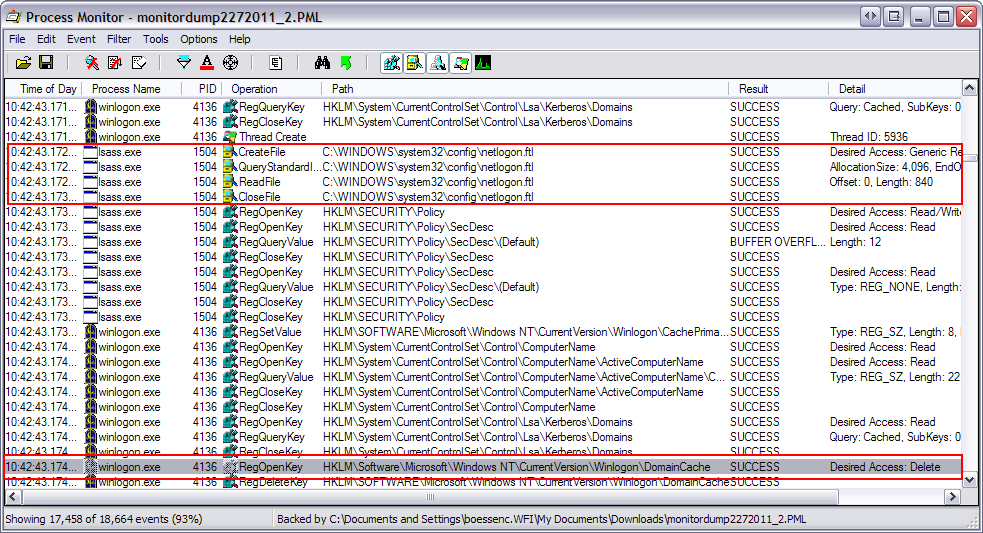
When it repopulated the DomainCache from netlogon.ftl, it deleted my CLINTY record.
What populates netlogon.ftl?
The netlogon.ftl file is populated from Active Directory by the netlogon service - I think this occurs when the system boots... but I'm not sure.
Where in Active Directory does netlogon.ftl populate from?
It the defaultNamingContext partition under the System container. It populates from the TrustedDomain object types.

You can also query this information using nltest or a VBScript:
nltest /domain_trusts

Here is a copy of the VB Script used in the above screenshot.
' This code prints the trusts for the specified domain.
' ------ SCRIPT CONFIGURATION ------
strDomain = "wfi.wan"
' ------ END CONFIGURATION ---------
' Trust Direction Constants taken from NTSecAPI.h
set objTrustDirectionHash = CreateObject("Scripting.Dictionary")
objTrustDirectionHash.Add "DIRECTION_DISABLED", 0
objTrustDirectionHash.Add "DIRECTION_INBOUND", 1
objTrustDirectionHash.Add "DIRECTION_OUTBOUND", 2
objTrustDirectionHash.Add "DIRECTION_BIDIRECTIONAL", 3
' Trust Type Constants - taken from NTSecAPI.h
set objTrustTypeHash = CreateObject("Scripting.Dictionary")
objTrustTypeHash.Add "TYPE_DOWNLEVEL", 1
objTrustTypeHash.Add "TYPE_UPLEVEL", 2
objTrustTypeHash.Add "TYPE_MIT", 3
objTrustTypeHash.Add "TYPE_DCE", 4
' Trust Attribute Constants - taken from NTSecAPI.h
set objTrustAttrHash = CreateObject("Scripting.Dictionary")
objTrustAttrHash.Add "ATTRIBUTES_NON_TRANSITIVE", 1
objTrustAttrHash.Add "ATTRIBUTES_UPLEVEL_ONLY", 2
objTrustAttrHash.Add "ATTRIBUTES_QUARANTINED_DOMAIN", 4
objTrustAttrHash.Add "ATTRIBUTES_FOREST_TRANSITIVE", 8
objTrustAttrHash.Add "ATTRIBUTES_CROSS_ORGANIZATION", 16
objTrustAttrHash.Add "ATTRIBUTES_WITHIN_FOREST", 32
objTrustAttrHash.Add "ATTRIBUTES_TREAT_AS_EXTERNAL", 64
set objRootDSE = GetObject("LDAP://" & strDomain & "/RootDSE")
set objTrusts = GetObject("LDAP://cn=System," & _
objRootDSE.Get("defaultNamingContext") )
objTrusts.Filter = Array("trustedDomain")
Wscript.Echo "Trusts for " & strDomain & ":"
for each objTrust in objTrusts
for each strFlag In objTrustDirectionHash.Keys
if objTrustDirectionHash(strFlag) = objTrust.Get("trustDirection") then
strTrustInfo = strTrustInfo & strFlag & " "
end If
next
for each strFlag In objTrustTypeHash.Keys
if objTrustTypeHash(strFlag) = objTrust.Get("trustType") then
strTrustInfo = strTrustInfo & strFlag & " "
end If
next
for each strFlag In objTrustAttrHash.Keys
if objTrustAttrHash(strFlag) = objTrust.Get("trustAttributes") then
strTrustInfo = strTrustInfo & strFlag & " "
end If
next
WScript.Echo " " & objTrust.Get("trustPartner") & " : " & strTrustInfo
strTrustInfo = ""
next
Disable SID Filtering - Access is denied.
I went and attempted to disable SID Filtering over some trust links to prepare for SID History during domain migration using the following command:
netdom trust TrustingDomainName /domain: TrustedDomainName /quarantine:No /userD: domainadministratorAcct /passwordD: domainadminpwd
http://technet.microsoft.com/en-us/library/cc772816.aspx
When doing this I got the following error (click to enlarge):

After research I found the cause. “Network access: Allow anonymous SID/name translation” was set to disabled on the Trusted Domain. This this should be enabled on domain controllers – please see http://technet.microsoft.com/en-us/library/cc728431.aspx.
To disable SID Filtering you must Enable anonymous SID/name translation on your Default Domain Controllers GPO for the Trusted Domain.
I set it to enabled. This policy is located under:
Computer Configuration\Windows Settings\Security Settings\Local Policies\Security Options\

After this the problem was resolved:

Note: Access is denied can also be caused if you use NetBIOS names instead of FQDN's for the domain names.
netdom trust TrustingDomainName /domain: TrustedDomainName /quarantine:No /userD: domainadministratorAcct /passwordD: domainadminpwd
http://technet.microsoft.com/en-us/library/cc772816.aspx
When doing this I got the following error (click to enlarge):

After research I found the cause. “Network access: Allow anonymous SID/name translation” was set to disabled on the Trusted Domain. This this should be enabled on domain controllers – please see http://technet.microsoft.com/en-us/library/cc728431.aspx.
To disable SID Filtering you must Enable anonymous SID/name translation on your Default Domain Controllers GPO for the Trusted Domain.
I set it to enabled. This policy is located under:
Computer Configuration\Windows Settings\Security Settings\Local Policies\Security Options\

After this the problem was resolved:

Note: Access is denied can also be caused if you use NetBIOS names instead of FQDN's for the domain names.
Monday, July 18, 2011
Microsoft Sync Toy - Perfect for Home Users
Today I stumbled across a fantastic little application called Sync Toy. Perfect for home users who want to backup data to a external drive on a regular basis, between computers or to mapped drive pointing to a cloud provider such as Windows Live.
SyncToy 2.1 is a free application that synchronizes files and folders between locations. Typical uses include sharing files, such as photos, with other computers and creating backup copies of files and folders.
It is so easy to use, I think my mum could do it.
Here I have setup synchronization of My Documents to my Microsoft Windows Live SkyDrive cloud account to ensure my documents are backed up at all times. This is a free service. This also allows me to sync the files down to any new computer I work on.
Z:\ is mapped to windows live cloud account.
Please click to enlarge:

As of this writing the latest version of SyncToy is 2.1. The x86 and x64 version is available from here:
http://www.microsoft.com/download/en/details.aspx?id=15155
Note: If you wish to setup a drive letter mapped to your Windows Live SkyDrive service please see the following link:
http://www.addictivetips.com/microsoft-office/map-local-drive-letter-to-live-skydrive-using-office-2010/
SyncToy 2.1 is a free application that synchronizes files and folders between locations. Typical uses include sharing files, such as photos, with other computers and creating backup copies of files and folders.
It is so easy to use, I think my mum could do it.
Here I have setup synchronization of My Documents to my Microsoft Windows Live SkyDrive cloud account to ensure my documents are backed up at all times. This is a free service. This also allows me to sync the files down to any new computer I work on.
Z:\ is mapped to windows live cloud account.
Please click to enlarge:

As of this writing the latest version of SyncToy is 2.1. The x86 and x64 version is available from here:
http://www.microsoft.com/download/en/details.aspx?id=15155
Note: If you wish to setup a drive letter mapped to your Windows Live SkyDrive service please see the following link:
http://www.addictivetips.com/microsoft-office/map-local-drive-letter-to-live-skydrive-using-office-2010/
Thursday, July 7, 2011
Bind to AD using Alternative Credentials VBS
Below is a VBS Script by MVP Richard L. Mueller which I found very useful. It shows you how to connect to Active Directory using alternative credentials.
Please view his original post here:
http://www.rlmueller.net/ADOAltCredentials.htm
Option Explicit
Dim objRootDSE, strDNSDomain, adoCommand, adoConnection
Dim strBase, strFilter, strAttributes, strQuery, adoRecordset
Dim strDN, strUser, strPassword, objNS, strServer
Const ADS_SECURE_AUTHENTICATION = &H1
Const ADS_SERVER_BIND = &H200
' Specify a server (Domain Controller).
strServer = "MyServer"
' Specify or prompt for credentials.
strUser = "MyDomain\TestUser"
strPassword = "xyz12345"
' Determine DNS domain name. Use server binding and alternate
' credentials. The value of strDNSDomain can also be hard coded.
Set objNS = GetObject("LDAP:")
Set objRootDSE = objNS.OpenDSObject("LDAP://" & strServer & "/RootDSE", _
strUser, strPassword, _
ADS_SERVER_BIND Or ADS_SECURE_AUTHENTICATION)
strDNSDomain = objRootDSE.Get("defaultNamingContext")
' Use ADO to search Active Directory.
' Use alternate credentials.
Set adoCommand = CreateObject("ADODB.Command")
Set adoConnection = CreateObject("ADODB.Connection")
adoConnection.Provider = "ADsDSOObject"
adoConnection.Properties("User ID") = strUser
adoConnection.Properties("Password") = strPassword
adoConnection.Properties("Encrypt Password") = True
adoConnection.Properties("ADSI Flag") = ADS_SERVER_BIND _
Or ADS_SECURE_AUTHENTICATION
adoConnection.Open "Active Directory Provider"
Set adoCommand.ActiveConnection = adoConnection
' Search entire domain. Use server binding.
strBase = "
' Search for all users.
strFilter = "(&(objectCategory=person)(objectClass=user))"
' Comma delimited list of attribute values to retrieve.
strAttributes = "distinguishedName"
' Construct the LDAP query.
strQuery = strBase & ";" & strFilter & ";" _
& strAttributes & ";subtree"
' Run the query.
adoCommand.CommandText = strQuery
adoCommand.Properties("Page Size") = 100
adoCommand.Properties("Timeout") = 30
adoCommand.Properties("Cache Results") = False
Set adoRecordset = adoCommand.Execute
' Enumerate the resulting recordset.
Do Until adoRecordset.EOF
' Retrieve values.
strDN = adoRecordset.Fields("distinguishedName").Value
Wscript.Echo strDN
adoRecordset.MoveNext
Loop
' Clean up.
adoRecordset.Close
adoConnection.Close
Please view his original post here:
http://www.rlmueller.net/ADOAltCredentials.htm
Option Explicit
Dim objRootDSE, strDNSDomain, adoCommand, adoConnection
Dim strBase, strFilter, strAttributes, strQuery, adoRecordset
Dim strDN, strUser, strPassword, objNS, strServer
Const ADS_SECURE_AUTHENTICATION = &H1
Const ADS_SERVER_BIND = &H200
' Specify a server (Domain Controller).
strServer = "MyServer"
' Specify or prompt for credentials.
strUser = "MyDomain\TestUser"
strPassword = "xyz12345"
' Determine DNS domain name. Use server binding and alternate
' credentials. The value of strDNSDomain can also be hard coded.
Set objNS = GetObject("LDAP:")
Set objRootDSE = objNS.OpenDSObject("LDAP://" & strServer & "/RootDSE", _
strUser, strPassword, _
ADS_SERVER_BIND Or ADS_SECURE_AUTHENTICATION)
strDNSDomain = objRootDSE.Get("defaultNamingContext")
' Use ADO to search Active Directory.
' Use alternate credentials.
Set adoCommand = CreateObject("ADODB.Command")
Set adoConnection = CreateObject("ADODB.Connection")
adoConnection.Provider = "ADsDSOObject"
adoConnection.Properties("User ID") = strUser
adoConnection.Properties("Password") = strPassword
adoConnection.Properties("Encrypt Password") = True
adoConnection.Properties("ADSI Flag") = ADS_SERVER_BIND _
Or ADS_SECURE_AUTHENTICATION
adoConnection.Open "Active Directory Provider"
Set adoCommand.ActiveConnection = adoConnection
' Search entire domain. Use server binding.
strBase = "
' Search for all users.
strFilter = "(&(objectCategory=person)(objectClass=user))"
' Comma delimited list of attribute values to retrieve.
strAttributes = "distinguishedName"
' Construct the LDAP query.
strQuery = strBase & ";" & strFilter & ";" _
& strAttributes & ";subtree"
' Run the query.
adoCommand.CommandText = strQuery
adoCommand.Properties("Page Size") = 100
adoCommand.Properties("Timeout") = 30
adoCommand.Properties("Cache Results") = False
Set adoRecordset = adoCommand.Execute
' Enumerate the resulting recordset.
Do Until adoRecordset.EOF
' Retrieve values.
strDN = adoRecordset.Fields("distinguishedName").Value
Wscript.Echo strDN
adoRecordset.MoveNext
Loop
' Clean up.
adoRecordset.Close
adoConnection.Close
List all OU's and Sub OU's using VBS
Simple Script to list all OU's and Sub OU's using a VBScript
On Error Resume Next
Const ADS_SCOPE_SUBTREE = 2
Set objConnection = CreateObject("ADODB.Connection")
Set objCommand = CreateObject("ADODB.Command")
objConnection.Provider = "ADsDSOObject"
objConnection.Open "Active Directory Provider"
Set objCommand.ActiveConnection = objConnection
objCommand.Properties("Page Size") = 1000
objCommand.Properties("Searchscope") = ADS_SCOPE_SUBTREE
objCommand.CommandText = _
"SELECT Name FROM 'LDAP://ou=finance,dc=fabrikam,dc=com' WHERE objectCategory='user'"
Set objRecordSet = objCommand.Execute
objRecordSet.MoveFirst
Do Until objRecordSet.EOF
Wscript.Echo objRecordSet.Fields("Name").Value
objRecordSet.MoveNext
Loop
On Error Resume Next
Const ADS_SCOPE_SUBTREE = 2
Set objConnection = CreateObject("ADODB.Connection")
Set objCommand = CreateObject("ADODB.Command")
objConnection.Provider = "ADsDSOObject"
objConnection.Open "Active Directory Provider"
Set objCommand.ActiveConnection = objConnection
objCommand.Properties("Page Size") = 1000
objCommand.Properties("Searchscope") = ADS_SCOPE_SUBTREE
objCommand.CommandText = _
"SELECT Name FROM 'LDAP://ou=finance,dc=fabrikam,dc=com' WHERE objectCategory='user'"
Set objRecordSet = objCommand.Execute
objRecordSet.MoveFirst
Do Until objRecordSet.EOF
Wscript.Echo objRecordSet.Fields("Name").Value
objRecordSet.MoveNext
Loop
Wednesday, July 6, 2011
The replication scope could not be set. For more information, see "DNS zone replication in Active Directory
When configuring the DNS zones to replicate to all domains in the forest, instead of all domains just in the current domain the following error was experianced:
"The replication scope could not be set. For more information, see "DNS zone replication in Active Directory" in Help and Support. The error was:
There was a server failure.
To understand where DNS is stored in Active Directory please see:
http://clintboessen.blogspot.com/2010/02/active-directory-dns-zone-locations.html
When trying to connect to the DNS Domain Partition Zone using ADSI Edit (following the above article) the following error was received:
Operation failed. Error code: 0x202b
A referral was returned from the server.
0000202B: RefErr: DSID-03100742, data 0, 1 access points
ref 1 : 'DomainDnsZones.domain.local'

It turned out that the partitions "DomainDNSZones" and "ForestDNSZones" were a lost cause. To fix this you need to perform the following steps:
1. use NTDSUtil to remove the replicas for both ForestDNSZone and DomainDNSZone. Wait for replication. Verify the changes took place then delete each of the partitions.
2. After the deletion has processed to all domain controllers, go into DNS Management and change the Zone to Forest Level/Domain Level. Active Directory will automatically recreate the partition within Active Directory. These new AD application partitions will automatically replicate to all DNS servers. These will then be accessible through ADSI Edit.
It may take over 30 minutes to get to synchronise the DNS zone around - AD is very slow when it comes to DNS.
After this no errors are showing up in the DNS or Active Directory event logs, diagnostics come back clean.
"The replication scope could not be set. For more information, see "DNS zone replication in Active Directory" in Help and Support. The error was:
There was a server failure.
To understand where DNS is stored in Active Directory please see:
http://clintboessen.blogspot.com/2010/02/active-directory-dns-zone-locations.html
When trying to connect to the DNS Domain Partition Zone using ADSI Edit (following the above article) the following error was received:
Operation failed. Error code: 0x202b
A referral was returned from the server.
0000202B: RefErr: DSID-03100742, data 0, 1 access points
ref 1 : 'DomainDnsZones.domain.local'

It turned out that the partitions "DomainDNSZones" and "ForestDNSZones" were a lost cause. To fix this you need to perform the following steps:
1. use NTDSUtil to remove the replicas for both ForestDNSZone and DomainDNSZone. Wait for replication. Verify the changes took place then delete each of the partitions.
2. After the deletion has processed to all domain controllers, go into DNS Management and change the Zone to Forest Level/Domain Level. Active Directory will automatically recreate the partition within Active Directory. These new AD application partitions will automatically replicate to all DNS servers. These will then be accessible through ADSI Edit.
It may take over 30 minutes to get to synchronise the DNS zone around - AD is very slow when it comes to DNS.
After this no errors are showing up in the DNS or Active Directory event logs, diagnostics come back clean.
ILM Sample Code PrepareMoveRequest Exchange 2010 Cross Forest Mailbox Moves - Multi Forest
Microsoft Identity Lifecycle Manager Service Pack 1 Feature Pack 1 (ILM 2007 SP1 FP1) can be used to pre-stage the user accounts with the appropriate attributes in a destination forest for cross-forest mailbox moves The out of the box GALSync MA cannot be used since it creates contact object instead of user object required for Online Mailbox Move. Microsoft has provided a sample code extension for the management agents to perform this which can be downloaded from:
http://www.microsoft.com/download/en/details.aspx?id=17741
The ILM sample code demonstrates how to sync source mailbox as Mail Enabled Users (MEU).
The problem with this sample code is was only designed for migration between two forests. My customer wishes to pre-stage user accounts from 2 forests into a new forest meaning I have two source forests! In the OneWaySync.xml file by default we have:
<?xml version="1.0" encoding="utf-8" ?>
<config>
<TargetOU>ou=MaiLboxmoves,DC=targetdom,DC=exchange,DC=contoso,DC=com</TargetOU>
<SourceMAName>Source Forest</SourceMAName>
<TargetMAName>Target Forest</TargetMAName>
</config>
I worked with a Microsoft FIM (Forefront Identity Manager) expert named Tracy Yu and together we made changes to the sample code and recompiled a new DLL to account for multiple source forests.
The file we needed to edit was Microsoft.Exchange.Sample.OneWayGALSync.MVRules.dll. The source code for this file is located under the solution folder under the sample ILM sample code package in a file named Microsoft.Exchange.Sample.OneWayGALSync.MVRules.cs. Here is our new code - in red are any changes made:
// ---------------------------------------------------------------------------
//
// Copyright (c) Microsoft Corporation. All rights reserved.
//
// ---------------------------------------------------------------------------
///
/// Example ILM 2007 Provisioning Rule to perform one-way cross-forest GAL synchronization
/// with required prerequisites for mailbox moves from source to target forests
///
using System;
using System.Xml;
using Microsoft.MetadirectoryServices;
namespace Microsoft.Exchange.Sample.OneWayGALSync.MVRules
{
public class MVExtensionObject : IMVSynchronization
{
// define variables for configuration setting
private string targetOU;
private string sourceMAName;
//add by tracy
private string sourceMAName1;
private string targetMAName;
public MVExtensionObject()
{
// No additional constructor logic required
}
void IMVSynchronization.Initialize()
{
// initialize the provisioning rules configuration parameters
// from config file in ILM Extensions directory
XmlDocument xmlConfigFile = new XmlDocument();
xmlConfigFile.Load(Utils.ExtensionsDirectory + "\\OneWaySync.xml");
XmlNode xmlConfig = xmlConfigFile.SelectSingleNode("config");
targetOU = xmlConfig.SelectSingleNode("TargetOU").InnerText.Trim();
sourceMAName = xmlConfig.SelectSingleNode("SourceMAName").InnerText.Trim();
targetMAName = xmlConfig.SelectSingleNode("TargetMAName").InnerText.Trim();
//add by tracy
sourceMAName1 = xmlConfig.SelectSingleNode("SourceMAName1").InnerText.Trim();
}
void IMVSynchronization.Terminate()
{
// No additional termination logic required
}
// For each Mailbox in the Source Forest Provision a connected
// Mail User object in the Target Forest.
void IMVSynchronization.Provision(MVEntry mventry)
{
// ConnectedMA sourceMA = mventry.ConnectedMAs[sourceMAName];
//ConnectedMA targetMA = mventry.ConnectedMAs[targetMAName];
//CSEntry csentry;
//modify by tracy
ConnectedMA targetMA = mventry.ConnectedMAs[targetMAName];
CSEntry csentry;
ConnectedMA sourceMA = null;
ConnectedMACollection MACols = mventry.ConnectedMAs;
foreach(ConnectedMA tmpMA in MACols)
{
if(tmpMA.Name == sourceMAName1)
{
sourceMA = mventry.ConnectedMAs[sourceMAName1];
}
else if (tmpMA.Name == targetMAName)
{
//did nothing
}
else
{
sourceMA = mventry.ConnectedMAs[sourceMAName];
}
}
// if the object has been deleted from Source Forest then delete it
// from Target Forest
if (sourceMA.Connectors.Count == 0)
{
targetMA.Connectors.DeprovisionAll();
return;
}
// This example provisioning rule excludes certain Exchange object types
if (sourceMA.Connectors.Count != 1 ||
!mventry["msExchHomeServerName"].IsPresent ||
!mventry["mailNickName"].IsPresent)
{
return;
}
ReferenceValue targetDN = targetMA.EscapeDNComponent("CN=" + mventry["cn"].Value).Concat(targetOU);
// check for Contacts in target forest that have to be converted to MEUs
for (int index = 0; index < targetMA.Connectors.Count; index++)
{
if (targetMA.Connectors.ByIndex[index].ObjectType.ToLower().Equals("contact"))
{
bool duplicateDN = targetMA.Connectors.ByIndex[index].DN.ToString().ToLower().Equals(targetDN.ToString().ToLower());
targetMA.Connectors.ByIndex[index].Deprovision();
if (duplicateDN)
return;
}
}
if (targetMA.Connectors.Count != 0)
return;
// provision a new AD User Object in the targetOU container
csentry = targetMA.Connectors.StartNewConnector("user");
csentry.DN = targetDN;
// provision the following minimal attributes on the new MailUser object
csentry["samAccountName"].Value = mventry["samAccountName"].Value;
csentry["msexchRecipientTypeDetails"].IntegerValue = 0x80;// MailUser
csentry["userAccountControl"].IntegerValue = 0x202; // ACCOUNTDISABLE | NORMAL_ACCOUNT
csentry["msexchRecipientDisplayType"].IntegerValue = -1073741818; // equivalent to *unsigned* 0xC0000006 i.e. ACL-able, Synced, MailUser
csentry["msExchMasterAccountSID"].Value = mventry["msExchMasterAccountSID"].IsPresent ? mventry["msExchMasterAccountSID"].Value : mventry["objectSID"].Value;
csentry["msExchMailboxGUID"].Value = mventry["msExchMailboxGUID"].Value;
csentry["mailNickname"].Value = mventry["mailNickname"].Value;
csentry["proxyAddresses"].Values = mventry["proxyAddresses"].Values;
csentry["proxyAddresses"].Values.Add("X500:" + mventry["legacyExchangeDN"].Value); // this ensures migrated mail that addresses this user is reply-able in target forest
csentry["msExchVersion"].IntegerValue = 44220983382016; // Set version to E14
csentry.CommitNewConnector();
}
bool IMVSynchronization.ShouldDeleteFromMV(CSEntry csentry, MVEntry mventry)
{
throw new EntryPointNotImplementedException();
}
}
}
Now when we can create two source domains in our OneWaySync.xml file for two source management agents.
<?xml version="1.0" encoding="utf-8" ?>
<config>
<TargetOU>ou=MaiLboxmoves,DC=targetdom,DC=exchange,DC=contoso,DC=com</TargetOU>
<SourceMAName>Source Forest 1</SourceMAName>
<SourceMAName1>Source Forest 2</SourceMAName1>
<TargetMAName>Target Forest</TargetMAName>
</config>
Thanks Tracy!
http://www.microsoft.com/download/en/details.aspx?id=17741
The ILM sample code demonstrates how to sync source mailbox as Mail Enabled Users (MEU).
The problem with this sample code is was only designed for migration between two forests. My customer wishes to pre-stage user accounts from 2 forests into a new forest meaning I have two source forests! In the OneWaySync.xml file by default we have:
<?xml version="1.0" encoding="utf-8" ?>
<config>
<TargetOU>ou=MaiLboxmoves,DC=targetdom,DC=exchange,DC=contoso,DC=com</TargetOU>
<SourceMAName>Source Forest</SourceMAName>
<TargetMAName>Target Forest</TargetMAName>
</config>
I worked with a Microsoft FIM (Forefront Identity Manager) expert named Tracy Yu and together we made changes to the sample code and recompiled a new DLL to account for multiple source forests.
The file we needed to edit was Microsoft.Exchange.Sample.OneWayGALSync.MVRules.dll. The source code for this file is located under the solution folder under the sample ILM sample code package in a file named Microsoft.Exchange.Sample.OneWayGALSync.MVRules.cs. Here is our new code - in red are any changes made:
// ---------------------------------------------------------------------------
//
// Copyright (c) Microsoft Corporation. All rights reserved.
//
// ---------------------------------------------------------------------------
///
/// Example ILM 2007 Provisioning Rule to perform one-way cross-forest GAL synchronization
/// with required prerequisites for mailbox moves from source to target forests
///
using System;
using System.Xml;
using Microsoft.MetadirectoryServices;
namespace Microsoft.Exchange.Sample.OneWayGALSync.MVRules
{
public class MVExtensionObject : IMVSynchronization
{
// define variables for configuration setting
private string targetOU;
private string sourceMAName;
//add by tracy
private string sourceMAName1;
private string targetMAName;
public MVExtensionObject()
{
// No additional constructor logic required
}
void IMVSynchronization.Initialize()
{
// initialize the provisioning rules configuration parameters
// from config file in ILM Extensions directory
XmlDocument xmlConfigFile = new XmlDocument();
xmlConfigFile.Load(Utils.ExtensionsDirectory + "\\OneWaySync.xml");
XmlNode xmlConfig = xmlConfigFile.SelectSingleNode("config");
targetOU = xmlConfig.SelectSingleNode("TargetOU").InnerText.Trim();
sourceMAName = xmlConfig.SelectSingleNode("SourceMAName").InnerText.Trim();
targetMAName = xmlConfig.SelectSingleNode("TargetMAName").InnerText.Trim();
//add by tracy
sourceMAName1 = xmlConfig.SelectSingleNode("SourceMAName1").InnerText.Trim();
}
void IMVSynchronization.Terminate()
{
// No additional termination logic required
}
// For each Mailbox in the Source Forest Provision a connected
// Mail User object in the Target Forest.
void IMVSynchronization.Provision(MVEntry mventry)
{
// ConnectedMA sourceMA = mventry.ConnectedMAs[sourceMAName];
//ConnectedMA targetMA = mventry.ConnectedMAs[targetMAName];
//CSEntry csentry;
//modify by tracy
ConnectedMA targetMA = mventry.ConnectedMAs[targetMAName];
CSEntry csentry;
ConnectedMA sourceMA = null;
ConnectedMACollection MACols = mventry.ConnectedMAs;
foreach(ConnectedMA tmpMA in MACols)
{
if(tmpMA.Name == sourceMAName1)
{
sourceMA = mventry.ConnectedMAs[sourceMAName1];
}
else if (tmpMA.Name == targetMAName)
{
//did nothing
}
else
{
sourceMA = mventry.ConnectedMAs[sourceMAName];
}
}
// if the object has been deleted from Source Forest then delete it
// from Target Forest
if (sourceMA.Connectors.Count == 0)
{
targetMA.Connectors.DeprovisionAll();
return;
}
// This example provisioning rule excludes certain Exchange object types
if (sourceMA.Connectors.Count != 1 ||
!mventry["msExchHomeServerName"].IsPresent ||
!mventry["mailNickName"].IsPresent)
{
return;
}
ReferenceValue targetDN = targetMA.EscapeDNComponent("CN=" + mventry["cn"].Value).Concat(targetOU);
// check for Contacts in target forest that have to be converted to MEUs
for (int index = 0; index < targetMA.Connectors.Count; index++)
{
if (targetMA.Connectors.ByIndex[index].ObjectType.ToLower().Equals("contact"))
{
bool duplicateDN = targetMA.Connectors.ByIndex[index].DN.ToString().ToLower().Equals(targetDN.ToString().ToLower());
targetMA.Connectors.ByIndex[index].Deprovision();
if (duplicateDN)
return;
}
}
if (targetMA.Connectors.Count != 0)
return;
// provision a new AD User Object in the targetOU container
csentry = targetMA.Connectors.StartNewConnector("user");
csentry.DN = targetDN;
// provision the following minimal attributes on the new MailUser object
csentry["samAccountName"].Value = mventry["samAccountName"].Value;
csentry["msexchRecipientTypeDetails"].IntegerValue = 0x80;// MailUser
csentry["userAccountControl"].IntegerValue = 0x202; // ACCOUNTDISABLE | NORMAL_ACCOUNT
csentry["msexchRecipientDisplayType"].IntegerValue = -1073741818; // equivalent to *unsigned* 0xC0000006 i.e. ACL-able, Synced, MailUser
csentry["msExchMasterAccountSID"].Value = mventry["msExchMasterAccountSID"].IsPresent ? mventry["msExchMasterAccountSID"].Value : mventry["objectSID"].Value;
csentry["msExchMailboxGUID"].Value = mventry["msExchMailboxGUID"].Value;
csentry["mailNickname"].Value = mventry["mailNickname"].Value;
csentry["proxyAddresses"].Values = mventry["proxyAddresses"].Values;
csentry["proxyAddresses"].Values.Add("X500:" + mventry["legacyExchangeDN"].Value); // this ensures migrated mail that addresses this user is reply-able in target forest
csentry["msExchVersion"].IntegerValue = 44220983382016; // Set version to E14
csentry.CommitNewConnector();
}
bool IMVSynchronization.ShouldDeleteFromMV(CSEntry csentry, MVEntry mventry)
{
throw new EntryPointNotImplementedException();
}
}
}
Now when we can create two source domains in our OneWaySync.xml file for two source management agents.
<?xml version="1.0" encoding="utf-8" ?>
<config>
<TargetOU>ou=MaiLboxmoves,DC=targetdom,DC=exchange,DC=contoso,DC=com</TargetOU>
<SourceMAName>Source Forest 1</SourceMAName>
<SourceMAName1>Source Forest 2</SourceMAName1>
<TargetMAName>Target Forest</TargetMAName>
</config>
Thanks Tracy!
stopped-error-limit
I was using ILM (Identity Lifecycle Manager) to synchronize users cross forest to prepare for cross-forest mailbox moves using the sample code provided by Microsoft. Please see:
http://www.microsoft.com/download/en/details.aspx?id=17741
I was synchronizing over 5000 users to the new forest. Synchronization was failing with stopped-error-limit.

I found out that MIIS / ILM and FIM only allow up to 5000 objects by default. You can change this with a DWORD in the registry which you create under HKLM\SYSTEM\CurrentControlSet\miisserver\Parameters. This is documented by Microsoft on KB2387673
I set my limit to 10,000 which resolved the problem.

http://www.microsoft.com/download/en/details.aspx?id=17741
I was synchronizing over 5000 users to the new forest. Synchronization was failing with stopped-error-limit.
I found out that MIIS / ILM and FIM only allow up to 5000 objects by default. You can change this with a DWORD in the registry which you create under HKLM\SYSTEM\CurrentControlSet\miisserver\Parameters. This is documented by Microsoft on KB2387673
I set my limit to 10,000 which resolved the problem.

Tuesday, June 28, 2011
Microsoft Office 2010 SP1 Released
Microsoft Office 2010 Service Pack 1 has now been officially released by Microsoft as of June 28th 2011.
The official KB for this release is 2460049
Download the 32bit version from here:
http://www.microsoft.com/downloads/details.aspx?FamilyId=9D2E1282-8B69-418B-AFA0-9F61239EC8BE
Download the 64bit version from here:
http://www.microsoft.com/downloads/details.aspx?FamilyId=E9F3C2D0-C321-4910-A4CE-B2F294B42D65
The official KB for this release is 2460049
Download the 32bit version from here:
http://www.microsoft.com/downloads/details.aspx?FamilyId=9D2E1282-8B69-418B-AFA0-9F61239EC8BE
Download the 64bit version from here:
http://www.microsoft.com/downloads/details.aspx?FamilyId=E9F3C2D0-C321-4910-A4CE-B2F294B42D65
Wednesday, June 22, 2011
WARNING: An unexpected error has occurred and a Watson dump is being generated: Failed to find the mailbox.
In this post I'm going to address a very common problem many new Exchange 2010 Administrators face.
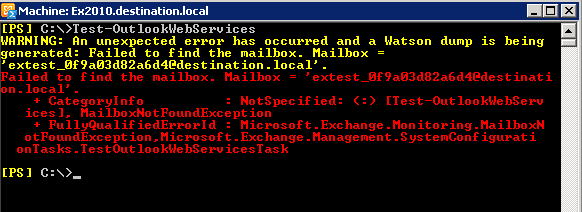
When running commands such as Test-OutlookWebServices on an Exchange 2010 CAS you will receive the following error:
[PS] C:\>Test-OutlookWebServices
WARNING: An unexpected error has occurred and a Watson dump is being generated: Failed to find the mailbox. Mailbox ='extest_0f9a03d82a6d4@destination.local'.
Failed to find the mailbox. Mailbox = 'extest_0f9a03d82a6d4@destination.local'.
+ CategoryInfo : NotSpecified: (:) [Test-OutlookWebServices], MailboxNotFoundException
+ FullyQualifiedErrorId : Microsoft.Exchange.Monitoring.MailboxNotFoundException,Microsoft.Exchange.Management.SystemConfigurationTasks.TestOutlookWebServicesTask

This is probally the first time you have run the Test command isn't it? In Exchange 2010 you need a test mailbox to perform tests with. This can be created using the new-TestCasConnectivityUser.ps1 powershell script Microsoft provides us with Exchange 2010.
All you need to do is navigate to the Scripts directory:
C:\Program Files\Microsoft\Exchange Server\V14\Scripts
Then run .\new-TestCasConnectivityUser.ps1
Provide the test mailbox a password when prompted...

Easy?
When running commands such as Test-OutlookWebServices on an Exchange 2010 CAS you will receive the following error:
[PS] C:\>Test-OutlookWebServices
WARNING: An unexpected error has occurred and a Watson dump is being generated: Failed to find the mailbox. Mailbox ='extest_0f9a03d82a6d4@destination.local'.
Failed to find the mailbox. Mailbox = 'extest_0f9a03d82a6d4@destination.local'.
+ CategoryInfo : NotSpecified: (:) [Test-OutlookWebServices], MailboxNotFoundException
+ FullyQualifiedErrorId : Microsoft.Exchange.Monitoring.MailboxNotFoundException,Microsoft.Exchange.Management.SystemConfigurationTasks.TestOutlookWebServicesTask
This is probally the first time you have run the Test command isn't it? In Exchange 2010 you need a test mailbox to perform tests with. This can be created using the new-TestCasConnectivityUser.ps1 powershell script Microsoft provides us with Exchange 2010.
All you need to do is navigate to the Scripts directory:
C:\Program Files\Microsoft\Exchange Server\V14\Scripts
Then run .\new-TestCasConnectivityUser.ps1
Provide the test mailbox a password when prompted...

Easy?
Monday, June 20, 2011
Error 49: ldap_simple_bind_s() failed: Invalid Credentials
I have setup a Windows Server 2008 R2 server running LDS. I have an LDS Instance running on 10001 (LDAP) and 20001 (LDAPS).
I added a user account using the following:
dn: CN=testaccount,CN=Users,DC=domain,DC=ADAM
changetype: add
objectClass: user
userPrincipalName: testaccount
cn: testaccount
displayName: My Test Account
userPassword: Passw0rd
Note: As the requirement for special formatting of unicodePwd has been lifted Microsoft has placed a default requirement to ensure all password operations are done through LDAPS instead of LDAP. To allow password operations through LDAP please see:
http://clintboessen.blogspot.com/2011/06/0x2077-illegal-modify-operation-some.html
When I attempt to bind to this account using ldp.exe using "Simple Bind" over LDAP (not secure LDAP) using the following credentials I get an error:
username: CN=testaccount,CN=Users,DC=domain,DC=ADAM
password: Passw0rd
-----------
res = ldap_simple_bind_s(ld, 'CN=testaccount,CN=Users,DC=domain,DC=ADAM',); // v.3
Error <49>: ldap_simple_bind_s() failed: Invalid Credentials
Server error: 8009030C: LdapErr: DSID-0C0903A9, comment: AcceptSecurityContext error, data 2030, v1db0
Error 0x8009030C The logon attempt failed
-----------
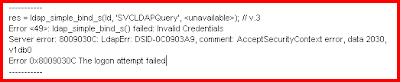
There were three things I needed to change to get this working.
Problem 1
I read from multiple places on the internet that by default when you associate a password to an account - the account is disabled. I also know that this error can be related to the user account being disabled - please see:
http://social.technet.microsoft.com/Forums/en-US/winserverDS/thread/44d29c43-4203-400a-bff4-c488da5c5f57/
However the attribute which sets the account password to disabled "msDS-UserAccountDisabled" was not associated with the user class object in the schema. AD LDS has a series of attributes to control a user account for items such as Account Lockout, Account Disabled, Password Never Expires, User Cannot Change Password etc. For a list of these attributes please see:
http://msdn.microsoft.com/en-us/library/aa772124.aspx
Note: Active Directory does not have these attributes, instead all these values are associated with an attribute called userAccountControl. This attribute has an integer set to it.. 512 is a normal account. To disable an account add a value of 2. In decimal, this is 514 (2 + 512). For more information on how this works in Active Directory please see: http://support.microsoft.com/kb/305144
To associate these attributes with the user class object you need to connect to the LDS Instance using the Active Directory Schema Console. If Active Directory Schema does not exist in your MMC snap-in list register it using "regsrv32 schmmgmt.dll" from command line.
Note: When connecting to your LDS Instance you cannot use localhost or it will fail. You must use the IP address of the LDS Instance. This is due to a code error in the Active Directory schema console, please see:
http://clintboessen.blogspot.com/2011/06/lds-active-directory-schema-status.html
Once connected to your LDS Instance in Active Directory Schema MMC snap-in go to the properties of the user class object and click the attributes tab.

As you see none of the msDS-User type class objects exist. Go ahead and add the following attributes:
- ms-DS-UserAccountAutoLocked
- msDS-UserAccountDisabled
- msDS-UserDontExpirePassword
- ms-DS-UserEncryptedTextPassword
- msDS-UserPasswordExpired
- ms-DS-UserPasswordNotRequired

After the attribute is added, restart your LDS Instance service and connect to the application partition in ADSIEdit containing your user account. Set the msDS-UserAccountDisabled to FALSE.

Problem 2
You must allow Simple Bind requests to an AD LDS Instance over standard LDAP. To do this connect to the configuration partition on your LDS Instance using ADSIEdit. My instance is listening on TCP 10001.

Navigate to:
CN=Directory Service,CN=Windows NT,CN=Services,CN=Configuration,CN={GUID}
Open the properties of Directory Service. Open the multivalued attribute msDS-Other-Settings. Ensure RequireSecureSimpleBind is set to 0. This will ensure that both LDAP and LDAPS connections are allowed to bind authentication to the LDS Instance.

Note: RequireSecureProxyBind is for userProxy class objects which perform bind proxy redirection.
Problem 3
The third problem related to the following TechNet article:
http://technet.microsoft.com/en-us/library/cc732460.aspx
This article states:
AD LDS does not include any default security principals. However, AD LDS does provide importable schema extensions that you can use to create users in AD LDS. Users that are created from these user classes can be used as security principals. In addition, you can make any object class in the AD LDS schema a security principal by adding the msDS-bindableobject auxiliary class and the unicodePwd attribute to the schema definition of an object class. Each AD LDS security principal must be assigned an account and password, which AD LDS uses for authentication.
To do this open up ADSIEdit and connect to the Schema partition of your LDS Instance.

Navigate to the CN=User class object in ADSIEdit under the Schema partition and open its properties.

As you see the msDS-bindableobject auxiliary class does not exist.

Add it to the list and click OK.

Restart the LDS Instance under the services MMC console.
Reset the user's password by connecting to the appropriate application partition in ADSIEdit, right clicking on the user and clicking Reset Password.
I was now ale to perform a simple bind to my LDS Instance using a LDS user account.
-----------
res = ldap_simple_bind_s(ld, 'CN=SVCLDAPQuery,CN=Users,DC=domain,DC=ADAM',); // v.3
Authenticated as: 'CN=SVCLDAPQuery,CN=Users,DC=domain,DC=ADAM'.
-----------

You can also do this using an LDIF file:
dn: CN=User,CN=Schema,CN=Configuration,DC=X
changetype: Modify
add: auxiliaryClass
auxiliaryClass: msDS-BindableObject
-
dn:
changetype: modify
add: schemaUpdateNow
schemaUpdateNow: 1
-
imported using (ignore line wraps below)
ldifde -i -f -s : -c
"CN=Schema,CN=Configuration,DC=X" #schemaNamingContext
Thanks to Lee Fight (Directory Services MVP) who assisted me in getting this working!
I added a user account using the following:
dn: CN=testaccount,CN=Users,DC=domain,DC=ADAM
changetype: add
objectClass: user
userPrincipalName: testaccount
cn: testaccount
displayName: My Test Account
userPassword: Passw0rd
Note: As the requirement for special formatting of unicodePwd has been lifted Microsoft has placed a default requirement to ensure all password operations are done through LDAPS instead of LDAP. To allow password operations through LDAP please see:
http://clintboessen.blogspot.com/2011/06/0x2077-illegal-modify-operation-some.html
When I attempt to bind to this account using ldp.exe using "Simple Bind" over LDAP (not secure LDAP) using the following credentials I get an error:
username: CN=testaccount,CN=Users,DC=domain,DC=ADAM
password: Passw0rd
-----------
res = ldap_simple_bind_s(ld, 'CN=testaccount,CN=Users,DC=domain,DC=ADAM',
Error <49>: ldap_simple_bind_s() failed: Invalid Credentials
Server error: 8009030C: LdapErr: DSID-0C0903A9, comment: AcceptSecurityContext error, data 2030, v1db0
Error 0x8009030C The logon attempt failed
-----------
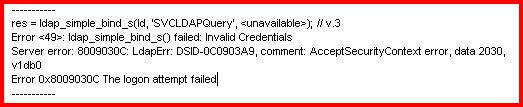
There were three things I needed to change to get this working.
Problem 1
I read from multiple places on the internet that by default when you associate a password to an account - the account is disabled. I also know that this error can be related to the user account being disabled - please see:
http://social.technet.microsoft.com/Forums/en-US/winserverDS/thread/44d29c43-4203-400a-bff4-c488da5c5f57/
However the attribute which sets the account password to disabled "msDS-UserAccountDisabled" was not associated with the user class object in the schema. AD LDS has a series of attributes to control a user account for items such as Account Lockout, Account Disabled, Password Never Expires, User Cannot Change Password etc. For a list of these attributes please see:
http://msdn.microsoft.com/en-us/library/aa772124.aspx
Note: Active Directory does not have these attributes, instead all these values are associated with an attribute called userAccountControl. This attribute has an integer set to it.. 512 is a normal account. To disable an account add a value of 2. In decimal, this is 514 (2 + 512). For more information on how this works in Active Directory please see: http://support.microsoft.com/kb/305144
To associate these attributes with the user class object you need to connect to the LDS Instance using the Active Directory Schema Console. If Active Directory Schema does not exist in your MMC snap-in list register it using "regsrv32 schmmgmt.dll" from command line.
Note: When connecting to your LDS Instance you cannot use localhost or it will fail. You must use the IP address of the LDS Instance. This is due to a code error in the Active Directory schema console, please see:
http://clintboessen.blogspot.com/2011/06/lds-active-directory-schema-status.html
Once connected to your LDS Instance in Active Directory Schema MMC snap-in go to the properties of the user class object and click the attributes tab.

As you see none of the msDS-User type class objects exist. Go ahead and add the following attributes:
- ms-DS-UserAccountAutoLocked
- msDS-UserAccountDisabled
- msDS-UserDontExpirePassword
- ms-DS-UserEncryptedTextPassword
- msDS-UserPasswordExpired
- ms-DS-UserPasswordNotRequired

After the attribute is added, restart your LDS Instance service and connect to the application partition in ADSIEdit containing your user account. Set the msDS-UserAccountDisabled to FALSE.

Problem 2
You must allow Simple Bind requests to an AD LDS Instance over standard LDAP. To do this connect to the configuration partition on your LDS Instance using ADSIEdit. My instance is listening on TCP 10001.

Navigate to:
CN=Directory Service,CN=Windows NT,CN=Services,CN=Configuration,CN={GUID}
Open the properties of Directory Service. Open the multivalued attribute msDS-Other-Settings. Ensure RequireSecureSimpleBind is set to 0. This will ensure that both LDAP and LDAPS connections are allowed to bind authentication to the LDS Instance.

Note: RequireSecureProxyBind is for userProxy class objects which perform bind proxy redirection.
Problem 3
The third problem related to the following TechNet article:
http://technet.microsoft.com/en-us/library/cc732460.aspx
This article states:
AD LDS does not include any default security principals. However, AD LDS does provide importable schema extensions that you can use to create users in AD LDS. Users that are created from these user classes can be used as security principals. In addition, you can make any object class in the AD LDS schema a security principal by adding the msDS-bindableobject auxiliary class and the unicodePwd attribute to the schema definition of an object class. Each AD LDS security principal must be assigned an account and password, which AD LDS uses for authentication.
To do this open up ADSIEdit and connect to the Schema partition of your LDS Instance.

Navigate to the CN=User class object in ADSIEdit under the Schema partition and open its properties.

As you see the msDS-bindableobject auxiliary class does not exist.

Add it to the list and click OK.
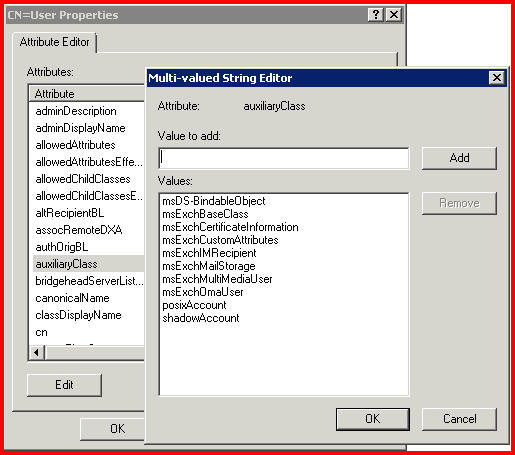
Restart the LDS Instance under the services MMC console.
Reset the user's password by connecting to the appropriate application partition in ADSIEdit, right clicking on the user and clicking Reset Password.
I was now ale to perform a simple bind to my LDS Instance using a LDS user account.
-----------
res = ldap_simple_bind_s(ld, 'CN=SVCLDAPQuery,CN=Users,DC=domain,DC=ADAM',); // v.3
Authenticated as: 'CN=SVCLDAPQuery,CN=Users,DC=domain,DC=ADAM'.
-----------

You can also do this using an LDIF file:
dn: CN=User,CN=Schema,CN=Configuration,DC=X
changetype: Modify
add: auxiliaryClass
auxiliaryClass: msDS-BindableObject
-
dn:
changetype: modify
add: schemaUpdateNow
schemaUpdateNow: 1
-
imported using (ignore line wraps below)
ldifde -i -f
"CN=Schema,CN=Configuration,DC=X" #schemaNamingContext
Thanks to Lee Fight (Directory Services MVP) who assisted me in getting this working!
Wednesday, June 15, 2011
Active Directory userAccountControl and LDS
Active Directory user accounts have an attribute called userAccountControl which is used to control items such as Account Lockout, Account Disabled, Password Never Expires, User Cannot Change Password etc. This is determined by an integer value... based on the value the system knows which options are enabled and which are disabled. The value 512 is the base value for all normal user accounts. To understand all integers that make this attribute work please refer to the following KB article.
http://support.microsoft.com/kb/305144
AD LDS (ADAM) does not support the userAccountControl attribute. Instead, AD LDS uses several individual attributes to hold the information that is contained in the flags of the userAccountControl attribute.
For a list of these attributes please refer to the following MSDN article:
http://msdn.microsoft.com/en-us/library/aa772124.aspx
Any userAccountControl flags that are not listed below are not supported by AD LDS.
http://support.microsoft.com/kb/305144
AD LDS (ADAM) does not support the userAccountControl attribute. Instead, AD LDS uses several individual attributes to hold the information that is contained in the flags of the userAccountControl attribute.
For a list of these attributes please refer to the following MSDN article:
http://msdn.microsoft.com/en-us/library/aa772124.aspx
Any userAccountControl flags that are not listed below are not supported by AD LDS.
0x2081 Multiple values were specified for an attribute
I'm trying to import the following LDIF file into an LDS Instance using LDIFDE.
dn: CN=SVCLDAPQuery,CN=Users,DC=testinstance,DC=ADAM
changetype: add
objectClass: user
userPrincipalName: SVCLDAPQuery
cn: Service Now LDAP Query
displayName: Service Now LDAP Query
userPassword: Passw0rd
I am performing the import with the following command:
ldifde -i -f SVCLDAPQuery.ldf -s localhost:10001
This command throws out the following errors:
Connecting to "localhost:10001"
Logging in as current user using SSPI
Importing directory from file "SVCLDAPQuery.ldf"
Loading entries.
Add error on entry starting on line 1: Invalid DN Syntax
The server side error is: 0x2081 Multiple values were specified for an attribute that can have only one value.
The extended server error is:
00002081: NameErr: DSID-03050C42, problem 2003 (BAD_ATT_SYNTAX), data 0, best match of:
'CN=SVCLDAPQuery,CN=Users,DC=testinstance,DC=ADAM'
0 entries modified successfully.
An error has occurred in the program
No log files were written. In order to generate a log file, please
specify the log file path via the -j option.

This occured because the "cn" attribute did not match the first part of the "distinguishedName" attribute. If we change this to:
dn: CN=SVCLDAPQuery,CN=Users,DC=testinstance,DC=ADAM
changetype: add
objectClass: user
userPrincipalName: SVCLDAPQuery
cn: SVCLDAPQuery
displayName: Service Now LDAP Query
userPassword: Passw0rd
The import will work correctly:

Please also see this problem as it is related:
http://clintboessen.blogspot.com/2011/06/0x2077-illegal-modify-operation-some.html
dn: CN=SVCLDAPQuery,CN=Users,DC=testinstance,DC=ADAM
changetype: add
objectClass: user
userPrincipalName: SVCLDAPQuery
cn: Service Now LDAP Query
displayName: Service Now LDAP Query
userPassword: Passw0rd
I am performing the import with the following command:
ldifde -i -f SVCLDAPQuery.ldf -s localhost:10001
This command throws out the following errors:
Connecting to "localhost:10001"
Logging in as current user using SSPI
Importing directory from file "SVCLDAPQuery.ldf"
Loading entries.
Add error on entry starting on line 1: Invalid DN Syntax
The server side error is: 0x2081 Multiple values were specified for an attribute that can have only one value.
The extended server error is:
00002081: NameErr: DSID-03050C42, problem 2003 (BAD_ATT_SYNTAX), data 0, best match of:
'CN=SVCLDAPQuery,CN=Users,DC=testinstance,DC=ADAM'
0 entries modified successfully.
An error has occurred in the program
No log files were written. In order to generate a log file, please
specify the log file path via the -j option.

This occured because the "cn" attribute did not match the first part of the "distinguishedName" attribute. If we change this to:
dn: CN=SVCLDAPQuery,CN=Users,DC=testinstance,DC=ADAM
changetype: add
objectClass: user
userPrincipalName: SVCLDAPQuery
cn: SVCLDAPQuery
displayName: Service Now LDAP Query
userPassword: Passw0rd
The import will work correctly:

Please also see this problem as it is related:
http://clintboessen.blogspot.com/2011/06/0x2077-illegal-modify-operation-some.html
0x2077 Illegal modify operation. Some aspect of the modification is not permitted.
I'm trying to import the following LDIF file into an LDS Instance using LDIFDE.
dn: CN=SVCLDAPQuery,CN=Users,DC=testinstance,DC=ADAM
changetype: add
objectClass: user
userPrincipalName: SVCLDAPQuery
userPassword: Passw0rd
Note: For ADAM, Microsoft enabled the userPassword attribute to function as a write-alias for unicodePwd and removed the requirement for the special formatting unicodePwd required. This allows your LDIF files to have clear-text passwords specified.
I am performing the import with the following command:
ldifde -i -f SVCLDAPQuery.ldf -s localhost:10001
This command throws out the following errors:
Connecting to "localhost:10001"
Logging in as current user using SSPI
Importing directory from file "SVCLDAPQuery.ldf"
Loading entries.
Add error on entry starting on line 1: Operations Error
The server side error is: 0x2077 Illegal modify operation. Some aspect of the modification is not permitted.
The extended server error is:
00002077: SvcErr: DSID-033807B5, problem 5012 (DIR_ERROR), data 8237
0 entries modified successfully.
An error has occurred in the program
No log files were written. In order to generate a log file, please
specify the log file path via the -j option.

As the requirement for special formatting of unicodePwd has been lifted Microsoft has placed a default requirement to ensure all password operations are done through LDAPS instead of LDAP. This is why it will not import the password!
To lift this requirement make the following change to the configuration partition of the instance:
Navigate to CN=Directory Service,CN=Windows NT,CN=Services,CN=Configuration,CN={GUID of the ADAM}
Edit dSHeuristics attribute and set value to 0000000001001

Now you can perform password operations without requiring LDAPS.
Please also see this problem as it is related:
http://clintboessen.blogspot.com/2011/06/0x2081-multiple-values-were-specified.html
dn: CN=SVCLDAPQuery,CN=Users,DC=testinstance,DC=ADAM
changetype: add
objectClass: user
userPrincipalName: SVCLDAPQuery
userPassword: Passw0rd
Note: For ADAM, Microsoft enabled the userPassword attribute to function as a write-alias for unicodePwd and removed the requirement for the special formatting unicodePwd required. This allows your LDIF files to have clear-text passwords specified.
I am performing the import with the following command:
ldifde -i -f SVCLDAPQuery.ldf -s localhost:10001
This command throws out the following errors:
Connecting to "localhost:10001"
Logging in as current user using SSPI
Importing directory from file "SVCLDAPQuery.ldf"
Loading entries.
Add error on entry starting on line 1: Operations Error
The server side error is: 0x2077 Illegal modify operation. Some aspect of the modification is not permitted.
The extended server error is:
00002077: SvcErr: DSID-033807B5, problem 5012 (DIR_ERROR), data 8237
0 entries modified successfully.
An error has occurred in the program
No log files were written. In order to generate a log file, please
specify the log file path via the -j option.

As the requirement for special formatting of unicodePwd has been lifted Microsoft has placed a default requirement to ensure all password operations are done through LDAPS instead of LDAP. This is why it will not import the password!
To lift this requirement make the following change to the configuration partition of the instance:
Navigate to CN=Directory Service,CN=Windows NT,CN=Services,CN=Configuration,CN={GUID of the ADAM}
Edit dSHeuristics attribute and set value to 0000000001001

Now you can perform password operations without requiring LDAPS.
Please also see this problem as it is related:
http://clintboessen.blogspot.com/2011/06/0x2081-multiple-values-were-specified.html
Monday, June 13, 2011
Ldap error occured. ldap_add_sW: Object Class Violation
I am performing ADAMSync from an Active Directory domain to an LDS Instance. My AD Domain Partition is called DC=Domain,DC=Local. My LDS Instance also has the same distinguished name of DC=Domain,DC=Local. When Syncing the following error is experienced:
Processing Entry: Page 18, Frame 1, Entry 48, Count 1, USN 0
Processing source entry
Processing in-scope entry 08080633da0dfe4f8b46508f00f2708f.
Adding target object CN=JoeBlow,OU=Disabled accounts,OU=IS Users,OU=IS,DC=Domain,DC=Local.
Adding attributes: sourceobjectguid, sn, title, description, physicalDeliveryOfficeName, telephoneNumber, givenName, instanceType, department, company, objectSid, sAMAccountName, lastagedchange, objectclass,
Ldap error occured. ldap_add_sW: Object Class Violation.
Extended Info: 0000207D: UpdErr: DSID-0315121C, problem 6002 (OBJ_CLASS_VIOLATION), data 19
.
Ldap error occured. ldap_add_sW: Object Class Violation.
Extended Info: 0000207D: UpdErr: DSID-0315121C, problem 6002 (OBJ_CLASS_VIOLATION), data 19
.
************
************
************ A fatal error occured in the program while processing entry
************ GUID=08080633da0dfe4f8b46508f00f2708f
************ The error will be ignored at user request. Continuing...
************
************
Below I will explain how to resolve this. I am syncing all User Objects from Active Directory to userProxy objects in LDS. This is required for single sign on (SSO). userProxy objects forward authentication bind requests to domain controllers which process the authentication request, pass it back to LDS then to the client.
To understand this in more detail please read my following blog post on the userProxy class:
http://clintboessen.blogspot.com/2011/04/userproxy-class-and-adam-lds.html
Here is a copy of my XML configuration file I installed into ADAMSync:
<?xml version="1.0"?>
<doc>
<configuration>
<!-- Sync File Description -->
<description>ADAMSync Configuration</description>
<security-mode>object</security-mode>
<!-- source-ad-name = fqdn of the domain controller -->
<source-ad-name>domaincontroller.domain.local</source-ad-name>
<!-- source-ad-partition = root AD domain partition -->
<source-ad-partition>dc=domain,dc=local</source-ad-partition>
<!-- source-ad-account = use this to specify an account to connect to AD -->
<!-- if not used, the current user will be used -->
<source-ad-account>ldapquery</source-ad-account>
<account-domain>domain</account-domain>
<!-- target-dn = target ADAM OU -->
<target-dn>dc=domain,dc=local</target-dn>
<query>
<!-- base-dn = should be the root AD partition if you want all users -->
<base-dn>dc=domain,dc=local</base-dn>
<!-- object-filter = standard ldap query format, this will grab all users -->
<!-- need to review results to see if you should modify this filter -->
<object-filter>(objectCategory=person)</object-filter>
<attributes>
<!-- include=userproxy requires objectSID to link back to the AD account -->
<include>objectSID</include>
<include>givenName</include>
<include>sn</include>
<include>description</include>
<include>title</include>
<include>company</include>
<include>department</include>
<include>mail</include>
<include>physicalDeliveryOfficeName</include>
<include>telephoneNumber</include>
<include>sAMAccountName</include>
</attributes>
</query>
<!-- map for user-to-userproxy object types -->
<user-proxy>
<source-object-class>user</source-object-class>
<target-object-class>userProxy</target-object-class>
</user-proxy>
<schedule>
<aging>
<frequency>0</frequency>
<num-objects>0</num-objects>
</aging>
<schtasks-cmd></schtasks-cmd>
</schedule>
</configuration>
<synchronizer-state>
<dirsync-cookie></dirsync-cookie>
<status></status>
<authoritative-adam-instance></authoritative-adam-instance>
<configuration-file-guid></configuration-file-guid>
<last-sync-attempt-time></last-sync-attempt-time>
<last-sync-success-time></last-sync-success-time>
<last-sync-error-time></last-sync-error-time>
<last-sync-error-string></last-sync-error-string>
<consecutive-sync-failures></consecutive-sync-failures>
<user-credentials></user-credentials>
<runs-since-last-object-update></runs-since-last-object-update>
<runs-since-last-full-sync></runs-since-last-full-sync>
</synchronizer-state>
</doc>
Notice the bits in bold. These are the attribute I want to Sync. I am also syncing these attributes FROM a user object TO a userProxy object. Let's use the "Active Directory Schema" mmc snap-in to look at the LDS Instance schema. To understand how to use "Active Directory Schema" mmc snap-in to connect to an LDS Instance please read:
http://technet.microsoft.com/en-us/library/cc816707.aspx
Your also going to probably run into this problem when connecting to the LDS Instance:
http://clintboessen.blogspot.com/2011/06/lds-active-directory-schema-status.html
In this environment I imported the following schema extensions MS-UserProxy.ldf, MS-AdamSyncMetadata.ldf, MS-AdamSchemaW2K8.ldf to my LDS Instance. In my Active Directory Schema if I look at my userProxy class object attribute association I have the following attributes associated:

However in my user class object I have the following attributes associated:

Can you pick the problem yet? I have asked ADAMSync to sync the following attributes FROM user class in Active Directory TO userProxy:
<attributes>
<!-- include=userproxy requires objectSID to link back to the AD account -->
<include>objectSID</include>
<include>givenName</include>
<include>sn</include>
<include>description</include>
<include>title</include>
<include>company</include>
<include>department</include>
<include>mail</include>
<include>physicalDeliveryOfficeName</include>
<include>telephoneNumber</include>
<include>sAMAccountName</include>
</attributes>
userProxy does not have these attributes associated. After I added these attributes to the userProxy class object all was fixed:

Processing Entry: Page 18, Frame 1, Entry 48, Count 1, USN 0
Processing source entry
Processing in-scope entry 08080633da0dfe4f8b46508f00f2708f.
Adding target object CN=JoeBlow,OU=Disabled accounts,OU=IS Users,OU=IS,DC=Domain,DC=Local.
Adding attributes: sourceobjectguid, sn, title, description, physicalDeliveryOfficeName, telephoneNumber, givenName, instanceType, department, company, objectSid, sAMAccountName, lastagedchange, objectclass,
Ldap error occured. ldap_add_sW: Object Class Violation.
Extended Info: 0000207D: UpdErr: DSID-0315121C, problem 6002 (OBJ_CLASS_VIOLATION), data 19
.
Ldap error occured. ldap_add_sW: Object Class Violation.
Extended Info: 0000207D: UpdErr: DSID-0315121C, problem 6002 (OBJ_CLASS_VIOLATION), data 19
.
************
************
************ A fatal error occured in the program while processing entry
************ GUID=08080633da0dfe4f8b46508f00f2708f
************ The error will be ignored at user request. Continuing...
************
************
Below I will explain how to resolve this. I am syncing all User Objects from Active Directory to userProxy objects in LDS. This is required for single sign on (SSO). userProxy objects forward authentication bind requests to domain controllers which process the authentication request, pass it back to LDS then to the client.
To understand this in more detail please read my following blog post on the userProxy class:
http://clintboessen.blogspot.com/2011/04/userproxy-class-and-adam-lds.html
Here is a copy of my XML configuration file I installed into ADAMSync:
<?xml version="1.0"?>
<doc>
<configuration>
<!-- Sync File Description -->
<description>ADAMSync Configuration</description>
<security-mode>object</security-mode>
<!-- source-ad-name = fqdn of the domain controller -->
<source-ad-name>domaincontroller.domain.local</source-ad-name>
<!-- source-ad-partition = root AD domain partition -->
<source-ad-partition>dc=domain,dc=local</source-ad-partition>
<!-- source-ad-account = use this to specify an account to connect to AD -->
<!-- if not used, the current user will be used -->
<source-ad-account>ldapquery</source-ad-account>
<account-domain>domain</account-domain>
<!-- target-dn = target ADAM OU -->
<target-dn>dc=domain,dc=local</target-dn>
<query>
<!-- base-dn = should be the root AD partition if you want all users -->
<base-dn>dc=domain,dc=local</base-dn>
<!-- object-filter = standard ldap query format, this will grab all users -->
<!-- need to review results to see if you should modify this filter -->
<object-filter>(objectCategory=person)</object-filter>
<attributes>
<!-- include=userproxy requires objectSID to link back to the AD account -->
<include>objectSID</include>
<include>givenName</include>
<include>sn</include>
<include>description</include>
<include>title</include>
<include>company</include>
<include>department</include>
<include>mail</include>
<include>physicalDeliveryOfficeName</include>
<include>telephoneNumber</include>
<include>sAMAccountName</include>
</attributes>
</query>
<!-- map for user-to-userproxy object types -->
<user-proxy>
<source-object-class>user</source-object-class>
<target-object-class>userProxy</target-object-class>
</user-proxy>
<schedule>
<aging>
<frequency>0</frequency>
<num-objects>0</num-objects>
</aging>
<schtasks-cmd></schtasks-cmd>
</schedule>
</configuration>
<synchronizer-state>
<dirsync-cookie></dirsync-cookie>
<status></status>
<authoritative-adam-instance></authoritative-adam-instance>
<configuration-file-guid></configuration-file-guid>
<last-sync-attempt-time></last-sync-attempt-time>
<last-sync-success-time></last-sync-success-time>
<last-sync-error-time></last-sync-error-time>
<last-sync-error-string></last-sync-error-string>
<consecutive-sync-failures></consecutive-sync-failures>
<user-credentials></user-credentials>
<runs-since-last-object-update></runs-since-last-object-update>
<runs-since-last-full-sync></runs-since-last-full-sync>
</synchronizer-state>
</doc>
Notice the bits in bold. These are the attribute I want to Sync. I am also syncing these attributes FROM a user object TO a userProxy object. Let's use the "Active Directory Schema" mmc snap-in to look at the LDS Instance schema. To understand how to use "Active Directory Schema" mmc snap-in to connect to an LDS Instance please read:
http://technet.microsoft.com/en-us/library/cc816707.aspx
Your also going to probably run into this problem when connecting to the LDS Instance:
http://clintboessen.blogspot.com/2011/06/lds-active-directory-schema-status.html
In this environment I imported the following schema extensions MS-UserProxy.ldf, MS-AdamSyncMetadata.ldf, MS-AdamSchemaW2K8.ldf to my LDS Instance. In my Active Directory Schema if I look at my userProxy class object attribute association I have the following attributes associated:

However in my user class object I have the following attributes associated:
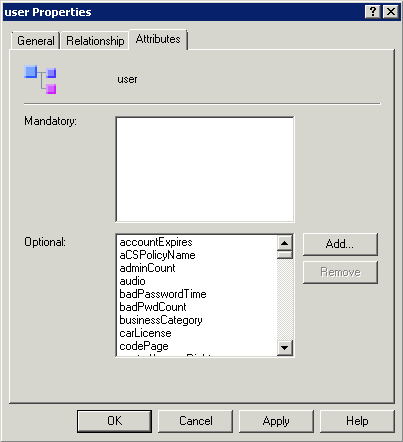
Can you pick the problem yet? I have asked ADAMSync to sync the following attributes FROM user class in Active Directory TO userProxy:
<attributes>
<!-- include=userproxy requires objectSID to link back to the AD account -->
<include>objectSID</include>
<include>givenName</include>
<include>sn</include>
<include>description</include>
<include>title</include>
<include>company</include>
<include>department</include>
<include>mail</include>
<include>physicalDeliveryOfficeName</include>
<include>telephoneNumber</include>
<include>sAMAccountName</include>
</attributes>
userProxy does not have these attributes associated. After I added these attributes to the userProxy class object all was fixed:

Subscribe to:
Posts (Atom)


