Thursday, March 31, 2011

OWA 2010 - You don't have permission to open this page

I just performed cross-forest migration of a number of mailboxes. Mailboxes come across as "linked" mailboxes linking to the account in the source forest. To link the mailboxes to the new user account in the destination forest I used the Disable-Mailbox command to unlink the mailbox from the old account followed by the Connect-Mailbox to link the mailbox to the new user account in the destination forest. Users who had been migrated across to the new forest had problems accessing "Options" in Outlook Web App.


Sorry! Access denied

You don't have permission to open this page. If you're a new user or were recently assigned credentials, please wait 15 minutes and try again. If the problem persists, contact your administrator.


I went and created a new mailbox user in the destination forest which I did not migrate. This worked fine. I went and compared attributes between my "test" mailbox account and "jim's" mailbox account.


There were a couple of differences. Jim's mailbox did not have a Role Assignment Policy. The RoleAssignmentPolicy parameter specifies the management role assignment policy to assign to the mailbox when it's created or enabled. If you don't include this parameter when you create or enable a mailbox, the default assignment policy is used. All mailboxes must have at least the default policy! I set the default policy as follows on Jims account

Set-Mailbox "jim" -RoleAssignmentPolicy "Default Role Assignment Policy"

This resolved the problem!

List all Attributes on Active Directory Object

Below is an easy way to quickly identify all attributes on an AD Object using adFind.exe by Joe Richards.

adFind.exe -b "CN=Default Policy,CN=Recipient Policies,CN=Destination,CN=Microsoft Exchange,CN=Services,CN=Configuration,DC=destination,DC=local"

Wednesday, March 30, 2011

An unknown error occurred, error code: 0x80070057

I'm performing a cross-forest migration using Prepare-MoveRequest.ps1, Identity Lifecycle Manager and Active Directory Migration Tool.

After a windows 7 PC was migrated to the new forest the user account and his mailbox, Outlook 2010 continued to reference the old Exchange 2003 servers which were failing to refer the user to the new Exchange 2010 servers in the new forest.


I created an Outlook PRF file with the following configuration:

[General]
Custom=1
ProfileName=Outlook
DefaultProfile=Yes
OverwriteProfile=Yes
ModifyDefaultProfileIfPresent=TRUE

[Service List]
;ServiceX=Microsoft Outlook Client
ServiceEGS1=Exchange Global Section
Service1=Microsoft Exchange Server

[ServiceEGS1]
MailboxName=%UserName%
HomeServer=ex2010.destination.local
AccountName=%UserName%
ConfigFlags=0x00000100

[Service1]
OverwriteExistingService=Yes
UniqueService=No
MailboxName=%UserName%
HomeServer=ex2010.destination.local


I attempted to import the PRF into Outlook 2010 using the following command:

outlook.exe /importprf path:C:\outlook.prf

During the import the following error was experienced:

An unknown error occurred, error code: 0x80070057


This turns out to be a bug with Outlook 2010 importing PRF files. I found this on knowledge base 2028193.

http://support.microsoft.com/kb/2028193

After installing the following hotfix my problem was resolved:

http://support.microsoft.com/default.aspx?scid=kb;en-US;2281463

Sunday, March 27, 2011

ADMT Error 0x80004005

I was performing an Active Directory Migration from a Windows Server 2008 DFL/FFL forest with Exchange 2003 to a Windows Server 2008 R2 DFL/FFL forest with Exchange 2010. During the migration I got the following error:

2011-03-28 14:42:03 Unable to store default excluded system properties in database. Unspecified error (0x80004005)
2011-03-28 14:42:03 The following system properties will be excluded:
2011-03-28 14:42:03 mail,proxyAddresses,msDS-PSOApplied,msDS-HostServiceAccount,altRecipient,
2011-03-28 14:42:03 altRecipientBL,attributeCertificate,attributeCertificateAttribute,audio,authOrig,
2011-03-28 14:42:03 authOrigBL,autoReply,autoReplyMessage,businessRoles,carLicense,dLMemDefault,
2011-03-28 14:42:03 dLMemRejectPerms,dLMemRejectPermsBL,dLMemSubmitPerms,dLMemSubmitPermsBL,
2011-03-28 14:42:03 dLMemberRule,deletedItemFlags,delivContLength,delivExtContTypes,
2011-03-28 14:42:03 deliverAndRedirect,deliveryMechanism,departmentNumber,dnQualifier,employeeNumber,
2011-03-28 14:42:03 employeeType,enabledProtocols,expirationTime,extensionAttribute1,
2011-03-28 14:42:03 extensionAttribute10,extensionAttribute11,extensionAttribute12,
2011-03-28 14:42:03 extensionAttribute13,extensionAttribute14,extensionAttribute15,
2011-03-28 14:42:03 extensionAttribute2,extensionAttribute3,extensionAttribute4,extensionAttribute5,
2011-03-28 14:42:03 extensionAttribute6,extensionAttribute7,extensionAttribute8,extensionAttribute9,
2011-03-28 14:42:03 extensionData,folderPathname,formData,forwardingAddress,gecos,gidNumber,
2011-03-28 14:42:03 heuristics,hideDLMembership,homeMDB,homeMTA,homePostalAddress,houseIdentifier,
2011-03-28 14:42:03 importedFrom,internetEncoding,ipHostNumber,jpegPhoto,kMServer,labeledURI,
2011-03-28 14:42:03 language,languageCode,logRolloverInterval,loginShell,mAPIRecipient,
2011-03-28 14:42:03 mDBOverHardQuotaLimit,mDBOverQuotaLimit,mDBStorageQuota,mDBUseDefaults,
2011-03-28 14:42:03 mailNickname,memberUid,monitoredConfigurations,monitoredServices,
2011-03-28 14:42:03 monitoringAvailabilityStyle,monitoringAvailabilityWindow,monitoringCachedViaMail,
2011-03-28 14:42:03 monitoringCachedViaRPC,monitoringMailUpdateInterval,monitoringMailUpdateUnits,
2011-03-28 14:42:03 monitoringRPCUpdateInterval,monitoringRPCUpdateUnits,msDFSR-ComputerReferenceBL,
2011-03-28 14:42:03 msDFSR-MemberReferenceBL,msDS-ObjectReferenceBL,msDS-SourceObjectDN,
2011-03-28 14:42:03 msExchADCGlobalNames,msExchALObjectVersion,
2011-03-28 14:42:03 msExchAggregationSubscriptionCredential,msExchAlternateMailboxes,
2011-03-28 14:42:03 msExchApprovalApplicationLink,msExchArbitrationMailbox,msExchArchiveDatabaseBL,
2011-03-28 14:42:03 msExchArchiveDatabaseLink,msExchArchiveGUID,msExchArchiveName,msExchArchiveQuota,
2011-03-28 14:42:03 msExchArchiveWarnQuota,msExchAssistantName,msExchAvailabilityOrgWideAccountBL,
2011-03-28 14:42:03 msExchAvailabilityPerUserAccountBL,msExchBlockedSendersHash,
2011-03-28 14:42:03 msExchBypassModerationBL,msExchBypassModerationFromDLMembersBL,
2011-03-28 14:42:03 msExchBypassModerationFromDLMembersLink,msExchBypassModerationLink,msExchCU,
2011-03-28 14:42:03 msExchCalendarRepairDisabled,msExchCoManagedByLink,msExchCoManagedObjectsBL,
2011-03-28 14:42:03 msExchConferenceMailboxBL,msExchConfigurationUnitBL,
2011-03-28 14:42:03 msExchContentConversionSettings,msExchControllingZone,msExchCustomProxyAddresses,
2011-03-28 14:42:03 msExchDelegateListBL,msExchDelegateListLink,msExchDeviceAccessControlRuleBL,
2011-03-28 14:42:03 msExchDirsyncID,msExchDumpsterQuota,msExchDumpsterWarningQuota,
2011-03-28 14:42:03 msExchELCExpirySuspensionEnd,msExchELCExpirySuspensionStart,
2011-03-28 14:42:03 msExchELCMailboxFlags,msExchEdgeSyncCookies,msExchEdgeSyncRetryCount,
2011-03-28 14:42:03 msExchEdgeSyncSourceGuid,msExchEnableModeration,msExchExchangeServerLink,
2011-03-28 14:42:03 msExchExpansionServerName,msExchExternalOOFOptions,msExchExternalSyncState,
2011-03-28 14:42:03 msExchFBURL,msExchForeignGroupSID,msExchGroupDepartRestriction,
2011-03-28 14:42:03 msExchGroupJoinRestriction,msExchHABShowInDepartments,msExchHideFromAddressLists,
2011-03-28 14:42:03 msExchHomeServerName,msExchHouseIdentifier,msExchIMACL,msExchIMAP4Settings,
2011-03-28 14:42:03 msExchIMAPOWAURLPrefixOverride,msExchIMAddress,msExchIMMetaPhysicalURL,
2011-03-28 14:42:03 msExchIMPhysicalURL,msExchIMVirtualServer,msExchImmutableId,
2011-03-28 14:42:03 msExchInconsistentState,msExchIntendedMailboxPlanBL,
2011-03-28 14:42:03 msExchIntendedMailboxPlanLink,msExchLabeledURI,msExchLicenseToken,
2011-03-28 14:42:03 msExchMDBRulesQuota,msExchMailboxFolderSet,msExchMailboxGuid,
2011-03-28 14:42:03 msExchMailboxMoveBatchName,msExchMailboxMoveFlags,
2011-03-28 14:42:03 msExchMailboxMoveRemoteHostName,msExchMailboxMoveSourceMDBBL,
2011-03-28 14:42:03 msExchMailboxMoveSourceMDBLink,msExchMailboxMoveStatus,
2011-03-28 14:42:03 msExchMailboxMoveTargetMDBBL,msExchMailboxMoveTargetMDBLink,
2011-03-28 14:42:03 msExchMailboxOABVirtualDirectoriesLink,msExchMailboxPlanType,
2011-03-28 14:42:03 msExchMailboxSecurityDescriptor,msExchMailboxTemplateLink,msExchMailboxUrl,
2011-03-28 14:42:03 msExchManagementSettings,msExchMasterAccountHistory,msExchMasterAccountSid,
2011-03-28 14:42:03 msExchMaxBlockedSenders,msExchMaxSafeSenders,msExchMessageHygieneFlags,
2011-03-28 14:42:03 msExchMessageHygieneSCLDeleteThreshold,msExchMessageHygieneSCLJunkThreshold,
2011-03-28 14:42:03 msExchMessageHygieneSCLQuarantineThreshold,
2011-03-28 14:42:03 msExchMessageHygieneSCLRejectThreshold,msExchMobileAllowedDeviceIDs,
2011-03-28 14:42:03 msExchMobileBlockedDeviceIDs,msExchMobileDebugLogging,msExchMobileMailboxFlags,
2011-03-28 14:42:03 msExchMobileMailboxPolicyLink,msExchMobileRemoteDocumentsAllowedServersBL,
2011-03-28 14:42:03 msExchMobileRemoteDocumentsBlockedServersBL,
2011-03-28 14:42:03 msExchMobileRemoteDocumentsInternalDomainSuffixListBL,msExchMobileSettings,
2011-03-28 14:42:03 msExchModeratedByLink,msExchModeratedObjectsBL,msExchModerationFlags,
2011-03-28 14:42:03 msExchOURoot,msExchOWAAllowedFileTypesBL,msExchOWAAllowedMimeTypesBL,
2011-03-28 14:42:03 msExchOWABlockedFileTypesBL,msExchOWABlockedMIMETypesBL,
2011-03-28 14:42:03 msExchOWAForceSaveFileTypesBL,msExchOWAForceSaveMIMETypesBL,msExchOWAPolicy,
2011-03-28 14:42:03 msExchOWARemoteDocumentsAllowedServersBL,
2011-03-28 14:42:03 msExchOWARemoteDocumentsBlockedServersBL,
2011-03-28 14:42:03 msExchOWARemoteDocumentsInternalDomainSuffixListBL,msExchOWASettings,
2011-03-28 14:42:03 msExchOWATranscodingFileTypesBL,msExchOWATranscodingMimeTypesBL,
2011-03-28 14:42:03 msExchObjectCountQuota,msExchObjectID,msExchOmaAdminExtendedSettings,
2011-03-28 14:42:03 msExchOmaAdminWirelessEnable,msExchOrganizationsAddressBookRootsBL,
2011-03-28 14:42:03 msExchOrganizationsGlobalAddressListsBL,msExchOrganizationsTemplateRootsBL,
2011-03-28 14:42:03 msExchOriginatingForest,msExchPOP3Settings,msExchParentPlanBL,
2011-03-28 14:42:03 msExchParentPlanLink,msExchPfRootUrl,msExchPoliciesExcluded,
2011-03-28 14:42:03 msExchPoliciesIncluded,msExchPolicyEnabled,msExchPolicyList,
2011-03-28 14:42:03 msExchPolicyOptionList,msExchPreviousAccountSid,msExchPreviousHomeMDB,
2011-03-28 14:42:03 msExchProvisioningFlags,msExchProxyCustomProxy,msExchQueryBaseDN,
2011-03-28 14:42:03 msExchRBACPolicyBL,msExchRBACPolicyLink,msExchRMSComputerAccountsBL,
2011-03-28 14:42:03 msExchRMSComputerAccountsLink,msExchRecipLimit,msExchRecipientDisplayType,
2011-03-28 14:42:03 msExchRecipientTypeDetails,msExchRecipientValidatorCookies,
2011-03-28 14:42:03 msExchRequireAuthToSendTo,msExchResourceCapacity,msExchResourceDisplay,
2011-03-28 14:42:03 msExchResourceGUID,msExchResourceMetaData,msExchResourceProperties,
2011-03-28 14:42:03 msExchResourceSearchProperties,msExchRetentionComment,msExchRetentionURL,
2011-03-28 14:42:03 msExchSMTPReceiveDefaultAcceptedDomainBL,msExchSafeRecipientsHash,
2011-03-28 14:42:03 msExchSafeSendersHash,msExchSendAsAddresses,msExchSenderHintTranslations,
2011-03-28 14:42:03 msExchServerAdminDelegationBL,msExchServerAssociationBL,
2011-03-28 14:42:03 msExchServerAssociationLink,msExchServerSiteBL,msExchSetupStatus,
2011-03-28 14:42:03 msExchSharingPartnerIdentities,msExchSharingPolicyLink,msExchSignupAddresses,
2011-03-28 14:42:03 msExchSupervisionDLBL,msExchSupervisionDLLink,msExchSupervisionOneOffBL,
2011-03-28 14:42:03 msExchSupervisionOneOffLink,msExchSupervisionUserBL,msExchSupervisionUserLink,
2011-03-28 14:42:03 msExchSyncAccountsPolicyDN,msExchTUIPassword,msExchTUISpeed,msExchTUIVolume,
2011-03-28 14:42:03 msExchTextMessagingState,msExchThrottlingPolicyDN,msExchTransportInboundSettings,
2011-03-28 14:42:03 msExchTransportOutboundSettings,msExchTransportRecipientSettingsFlags,
2011-03-28 14:42:03 msExchUMAddresses,msExchUMAudioCodec,msExchUMAudioCodec2,msExchUMCallingLineIDs,
2011-03-28 14:42:03 msExchUMDtmfMap,msExchUMEnabledFlags,msExchUMEnabledFlags2,msExchUMFaxId,
2011-03-28 14:42:03 msExchUMListInDirectorySearch,msExchUMMailboxOVALanguage,
2011-03-28 14:42:03 msExchUMMaxGreetingDuration,msExchUMOperatorNumber,msExchUMPhoneProvider,
2011-03-28 14:42:03 msExchUMPinChecksum,msExchUMRecipientDialPlanLink,msExchUMServerWritableFlags,
2011-03-28 14:42:03 msExchUMSpokenName,msExchUMTemplateLink,msExchUnmergedAttsPt,msExchUseOAB,
2011-03-28 14:42:03 msExchUserAccountControl,msExchUserBL,msExchUserCulture,msExchVersion,
2011-03-28 14:42:03 msExchVoiceMailboxID,msExchWindowsLiveID,msRADIUS-FramedIpv6Route,
2011-03-28 14:42:03 msRADIUS-SavedFramedIpv6Route,msSFU30Aliases,msSFU30Name,msSFU30NisDomain,
2011-03-28 14:42:03 msSFU30PosixMember,msSFU30PosixMemberOf,networkAddress,nisMapName,
2011-03-28 14:42:03 oOFReplyToOriginator,otherMailbox,pOPCharacterSet,pOPContentFormat,personalPager,
2011-03-28 14:42:03 photo,preferredLanguage,promoExpiration,protocolSettings,publicDelegates,
2011-03-28 14:42:03 publicDelegatesBL,registeredAddress,replicatedObjectVersion,
2011-03-28 14:42:03 replicationSensitivity,replicationSignature,reportToOriginator,reportToOwner,
2011-03-28 14:42:03 roomNumber,secretary,securityProtocol,shadowExpire,shadowFlag,shadowInactive,
2011-03-28 14:42:03 shadowLastChange,shadowMax,shadowMin,shadowWarning,submissionContLength,
2011-03-28 14:42:03 supportedAlgorithms,targetAddress,telephoneAssistant,textEncodedORAddress,
2011-03-28 14:42:03 trackingLogPathName,type,uid,uidNumber,unauthOrig,unauthOrigBL,unixHomeDirectory,
2011-03-28 14:42:03 unixUserPassword,unmergedAtts,userPKCS12,userSMIMECertificate,
2011-03-28 14:42:03 x500uniqueIdentifier


This is due to the difference of the schema versions, some attributes are not migrated to target domain.

The system attribute exclusion list contains two attributes by default: mail and proxyAddresses. ADMT also reads the schema in the target domain. If the target domain schema is further extended, it adds any attributes to the list that are not part of the base schema. Attributes in this list are excluded from migration operations even if the attribute is not specified in the attribute exclusion list.

For more information about this see the article below "Migrating and Restructuring Active Directory Domains Using ADMT v3.1"

http://www.microsoft.com/downloads/details.aspx?familyid=6D710919-1BA5-41CA-B2F3-C11BCB4857AF&displaylang=en

The self-extracting zip file is part of a multidisk zip file

I require the hotfix Cumulative update package 4 for SQL Server 2008 documented under KB963036.

http://support.microsoft.com/kb/963036

I sent in a request for the hotfix, Microsoft emailed me the download link. I retreived the file 374964_intl_x64_zip.

When I run it and attempt to extract the archive I get the following message.

"The self-extracting zip file is part of a multidisk zip file. Please insert the last disk of the set."


I am given no option other then to press OK. When I press OK three times I get the following error:

"An error occured while unzipping. One or more files were not succesfully unzipped. The error code is 110."


I believe there may be something wrong with the hotfix. I contacted Microsoft using the appropriate Security Essentials portal for hotfix related problems.

https://support.microsoftsecurityessentials.com/Default.aspx

I will update this post when I hear back from Microsoft with the solution.

Resolution

I redownloaded the hotfix and it now works!

What's the difference between SSL Bridging and SSL Tunneling?

Many firewalls on the market support the concept of SSL Bridging and SSL Tunneling. Microsoft firewalls that support this functionality include:
- Internet Security and Acceleration (ISA)
- Forefront Threat Management Gateway (TMG)

What is the difference between SSL Bridging and SSL Tunneling?

SSL Bridging involves decrypting the traffic on the firewall, inspecting the HTML code and filtering it for malware and any content policies that may be applied. The traffic is then re-encrypted usually using a different certificate provided by an Internal Certificate Authority and passing it onto the end client.

SSL Tunneling involves relaying the traffic unmodified still encrypted with the digital certificate to the end client. No filtering can be applied when a router is configured with SSL Tunneling.

Some companies may not wish to have SSL Bridging configured. When dealing with sensitive traffic such as online banking, I for one would be very concerned if I saw the SSL traffic coming to me with a certificate from an Internal Certificate Authority!

Friday, March 25, 2011

Convert Octet String into Readable String

Below shows you how to view an users GUID in Windows Server 2003.

In Server 2003 all GUID attributes in Active Directory were displayed in ADSI edit as Octet values for each Active Directory object.


In Server 2008 ADSIedit GUID attributes are now displayed in a readable format.


If you only have Server 2003 how can you read the GUID on Active Directory objects? Use the following script, here we are finding the GUID of my user account on my KBOMB domain.

Set objUser = GetObject("LDAP://CN=Clint Boessen,OU=Internal,OU=Users,OU=KBOMB,DC=kbomb,DC=local")

arrbytGuid = objUser.objectGuid
strHexGuid = OctetToHexStr(arrbytGuid)
strGuid = HexGuidToGuidStr(strHexGuid)

Wscript.Echo "Guid in display format: " & strGuid

Function OctetToHexStr(arrbytOctet)
' Function to convert OctetString (byte array) to Hex string.

Dim k
OctetToHexStr = ""
For k = 1 To Lenb(arrbytOctet)
OctetToHexStr = OctetToHexStr _
& Right("0" & Hex(Ascb(Midb(arrbytOctet, k, 1))), 2)
Next
End Function

Function HexGuidToGuidStr(strGuid)
' Function to convert Hex Guid to display form.
Dim k

HexGuidToGuidStr = ""
For k = 1 To 4
HexGuidToGuidStr = HexGuidToGuidStr & Mid(strGuid, 9 - 2*k, 2)
Next
HexGuidToGuidStr = HexGuidToGuidStr & "-"
For k = 1 To 2
HexGuidToGuidStr = HexGuidToGuidStr & Mid(strGuid, 13 - 2*k, 2)
Next
HexGuidToGuidStr = HexGuidToGuidStr & "-"
For k = 1 To 2
HexGuidToGuidStr = HexGuidToGuidStr & Mid(strGuid, 17 - 2*k, 2)
Next
HexGuidToGuidStr = HexGuidToGuidStr & "-" & Mid(strGuid, 17, 4)
HexGuidToGuidStr = HexGuidToGuidStr & "-" & Mid(strGuid, 21)
End Function


When I run the visual basic script I get my GUID.


I also have code here for converting SID from octect, hex or binary to String values. This script was developed by a guy named Richard who is an MVP in Microsoft MVP Scripting and ADSI.

Option Explicit
Dim objUser

Set objUser = GetObject("LDAP://CN=Clint Boessen,OU=Internal,OU=Users,OU=KBOMB,DC=kbomb,DC=local")
Wscript.Echo ObjSidToStrSid(objUser.objectSid)

Function ObjSidToStrSid(arrSid)
' Function to convert OctetString (byte array) to Decimal string (SDDL) \Sid.
Dim strHex, strDec

strHex = OctetStrToHexStr(arrSid)
strDec = HexStrToDecStr(strHex)
ObjSidToStrSid = strDec
End Function ' ObjSidToStrSid

Function OctetStrToHexStr(arrbytOctet)
' Function to convert OctetString (byte array) to Hex string.
Dim k

OctetStrToHexStr = ""
For k = 1 To Lenb(arrbytOctet)
OctetStrToHexStr = OctetStrToHexStr _
& Right("0" & Hex(Ascb(Midb(arrbytOctet, k, 1))), 2)
Next
End Function ' OctetStrToHexStr

Function HexStrToDecStr(strSid)
' Function to convert Hex string Sid to Decimal string (SDDL) Sid.

' SID anatomy:
' Byte Position
' 0 : SID Structure Revision Level (SRL)
' 1 : Number of Subauthority/Relative Identifier
' 2-7 : Identifier Authority Value (IAV) [48 bits]
' 8-x : Variable number of Subauthority or Relative Identifier (RID) [32 bits]
'
' Example: '
' \Administrator
' Pos : 0 1 2 3 4 5 6 7 8 9 10 11 12 13 14 15 16 17 18 19 20 21 22 23 24 25 26 27
' Value: 01 05 00 00 00 00 00 05 15 00 00 00 06 4E 7D 7F 11 57 56 7A 04 11 C5 20 F4 01 00 00
' str : S- 1 -5 -21 -2138918406 -2052478737 -549785860 -500

Const BYTES_IN_32BITS = 4
Const SRL_BYTE = 0
Const IAV_START_BYTE = 2
Const IAV_END_BYTE = 7
Const RID_START_BYTE = 8
Const MSB = 3 'Most significant byte
Const LSB = 0 'Least significant byte

Dim arrbytSid, lngTemp, base, offset, i

ReDim arrbytSid(Len(strSid)/2 - 1)

' Convert hex string into integer array
For i = 0 To UBound(arrbytSid)
arrbytSid(i) = CInt("&H" & Mid(strSid, 2 * i + 1, 2))
Next

' Add SRL number
HexStrToDecStr = "S-" & arrbytSid(SRL_BYTE)

' Add Identifier Authority Value
lngTemp = 0
For i = IAV_START_BYTE To IAV_END_BYTE
lngTemp = lngTemp * 256 + arrbytSid(i)
Next
HexStrToDecStr = HexStrToDecStr & "-" & CStr(lngTemp)

' Add a variable number of 32-bit subauthority or
' relative identifier (RID) values.
' Bytes are in reverse significant order.
' i.e. HEX 01 02 03 04 => HEX 04 03 02 01
' = (((0 * 256 + 04) * 256 + 03) * 256 + 02) * 256 + 01
' = DEC 67305985
For base = RID_START_BYTE To UBound(arrbytSid) Step BYTES_IN_32BITS
lngTemp = 0
For offset = MSB to LSB Step -1
lngTemp = lngTemp * 256 + arrbytSid(base + offset)
Next
HexStrToDecStr = HexStrToDecStr & "-" & CStr(lngTemp)
Next
End Function ' HexStrToDecStr

Thursday, March 24, 2011

Datacenter Activation Coordination mode

In a scenario where the first datacenter contains two DAG members and the witness server, and the second datacenter contains two other DAG members. If the first datacenter loses power and you activate the DAG in the second datacenter (for example, by activating the alternate file share witness in the second datacenter), if the first datacenter is restored without network connectivity to the second datacenter, the DAG may enter a split brain syndrome.

Datacenter Activation Coordination (DAC) mode prevents split brain syndrome from occurring by including a protocol called Datacenter Activation Coordination Protocol (DACP). After a catastrophic failure, when the DAG recovers, it won't automatically mount databases even though the DAG has a quorum. Instead DACP is used to determine the current state of the DAG and whether Active Manager should attempt to mount the databases.

Datacenter Activation Coordination (DAC) mode is disabled by default.

Datacenter Activation Coordination (DAC) mode is disabled by default.
DACP was created to address this issue. Active Manager stores a bit in memory (either a 0 or a 1) that tells the DAG whether it's allowed to mount local databases that are assigned as active on the server. When a DAG is running in DAC mode (which would be any DAG with three or more members), each time Active Manager starts up the bit is set to 0, meaning it isn't allowed to mount databases. Because it's in DAC mode, the server must try to communicate with all other members of the DAG that it knows to get another DAG member to give it an answer as to whether it can mount local databases that are assigned as active to it. The answer comes in the form of the bit setting for other Active Managers in the DAG. If another server responds that its bit is set to 1, it means servers are allowed to mount databases, so the server starting up sets its bit to 1 and mounts its databases.

But when you recover from a primary datacenter power outage where the servers are recovered but WAN connectivity has not been restored, all of the DAG members in the primary datacenter will have a DACP bit value of 0; and therefore none of the servers starting back up in the recovered primary datacenter will mount databases, because none of them can communicate with a DAG member that has a DACP bit value of 1.

To enable DAC mode use the following powershell command:

Set-DatabaseAvailabilityGroup -Identity TOPHDAG01 -DatacenterActivationMode DagOnly


To view weather DAC mode is enabled you may run:

(Get-DatabaseAvailabilityGroup).DatacenterActivationMode

This will say either Off or DagOnly

Friday, March 11, 2011

Logon Script from Profile Tab Not Working

When specifying the logon script via the user account ensure you do not enter a full UNC path.

\\source.local\netlogon\logon.bat does not work.


logon.bat does does work.


The logon script field in the user account properties automatically points to the netlogon directory.

The publisher could not be verified.

When running scripts of network shares you may receive the following warning:

The publisher could not be verified. Are you sure you want to run this software?


This prevents the logon script from automatically running when a user logs into their workstation.

Create a group policy object and navigate to User Configuration --> Administrative Templates --> Windows Components --> Attachment Manager

Add "logon.bat" to the "Inclusion list for moderate risk file types" setting.


You can also use wild cards such as *.bat and comma's to separate entries.

Monday, March 7, 2011

Internet Explorer 9

As I'm a Microsoft Engineer I always put Microsoft products first. I use Internet Explorer 8.0 on my desktop PC and high performance laptops.

Being a IT geek I have a number of computers I use for different purposes. I purchased a Asus Eee PC netbook for when I'm on the go and want something light and portable (with a USB port) which rules out the iPad!

I installed Windows 7 Ultimate on the Eee PC netbook and set the windows theme to "Windows Classic" to provide best optimized performance.

My Eee PC only has a Intel Atom N450 @ 1.44GHz processor that delivers a performance score of 2.3 (pretty poor).


Internet Explorer 8.0 ran like a dog! Performing simple tasks such as utilizing Exchange 2010 Outlook Web App and Facebook continuously hung and become unresponsive. As a result I was forced to install Google Chrome - the performance difference between IE 8.0 and Chrome was amazing!

After just getting back from the MVP summit in Seattle I was speaking with some of the Internet Explorer 9 MVP's. They mentioned that Internet Explorer 9 was completely redesigned and now provides fantastic performance - even faster then Chrome! This I had to see for myself as I found it very hard to believe them (being IE junkies).

I just installed IE 9.0 RC on my Eee PC and yes it is amazingly fast (It is performing faster then Chrome!) If you have tried IE 9.0 Beta and were unimpressed I encourage you to try RC. Between the Internet Explorer 9 Beta and Internet Explorer 9 RC releases, over 2,000 changes have been made to improve browser performance for real customer scenarios.

Internet Explorer 9 RC starts faster, loads webpages faster, and allows you to interact with web pages faster than ever before. One thing I liked is it actually timed how long it took to load each of my browser Add-on's. I was then able to disable Add-on's such as Microsoft Corporation "Search Helper" which took 0.22 seconds to load. It prompted me to do this - making this very easy for end users!

The Site loading indicator is making sense now! Was very disappointed with previous versions.

However Microsoft failed to listen to the community on some key features. Internet Explorer 9 RC is still missing a Spell Checker - ahhg. This means you need to download a third party add-on to perform this functionality. A download manager would also be an awesome addition.

Microsoft have lead the way in terms of hardware acceleration for web browsing. Check out this comparison video comparing a web app which takes advantage of graphics acceleration (Chrome vs IE9).

http://www.youtube.com/watch?v=jhi70EJlw7w

IE9 is also compliant with all HTML5 standards.

I have now uninstalled Chrome from my Asus EeePC and I'm back on the Microsoft ship for web browsing on low performing devices.

The following URL's are comparison articles comparing the current web browsers on the market to Internet Explorer 9.

http://www.nirmaltv.com/2010/09/16/internet-explorer-9-vs-google-chrome-6-vs-firefox-4b/

http://news.softpedia.com/news/IE9-RC-vs-Chrome-10-9-vs-Opera-11-vs-Firefox-11-Performance-Comparison-183973.shtml

For benchmark tests refer to this blog post:
http://haxterslab.blogspot.com/2011/02/internet-explorer-9-rc-review.html

Feature Comparison:
http://windows.microsoft.com/en-US/internet-explorer/products/ie-9/compare-browsers

Friday, February 25, 2011

Language Pack Error when Attempting to Install Exchange 2010 Service Pack 1 Upgrade

While upgrading to Exchange 2010 Service Pack 1 you may receive the following error during the readiness check:

Language Prerequisites

Language packs are installed on this server and must be upgraded with the Exchange binaries. Please specify a language bundle with the upgrade operation.


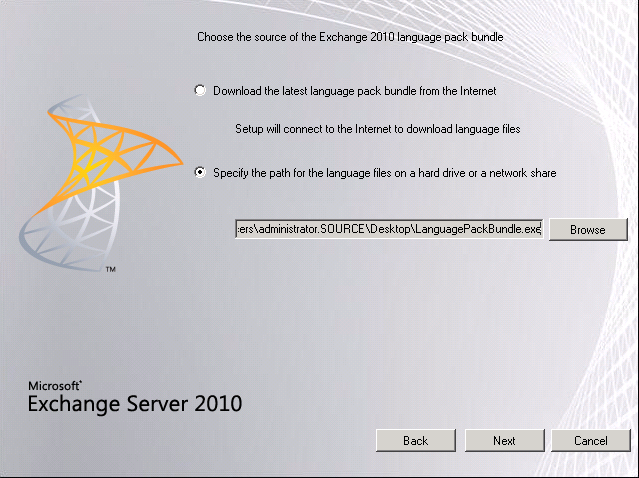
Download the language pack from the Microsoft website instead of using the one on the DVD:

http://www.microsoft.com/downloads/en/details.aspx?FamilyID=56C2AF38-A080-4CE1-8518-E63EE87F11C5

Run Exchange 2010 setup again. Click Upgrade all languages from the language bundle.


Set the path to the language bundle you downloaded from the Microsoft website.


Hit Finish


Now when setup runs it will pass...

Thursday, February 24, 2011

Wednesday, February 23, 2011

Migrating from Exchange 2003 to Exchange 2010

When upgrading to Exchange 2010 the first thing you must check is that your Exchange 2003 organisation is in Native mode. By default all Exchange 2003 installations are in mixed mode.

Exchange 2003 mixed mode allows 2003 to work with legacy Exchange 2000 servers.

Native mode does not allow Exchange 2000 servers and provides enhanced functionality. To understand the improvements in Exchange 2003 native mode please see the following article:

http://support.microsoft.com/kb/270143

If you have any Exchange 2000 servers you must remove them before being able to upgrade to Native mode.

To upgrade Exchange 2003 to native mode open system manager, right click the organisation (mines Test Lab) and click properties.


Click Change Mode to change to Native Mode.


Now you must prepare the legacy Exchange 2003 permissions. This ensures the Exchange 2003 Recipient Update Service functions correctly after you update the Active Directory schema for Exchange Server 2010. For more information on this please see:

http://technet.microsoft.com/en-us/library/aa997914.aspx

To do this run the following command of the Exchange 2010 media:

setup.com /PrepareLegacyExchangePermissions

Note you will get an error if you haven't upgraded Exchange 2003 to native mode:


Lastly prepare the schema and domain for Exchange 2010. You can do this by running the following command:

setup.com /PrepareAD

Congratulations you can now migrate to Exchange 2010

Monday, February 21, 2011

Microsoft Word 2010 Shading Fill Bug

I found today what appears to be a bug with the Shading tool in Microsoft Word 2010 when dealing with tables. The build of Microsoft Word I'm using is 14.0.5123.5000.

I'm running Windows 7 SP1 Enterprise x64. My installation of Office 2010 is 32bit.

My word document I'm working on is in docx format.

The problem comes around selecting an existing colour from a table.

Here i have my cursor in a light blue table:


To get the RGB color code I go to "Shading" --> "More Colors".


However its coming up with my current color as black (see bottom right). It comes up as black not light blue!


If I click OK it will make my cell black.


Now I undo my change (CTRL + Z).


Now I go back to "Shading" --> "More Colors"


My light blue color is now coming up correctly.


If I close my word document and re-open it, the problem does not re-occur.

If I log off my session and log back in, the problem re-occurs.

I reported this bug to Microsoft on the following forum thread:
http://social.technet.microsoft.com/Forums/en-US/word/thread/2f95341a-e0af-4a7b-b6dd-8d4fca54d939

Thursday, February 17, 2011

Eventid 4002, MSExchangeAvailability

I had a user experiencing Eventid 4002 from source MSExchangeAvailability under the application logs in event viewer. In the description field for the error the following was logged:

Process 9696: ProxyWebRequest CrossSite from S-1-1-0 to https://mail.example.com/ews/Exchange.asmx failed. Caller SIDs: NetworkCredentials. The exception returned is Microsoft.Exchange.InfoWorker.Common.Availability.ProxyWebRequestProcessingException: System.Net.WebException: Unable to connect to the remote server ---> System.Net.Sockets.SocketException: A connection attempt failed because the connected party did not properly respond after a period of time, or established connection failed because connected host has failed to respond 10.70.5.21:443

at System.Net.Sockets.Socket.EndConnect(IAsyncResult asyncResult)

at System.Net.ServicePoint.ConnectSocketInternal(Boolean connectFailure, Socket s4, Socket s6, Socket& socket, IPAddress& address, ConnectSocketState state, IAsyncResult asyncResult, Int32 timeout, Exception& exception)

--- End of inner exception stack trace ---

at System.Web.Services.Protocols.WebClientAsyncResult.WaitForResponse()

at System.Web.Services.Protocols.WebClientProtocol.EndSend(IAsyncResult asyncResult, Object& internalAsyncState, Stream& responseStream)

at System.Web.Services.Protocols.SoapHttpClientProtocol.EndInvoke(IAsyncResult asyncResult)

at Microsoft.Exchange.InfoWorker.Common.Availability.Proxy.Service.EndGetUserAvailability(IAsyncResult asyncResult)

at Microsoft.Exchange.InfoWorker.Common.Availability.FreeBusyApplication.EndProxyWebRequest(ProxyWebRequest proxyWebRequest, QueryList queryList, Service service, IAsyncResult asyncResult)

at Microsoft.Exchange.InfoWorker.Common.Availability.ProxyWebRequest.EndInvoke(IAsyncResult asyncResult)

at Microsoft.Exchange.InfoWorker.Common.Availability.AsyncWebRequest.EndInvokeWithErrorHandling():. The request information is ProxyWebRequest type = CrossSite, url = https://mail.example.com/ews/Exchange.asmx

Mailbox list = SMTP:Werner.Zelisko@brnet.de, Parameters: windowStart = 2/1/2011 12:00:00 AM, windowEnd = 4/1/2011 12:00:00 AM, MergedFBInterval = 30, RequestedView = FreeBusy

. ---> System.Net.WebException: Unable to connect to the remote server ---> System.Net.Sockets.SocketException: A connection attempt failed because the connected party did not properly respond after a period of time, or established connection failed because connected host has failed to respond 10.70.5.21:443

at System.Net.Sockets.Socket.EndConnect(IAsyncResult asyncResult)

at System.Net.ServicePoint.ConnectSocketInternal(Boolean connectFailure, Socket s4, Socket s6, Socket& socket, IPAddress& address, ConnectSocketState state, IAsyncResult asyncResult, Int32 timeout, Exception& exception)

--- End of inner exception stack trace ---

at System.Web.Services.Protocols.WebClientAsyncResult.WaitForResponse()

at System.Web.Services.Protocols.WebClientProtocol.EndSend(IAsyncResult asyncResult, Object& internalAsyncState, Stream& responseStream)

at System.Web.Services.Protocols.SoapHttpClientProtocol.EndInvoke(IAsyncResult asyncResult)

at Microsoft.Exchange.InfoWorker.Common.Availability.Proxy.Service.EndGetUserAvailability(IAsyncResult asyncResult)

at Microsoft.Exchange.InfoWorker.Common.Availability.FreeBusyApplication.EndProxyWebRequest(ProxyWebRequest proxyWebRequest, QueryList queryList, Service service, IAsyncResult asyncResult)

at Microsoft.Exchange.InfoWorker.Common.Availability.ProxyWebRequest.EndInvoke(IAsyncResult asyncResult)

at Microsoft.Exchange.InfoWorker.Common.Availability.AsyncWebRequest.EndInvokeWithErrorHandling()


The user had set the Internal and External URL for his WebServiceVirtualDirectory to a hostname of a CAS server that was a member of an array. When a CAS server is a member of an array the virtual directories need to point at the hostname of the array, not the hostname of the individual servers!

Please refer to the following technet article:
http://technet.microsoft.com/en-us/library/aa997237.aspx

This technet article says:

If you have a set of load balanced Client Access servers, you don't have to specify the name of each server when you run this command. You only need to use the name of one of the servers in the set of load balanced servers.


Changing the WebServiceVirtualDirectory to the name of the load balanced array resolved the issue.

Wednesday, February 16, 2011

HyperV Advances closer to VMware

Microsoft has just completed the RTM of Windows Server 2008 R2 SP1 and Windows 7 SP1 which will be available for download on the 22nd of Feb.

In this post I want to talk about some major enhancements to Hyper V server.

The Windows Server 2008 R2 SP1 hyper visor offers two new features - Dynamic Memory and RemoteFX.

Dynamic Memory takes Windows Server’s Hyper-V feature to a whole new level. Dynamic Memory lets you increase virtual machine density with the resources you already have—without sacrificing performance or scalability. In Microsoft's lab environment, Windows 7 SP1 as the guest operating system in a Virtual Desktop Infrastructure (VDI) scenario yeilded 40% increased density from Windows Server 2008 R2 RTM to SP1. This was achieved by enabling Dynamic Memory.

You get immediate benefit from the moment you turn on the virtual machine. There’s no waiting for memory management algorithms to work. Nor do you have to tweak the hypervisor with custom settings for specific workloads to maximize density. It’s an awesome out-of-box experience for all your virtualization workloads.

RemoteFX is a "first to market" technology that lets lets you virtualize the Graphical Processing Unit (GPU) on the server side and deliver next-generation rich media and 3D user experiences for VDI - yes they beat VMware at this.

For more info on RemoteFX please see:

http://blogs.technet.com/b/virtualization/archive/2010/03/18/explaining-microsoft-remotefx.aspx

Resource Has Declined Your Meeting Because it Is Recurring

There is an issue during an EX2003 to 2010 migration. When an Exchange 2003 resource mailbox is migrated and then converted to an Exchange 2010 resource, clients get this error.

Error Message: "Resource Has Declined Your Meeting Because it Is Recurring"

This error occurs for Outlook 2003, 2007 and 2010.

When creating a new resource mailbox on 2010 servers there are no issues on Outlook 2003 / 2007 or 2010 clients - only migrated mailboxes have the problem.

This issue occurs if the Auto Accept agent is enabled on the Exchange 2003 resource mailbox. This needs to be unregistered before you move the Exchange 2003 resource mailbox to Exchange 2010.

Wednesday, February 9, 2011

FX:{813c1b01-6624-4922-9c6c-03c315646584} - SBS 2008

I just finished an SBS 2008 install - everything working perfectly. The last item was to setup Dial-in VPN server. Fired up RASS, activated it and performed the required configuration (something I have done many times!). When the wizard finished and RRAS was enabling itself, the service "Routing and Remote Access" hung.

I rebooted the server - when it came back up the following services kept crashing:
• Application Experience
• IKE and AuthIP IPsec Keying Modules
• IP Helper
• Secondary Logon
• Server
• Shell Hardware Detection
• System Event Notification Service
• Task Scheduler
• User Profile Service
• Windows Management Instrumentation
• Background Intelligent Transfer Service
• Network Policy Server
• Routing and Remote Access
• TPM Base Service
• Windows Update

When I started Routing and Remote Access I got the following message.


Everytime this came up all services would crash. If I did not start this service, all services above would still crash approximately every 3 minutes.

I also experianced the following errors.

FX:{813c1b01-6624-4922-9c6c-03c315646584}

Could not find a part of the path
'C:\Windows\system32\config\systemprofile\AppData\Local\Temp\6kehjclx.tmp'.


System.IO.DirectoryNotFoundException

at System.IO.__Error.WinIOError(Int32 errorCode, String maybeFullPath)
at System.IO.FileStream.Init(String path, FileMode mode, FileAccess access, Int32 rights, Boolean useRights, FileShare share, Int32 bufferSize, FileOptions options, SECURITY_ATTRIBUTES secAttrs, String msgPath, Boolean bFromProxy)
at System.IO.FileStream..ctor(String path, FileMode mode, FileAccess access, FileShare share, Int32 bufferSize, FileOptions options, String msgPath, Boolean bFromProxy)
at System.IO.FileStream..ctor(String path, FileMode mode, FileAccess access)
at System.CodeDom.Compiler.TempFileCollection.EnsureTempNameCreated()
at System.CodeDom.Compiler.TempFileCollection.AddExtension(String fileExtension, Boolean keepFile)
at Microsoft.CSharp.CSharpCodeGenerator.FromSourceBatch(CompilerParameters options, String[] sources)
at Microsoft.CSharp.CSharpCodeGenerator.System.CodeDom.Compiler.ICodeCompiler.CompileAssemblyFromSourceBatch(CompilerParameters options, String[] sources)
at System.CodeDom.Compiler.CodeDomProvider.CompileAssemblyFromSource(CompilerParameters options, String[] sources)
at System.Xml.Serialization.Compiler.Compile(Assembly parent, String ns, XmlSerializerCompilerParameters xmlParameters, Evidence evidence)
at System.Xml.Serialization.TempAssembly.GenerateAssembly(XmlMapping[] xmlMappings, Type[] types, String defaultNamespace, Evidence evidence, XmlSerializerCompilerParameters parameters, Assembly assembly, Hashtable assemblies)
at System.Xml.Serialization.TempAssembly..ctor(XmlMapping[] xmlMappings, Type[] types, String defaultNamespace, String location, Evidence evidence)
at System.Xml.Serialization.XmlSerializer.GenerateTempAssembly(XmlMapping xmlMapping, Type type, String defaultNamespace)
at System.Xml.Serialization.XmlSerializer..ctor(Type type, String defaultNamespace)
at Microsoft.Storage.Management.SnapIn.StorageRootScopeNode.LoadCustomData(Byte[] snapInData)
at Microsoft.ManagementConsole.SnapIn.ProcessRequest(Request request)
at Microsoft.ManagementConsole.Internal.SnapInClient.Microsoft.ManagementConsole.Internal.IMessageClient.ProcessRequest(Request request)
at Microsoft.ManagementConsole.Internal.IMessageClient.ProcessRequest(Request request)
at Microsoft.ManagementConsole.Executive.RequestStatus.BeginRequest(IMessageClient messageClient, RequestInfo requestInfo)
at Microsoft.ManagementConsole.Executive.SnapInRequestOperation.ProcessRequest()
at Microsoft.ManagementConsole.Executive.Operation.OnThreadTransfer(SimpleOperationCallback callback)


Log Name: Application
Source: Microsoft-Windows-PerfNet
Date: 2/10/2011 1:02:29 PM
Event ID: 2005
Task Category: None
Level: Error
Keywords: Classic
User: N/A
Computer: JCC-SBS.jcc.local
Description:
Unable to read performance data for the Server service. The first four bytes (DWORD) of the Data section contains the status code, the second four bytes contains the IOSB.Status and the next four bytes contains the IOSB.Information.


Log Name: Application
Source: Application Error
Date: 2/10/2011 12:50:55 PM
Event ID: 1000
Task Category: (100)
Level: Error
Keywords: Classic
User: N/A
Computer: JCC-SBS.jcc.local
Description:
Faulting application svchost.exe_RemoteAccess, version 6.0.6001.18000, time stamp 0x47919291, faulting module mprdim.dll, version 6.0.6001.18000, time stamp 0x4791ad32, exception code 0xc0000005, fault offset 0x000000000000e352, process id 0x1aa4, application start time 0x01cbc8d2297dcc0c.


I also had this weird system folder appearing in Computer.


Resolution

I started off by completely removing routing and remote access and all network policy server components - however this did not help the situation.


I did some reading around and found out this issue can be caused by many things. Here are some links to problems other people have been experiancing:

http://social.technet.microsoft.com/Forums/en-US/winserverManagement/thread/78767fb7-9b83-4087-8bb2-1b4718ee4d3a
http://social.technet.microsoft.com/Forums/en/itprovistaapps/thread/3928aa45-497c-4f2a-93fb-faaa7946d973
http://social.technet.microsoft.com/Forums/en-US/winservermanager/thread/07feb5ce-a757-45f8-972e-43c343d946fb
http://social.technet.microsoft.com/Forums/en-US/winservermanager/thread/6e77f9d0-e86d-4a35-abed-504cf217fc96

I happened to have the same problem as Jared Heinrichs:

http://jaredheinrichs.com/mmc-error-18ea3f92-d6aa-41d9-a205-2023400c8fbb.html

I navigated to the following directory:

C:\Windows\Microsoft.NET\Framework64\v2.0.50727\CONFIG


I renamed the "machine.config" file to "machine.config.bad". I then made a copy of the "machine.config.default" file and renamed it to "machine.config".


After rebooting the SBS 2008 server it came up fine with all services started!

However now when users log into Outlook Web Access they get the following error due to the machine.config being restored!

Outlook Web Access encountered an unexpected error and was unable to handle your request.

--------------------------------------------------------------------------------


Request
Url: https://mail.company.com:443/owa/default.aspx
User host address: 203.173.30.210

Exception
Exception type: System.Configuration.ConfigurationErrorsException
Exception message: The 'system.serviceModel/serviceHostingEnvironment' configuration section cannot be created. The machine.config file is missing information. Verify that this configuration section is properly registered and that you have correctly spelled the section name. For Windows Communication Foundation sections, run ServiceModelReg.exe -i to fix this error.

Call stack

System.ServiceModel.Configuration.ConfigurationHelpers.UnsafeGetAssociatedSection(ContextInformation evalContext, String sectionPath)
System.ServiceModel.Configuration.ServiceHostingEnvironmentSection.UnsafeGetSection()
System.ServiceModel.ServiceHostingEnvironment.HostingManager.LoadConfigParameters()
System.ServiceModel.ServiceHostingEnvironment.HostingManager..ctor()
System.ServiceModel.ServiceHostingEnvironment.EnsureInitialized()
System.ServiceModel.PartialTrustHelpers.PartialTrustInvoke(ContextCallback callback, Object state)
System.ServiceModel.Activation.HttpModule.ProcessRequest(Object sender, EventArgs e)
System.Web.HttpApplication.SyncEventExecutionStep.System.Web.HttpApplication.IExecutionStep.Execute()
System.Web.HttpApplication.ExecuteStep(IExecutionStep step, Boolean& completedSynchronously)


To resolve this problem with OWA the following command was run:

C:\Windows\Microsoft.NET\Framework\v3.0\Windows Communication Foundation>ServiceModelReg.exe -i


Followed by an IISReset
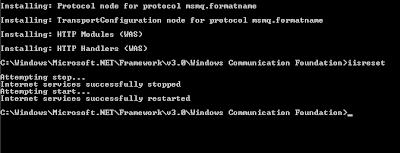


OWA is now working!

SBS Server hangs at "Applying Computer Settings" after Disabling IPv6

I disabled IPv6 on an SBS 2008 server to resolve an issue with the Exchange 2007 NSPI RPC endpoint. Please see:

http://clintboessen.blogspot.com/2010/07/error-occurred-while-testing-nspi-rpc.html

After disabling IPv6 the server would hang at "Applying Computer Settings" for approximately 1 hour before finally booting.

If you ever disable IPv6 on an SBS2008 server you need to perform the following registry change!

1. Open Registry Editor and then the registry subkey: HKEY_LOCAL_MACHINE\SYSTEM\CurrentControlSet\Services\Tcpip6\Parameters\

2. Double-click DisabledComponents entry. Create this entry if required.

3. In Create the new entry DWORD (32-bit) Value.

4. Type DisabledComponents, and then press ENTER.

5. Double-click to open DisabledComponents. Enter the value as "ffffffff" and then click OK.


This should do the trick. You will now be able to disable IPv6 and still boot into SBS2008.

Additional reading:

http://blogs.technet.com/b/sbs/archive/2008/10/24/issues-after-disabling-ipv6-on-your-nic-on-sbs-2008.aspx

Tuesday, February 8, 2011

ifmember.exe doesnt work Windows Vista/2008/7

ifmember.exe no longer works on Windows Vista, 2008 or Windows 7. ifmember.exe was a handy tool for checking a users group membership in bat scripts.

In previous versions of windows ifmember.exe was used like this:

ifmember.exe "MYOB Users"
if not errorlevel = 1
net use m: \\JCC-SBS\MYOB (
)


What about Windows Vista, 2008 and Windows 7? Is there an alternative for ifmember.exe? The answer is yes! I use this:

net user /domain %username% | find "MYOB Users"
if not errorlevel = 1 (
net use m: \\JCC-SBS\MYOB
)

Windows 7 Syncs 1 hour behind to 2008 SBS Server

I just setup a new SBS site. All windows 7 workstations were configured to use NT5DS (authoritative time). They were successfully syncing against the Windows Server 2008 SBS server.

Problem: Each time the workstations synced against the SBS server the time went back by 1 hour. You can force a sync using w32tm /resync.

This is because the SBS server is not syncing against an Atomic clock! Configure the SBS server to sync it's time against something (I use pool.ntp.org). Run the following commands on the SBS server!

w32tm /config /manualpeerlist:pool.ntp.org,0x8 /syncfromflags:MANUAL
net stop w32time
net start w32time
w32tm /resync


Then go to the Windows 7 workstations and run w32tm /resync. The time should be correct.

Note: Workstations will automatically sync.

Thursday, January 27, 2011

Exchange 2010 SP2 - Enhanced Address List Segmentation

Exchange 2010 SP2 is expected to be released by Microsoft second half of 2011. With the release of SP2 the way GAL segmentation will work has been changed.

GAL segmentation allowed administrators to optimize address lists in large companies, creating smaller 'virtual' organizations, with users only able to see the users they need to see.

In previous versions of Exchange GAL Segmentation was ACL based on a permission structure.

With Exchange 2010 SP2 GAL Segmentation will be delivered using an "Address Book Policy" assignment model.

Microsoft's intended audiences for this feature are organizations that:
- Require some form of sub-divided address book or who wish to create several 'virtual' organizations within a single Exchange Organization.
- Enable users to share some resources between these segmented user populations
- Seek to control which objects are visible to a user when they open their address book picker.

I will post more information on the new GAL Segmentation feature when given the thumbs up from Microsoft.

Additional reading:
http://msexchangeteam.com/archive/2011/01/27/457820.aspx

VBS - Find if logged on user is member of group

This script finds out if the logged on user is a member of a group. This is very handy for logon scripts.

' Find the user logged in
Set WSHShell = CreateObject("WScript.Shell")
UserLoggedIn = WshShell.ExpandEnvironmentStrings("%username%")

'Run the functions if the user is a member of the group
Set oGroup = getobject("WinNT://kbomb.local/" & "Domain Admins")
For Each oMember in oGroup.Members
If lcase(oMember.Name) = lcase(UserLoggedIn) Then
RunRegModifications()
RunFileModifications()
End If
Next

Function RunRegModifications()
wscript.echo "reg modification code here"
End Function

Function RunFileModifications()
wscript.echo "file modification code here"
End Function

Find User Currently Logged In VBS

In VB Script the following code shows you which user is logged in:

Set WSHShell = CreateObject("WScript.Shell")
UserLoggedIn = WshShell.ExpandEnvironmentStrings("%username%")
wscript.echo UserLoggedIn


Very handy for logon scripts

Wednesday, January 26, 2011

Outlook on an Exchange 2007/2010 Server

Is outlook supported on an Exchange server? The answer is Yes!

http://technet.microsoft.com/en-us/library/aa996719.aspx

It is supported to install Outlook 2007 on the same computer on which you have installed Exchange 2007.

Why install Outlook on the Exchange server?

In Exchange 2007 (RTM, SP1, SP2 and SP3) and Exchange 2010 RTM, Outlook was a requirement to use the import/export from/to PST files powershell cmdlets as it used API's from Outlook to perform these operations.

In Exchange 2010 SP1 Outlook is no longer a requirement to use the import/export PST cmdlets in powershell.

For small organisations installing Outlook on the Exchange server is ok!

For large organisations it is best practice to install the exchange management tools on a Windows 7 PC or management server with Outlook.

Monday, January 24, 2011

Exchange 2003 Setup Error 0xc0070002

When Installing Exchange 2003 SP2 management tools on an Exchange 2003 SP2 mailbox server the following error was experianced.

Setup failed while installing sub-components Exchange System Management Snap-ins with error code 0xC0070002 (please consult the installation logs for a detailed description). You may cancel the installation or try the failed setup again.


After the setup process EventID 1002 was logged from MSExchangeSetup in the Application logs.

Exchange Server component Microsoft Exchange System Mangement Tools failed.
Error: 0xc0070002 - The system cannot find the file specified.


Microsoft has documented two possible causes to this problem here:

http://support.microsoft.com/kb/924257

This problem can also occur if you try install Exchange 2003 SP2 management tools without Exchange 2003 management tools installed.

1. To resolve this reinstall Exchange 2003 with management tools - hit yes everytime prompted to replace any SP2 files.
2. Reinstall Exchange 2003 SP2 with SP2 management tools.
3. Reinstall SP2 security updates

Wednesday, January 19, 2011

Cross-Forest Migration and Exchange 2010 "hosting mode"

I'm consulting for a large company with 2 forests (Forest A and Forest B) running 7 domains - all Exchange 2003.

I am creating a new forest, Forest C.

All users, groups, computer objects and contacts are being migrated from all domains in Forest A and Forest B into a new domain in Forest C.

My customer wanted to know if it was possible to move the users mailboxes "into the cloud" during the migration a forth forest, Forest D by an Exchange hosting provider running Exchange 2010 "hosting mode".

Here is a copy of the response I received from Microsoft on the matter:

Hi Clint,

Thanks for your update.

So, here I would like to re-understand your concern: there are four forests A, B, C and D(D forest is installed with hosting mode Exchange 2010 ). You want to confirm that whether it is possible to migrate user accounts, groups, computer accounts and other Active Directory objects from forest A, B to forest C while migrating mailboxes to forest D. Please let me know if there is any misunderstanding.

If my understand is correct, I would like to let you know that it is not recommended migration because of the following reason:

1. If we migrate the mailbox and Active Directory account to different forest, we have to create linked mailboxes. However, Exchange 2010 which is installed in hosting mode don't support "resource forest". For example, based on the result of many tests, if we create a mailbox in forest D for the user in forest C, this user is not able to see others in Global Address List while others are able to see him/her in Global Address List.

2. Hosting mode Exchange server is designed for multi-tenant. It is designed for those companies and organizations which haven't Active Directory and Exchange. So if we migrate mailboxes to the forest which holds hosting mode Exchange server, I believe there will be a lot of unexpected issues and inconvenience.

For your reference, I would like to share the following article with you:

Multi-Tenant Support
http://technet.microsoft.com/en-us/library/ff923272.aspx

Please feel free to let me know if you have any concerns. I'm looking forward to hearing from you.

Best regards,
Leo Qin
Partner Online Technical Community


Hope this sheds some light on the matter for anyone facing the same scenario.

Thursday, January 13, 2011

Invoke or BeginInvoke cannot be called

When running SQL 2008 setup I received the following error.

SQL Server Setup has encountered the following error:

Invoke or BeginInvoke cannot be called on a control until the window handle has been created..


Weirdly enough when I closed my Explorer window which I used to browse to setup.exe it stopped the error from being generated.

Wednesday, January 12, 2011

How to find the SPECint2006 Rate Value for CPU.

How to find out your SPECint2006 Rate Value CPU rating when filling out Ross Smith's Exchange 2010 Mailbox Server Role Requirements Calculator.

Navigate to the following SPEC website and bang in the CPU or System you to recieve the SPECint2006 Rate Value for:

http://www.spec.org/cgi-bin/osgresults?conf=cpu2006